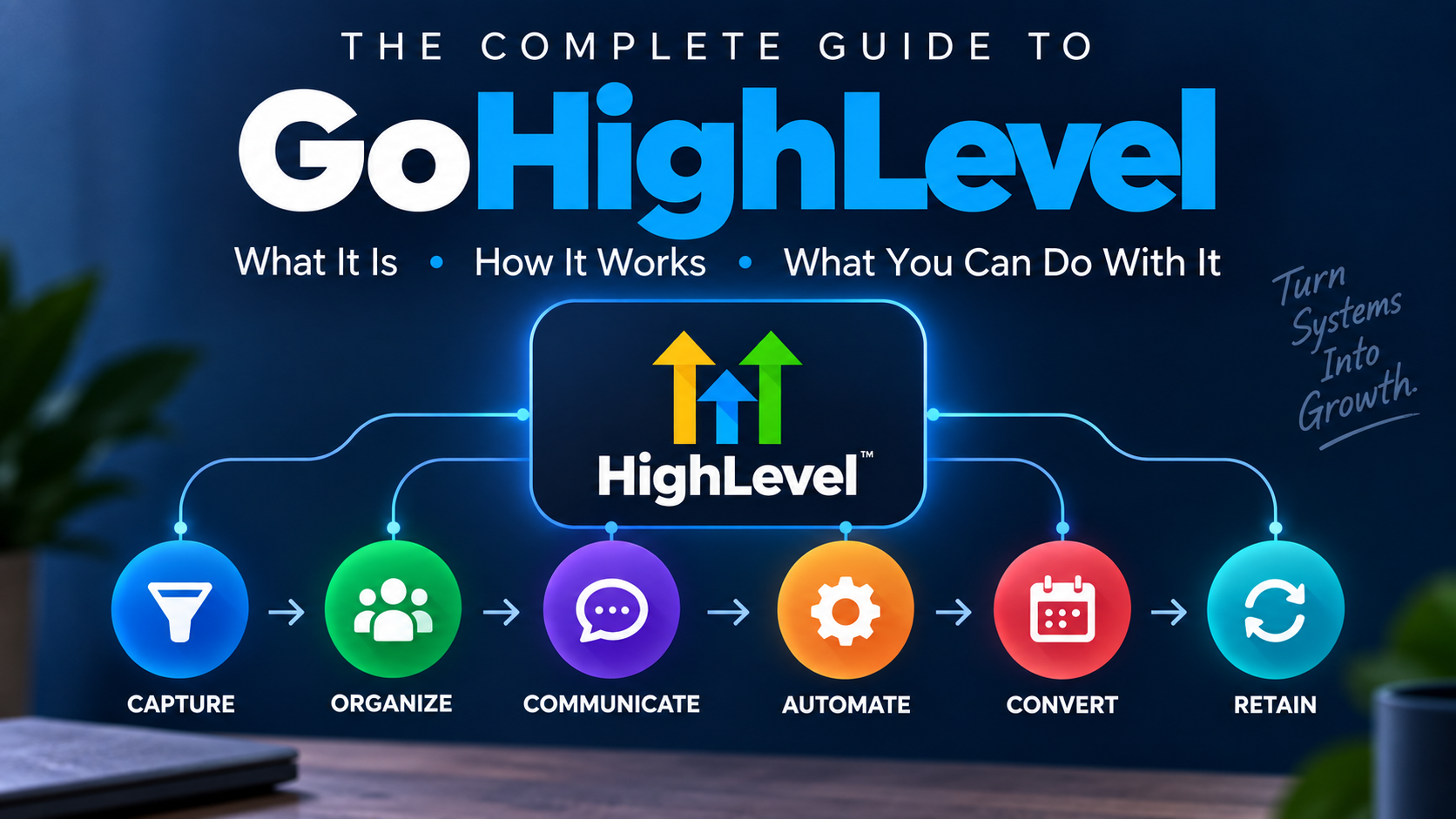
If you've spent any time researching CRM software, marketing automation, AI tools, or how to start an automation agency, you've probably run into GoHighLevel.
Then you open the platform—or even just look at the feature list—and things get complicated fast.
CRM. Pipelines. Workflows. Calendars. Websites. Funnels. Email. SMS. Phone calls. Reputation management. Social media. Payments. AI agents. SaaS Mode.
So what exactly is HighLevel?
The simplest explanation is this:
HighLevel is a platform for building and connecting the systems businesses use to capture leads, organize contacts, communicate with prospects and customers, automate follow-up, schedule appointments, and manage parts of the customer journey.
For agencies, there's another important layer: those systems can be created and managed across separate client accounts.
I've personally used HighLevel for about 2.5 years. But this isn't another review of whether I like it. I wrote a separate GoHighLevel review based on my firsthand experience for that.
This guide has a different job.
I want to make the platform understandable.
First: GoHighLevel or HighLevel?
You'll see both names used.
The company and platform are commonly referred to as HighLevel, while “GoHighLevel” remains widely used when people search for or talk about the software.
For the purposes of this guide, when I say HighLevel or GoHighLevel, I'm talking about the same overall platform.
What Is GoHighLevel?
HighLevel is an all-in-one CRM, marketing, sales, communication, and automation platform with additional tools for websites, scheduling, reputation management, payments, AI, client management, and more.
That's accurate.
It's also not a particularly helpful way to understand it.
Calling HighLevel “all-in-one software” makes it sound like someone took 30 unrelated tools and stuffed them into one login.
A better way to think about HighLevel is as business infrastructure.
A potential customer discovers a business.
They submit a form.
Their contact information enters the CRM.
An opportunity can enter a sales pipeline.
A text or email can go out.
A workflow can trigger additional follow-up.
A conversation can continue.
The prospect can schedule an appointment.
Reminders can go out automatically.
The opportunity moves through the sales process.
Afterward, the business might request a review or continue nurturing the customer.
Those aren't necessarily separate systems inside HighLevel.
They can be connected parts of one system.
And that distinction is where HighLevel starts making a lot more sense.
The Easiest Way to Understand HighLevel
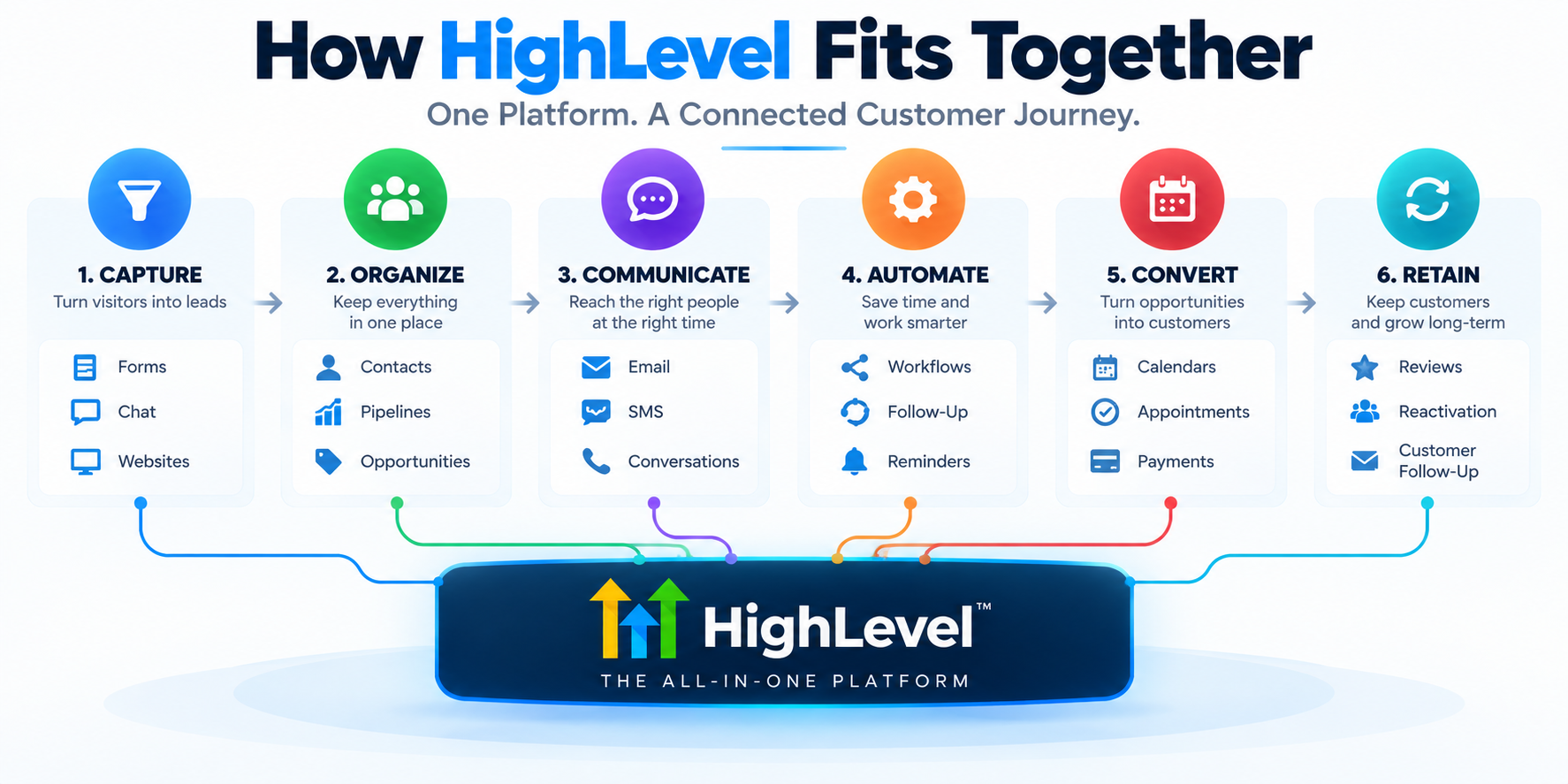
Instead of memorizing features, think about six jobs:
Capture → Organize → Communicate → Automate → Convert → Retain
1. Capture
First, something needs to turn an anonymous visitor or caller into an identifiable opportunity.
HighLevel provides tools such as:
- Forms
- Surveys
- Quizzes
- Website and funnel pages
- Chat
- Calendars
- Phone and messaging capabilities
A business might capture an inquiry through a website form, booking page, chat conversation, incoming call, or another connected source.
2. Organize
Once someone becomes a lead or contact, the information needs somewhere to live.
That's where the CRM comes in.
Contacts can contain customer information, communication history, and other relevant data.
Then opportunities and pipelines can be used to represent where potential deals are in a sales process.
For example:
New Lead → Contacted → Estimate Scheduled → Estimate Sent → Won/Lost
If CRM terminology is new to you, I have a separate explanation of what a CRM pipeline is.
3. Communicate
Capturing a lead isn't particularly valuable if nobody ever talks to them.
HighLevel brings several communication channels into the broader system, including email, SMS, calling, chat, and unified conversations.
That creates possibilities such as:
- Responding to new inquiries
- Following up with prospects
- Sending appointment confirmations
- Sending reminders
- Continuing conversations
- Re-engaging older leads
- Communicating with existing customers
This is where features like missed-call text back become more interesting.
The value isn't simply that a text can be sent after someone calls.
The value is that the response can become part of a larger lead-conversion process.
4. Automate
This is where HighLevel becomes substantially more powerful.
A workflow is essentially a set of triggers and actions that tells the system what to do when something happens.
For example:
New form submitted → create/update contact → send text → send email → create opportunity → notify salesperson → wait → follow up again if needed
That doesn't mean every customer interaction should be automated.
It means repetitive steps don't necessarily have to depend on someone remembering to do them manually.
I've written separately about automated lead follow-up and lead nurturing because those are business strategies. HighLevel is simply one platform that can be used to implement them.
5. Convert
Eventually, the goal is usually to move someone toward a meaningful business action.
Depending on the company, that might mean:
- Booking an appointment
- Scheduling an estimate
- Starting a conversation
- Making a purchase
- Signing an agreement
- Moving into another sales stage
Calendars, pipelines, conversations, automation, and payments can all play roles here.
HighLevel doesn't magically create the conversion.
It gives you infrastructure for building the process around it.
6. Retain
The customer journey doesn't necessarily stop after the sale.
HighLevel also includes capabilities that can support:
- Review requests
- Reputation management
- Customer communication
- Follow-up
- Reactivation
- Communities
- Courses
- Additional offers
That means the same platform can potentially support parts of the customer lifecycle before, during, and after a sale.
CRM, Contacts, Opportunities, and Pipelines
These terms get thrown around constantly, so let's simplify them.
A contact is the person or business in your database.
An opportunity represents a potential deal or sales opportunity associated with that contact.
A pipeline is the series of stages you use to track those opportunities.
Imagine a roofing company receives an estimate request from Sarah.
Sarah becomes a contact.
Her roof-replacement project becomes an opportunity.
That opportunity might move through:
New Inquiry → Contacted → Inspection Scheduled → Estimate Sent → Follow-Up → Won
The CRM stores the relationship.
The pipeline helps the business understand what is happening with the potential sale.
The automation can help move the process along.
That's much easier to understand than treating CRM, pipelines, and automation as three unrelated features. If you want to see how to actually build and use pipelines inside HighLevel, I cover that in the pipelines guide.
What Are HighLevel Workflows?
Workflows are one of the most important parts of HighLevel because they're what allow different parts of the platform to start working together.
I've written a separate practical guide to HighLevel workflows if you want to go deeper on how to build them.
A workflow begins with some type of trigger.
Something happens.
Then HighLevel performs one or more actions based on the rules you've created.
A new lead submits a form. That could trigger:
- An immediate confirmation text.
- An email.
- Creation of an opportunity.
- A notification to a team member.
- A delay.
- Another follow-up.
- A task for someone to call the lead.
Or an appointment gets booked.
That could trigger confirmations, reminders, and internal notifications.
Or a customer reaches a certain pipeline stage.
That could trigger an entirely different process.
The point isn't to automate everything.
The point is to automate the repetitive parts that benefit from happening consistently. You can read more in HighLevel's workflows documentation.
Calendars and Scheduling
HighLevel also includes booking calendars.
At the basic level, someone can choose an available time and schedule an appointment.
But calendars become more useful when connected to everything around them.
A booking might:
- Update a contact
- Create or update an opportunity
- Trigger a confirmation
- Send reminders
- Notify a team member
- Start or stop another workflow
A calendar by itself isn't particularly unusual.
A calendar connected to the CRM, communication system, and automation is much more interesting.
Email, SMS, Phone, and Conversations
HighLevel brings multiple communication methods into the platform.
That can include email, text messaging, phone capabilities, chat, and AI-assisted conversations.
Instead of customer communication living in completely separate places, businesses can use HighLevel's Conversations area to centralize more of that activity.
Someone might submit a form, receive a text, reply to that text, book an appointment, and later receive an email.
From the customer's perspective, that's one relationship with a business.
Your software architecture should ideally reflect that.
Forms, Surveys, and Lead Capture
Forms are another good example of why HighLevel makes more sense when viewed as a system.
You can certainly build a form just to collect a name, email, phone number, and message.
But the more important question is:
What happens after someone submits it?
A HighLevel form can feed information into the CRM and become a trigger for additional actions.
That's the difference between thinking about a form as a box on a website and thinking about it as the entrance to a lead-conversion process.
Websites and Funnels
HighLevel also includes tools for creating websites and funnels.
Its traditional Website & Funnel Builder can create websites, landing pages, and funnel sequences. Funnels are generally more sequential experiences built around a particular action, while websites allow visitors to navigate more freely.
There's also an important newer distinction.
HighLevel AI Studio Is Different
HighLevel now has AI Studio, a separate AI-powered creation workspace.
AI Studio can use natural-language prompts to create websites, landing pages, and other interactive web experiences. Users can continue refining projects conversationally. You can read more in HighLevel's AI Studio documentation.
HighLevel also distinguishes AI Studio from Agent Studio. AI Studio focuses on building web experiences; Agent Studio is used to build AI-powered agents.
Personally, this distinction matters quite a bit to me.
I don't use HighLevel's traditional Website & Funnel Builder for the websites I build now. I use AI Studio extensively.
That's my workflow—not a requirement for using HighLevel—but it's worth clarifying because simply saying “HighLevel has a website builder” no longer tells the whole story.
Reputation Management
HighLevel includes reputation-management tools that can be used for things like requesting reviews and managing parts of the review process.
Instead of manually remembering to ask every customer for a review, a business can potentially build review requests into the process that happens after a completed service or another appropriate milestone.
The software doesn't create a good reputation for a bad business.
It can help make the process of asking satisfied customers for feedback more consistent.
Social Media and Content Tools
HighLevel also includes social-media management capabilities.
Businesses and agencies can use its Social Planner to create, schedule, and publish content across connected channels.
The social tool isn't necessarily the reason someone buys HighLevel.
But if you're already managing client CRM, automation, communication, and other systems there, having additional client activity inside the same environment can be useful.
Payments, Invoicing, and Other Tools
HighLevel has expanded well beyond the categories I've covered so far.
Its current platform includes capabilities around areas such as:
- Payments and invoicing
- Courses
- Communities
- Ad management
- Reporting
- Prospecting
- Mobile access
- APIs
- AI tools
This is where beginners can make a mistake.
They start trying to understand everything.
You don't need to.
Learn the parts required to solve the problem you're working on.
The rest can wait.
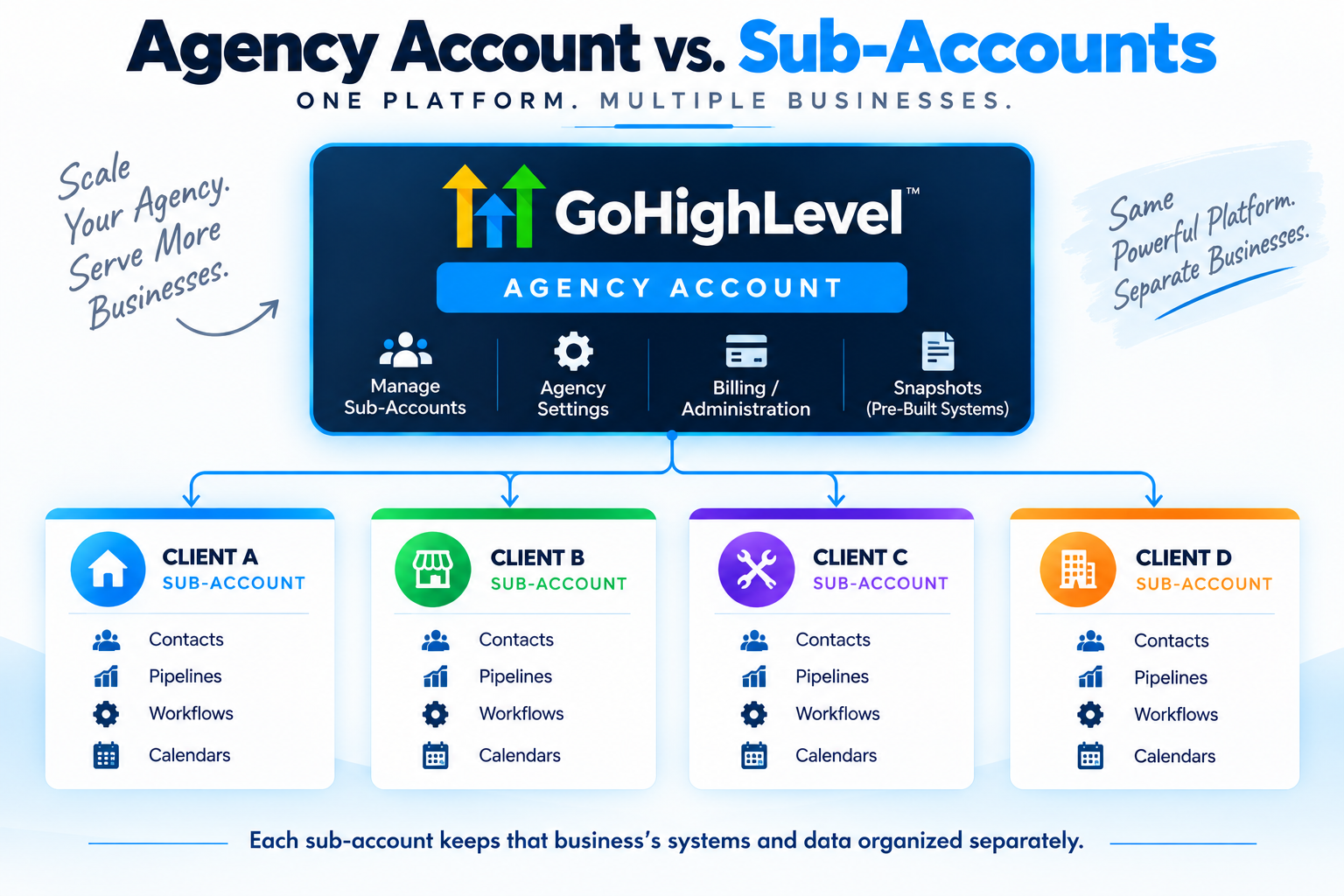
How Agency Accounts and Sub-Accounts Work
This is one of the concepts that makes HighLevel particularly important for agencies.
At the top is the agency account.
Underneath it are sub-accounts, sometimes referred to as locations.
A simplified version looks like this:
Your Agency
→ Client A
→ Client B
→ Client C
→ Your Own Business
Each sub-account can have its own contacts, pipelines, workflows, calendars, and other business configurations.
The agency level is where broader agency management happens.
That's one of the biggest structural differences between using HighLevel as an agency and using a typical standalone CRM for one company. You can read more in HighLevel's pipelines and opportunities documentation.
What Are HighLevel Snapshots?
Snapshots help agencies replicate configurations across accounts.
Suppose you've built a useful setup containing certain pipelines, workflows, calendars, and other components.
Instead of manually recreating everything for every new client, snapshots can help package and deploy configurations.
This becomes particularly relevant when an agency starts productizing what it sells.
You're no longer necessarily rebuilding the same system from zero every time.
But don't confuse replication with strategy.
A snapshot can copy configuration.
It can't make every business operate exactly the same way.
What Is SaaS Mode?
At the Agency Pro level, HighLevel includes SaaS Mode.
SaaS Mode is designed to let agencies package access to HighLevel capabilities into their own software-style offering.
That's a significant feature for certain agency models.
It's also something many beginners do not need on day one.
You can build an automation or service business without immediately trying to become a SaaS company.
HighLevel's AI Tools
HighLevel now has a growing collection of AI capabilities, including areas such as:
- Conversation AI
- Voice AI
- Content AI
- Reviews AI
- Funnel AI
- AI Studio
The exact capabilities and pricing around AI are changing quickly enough that I would not build a buying decision around an old feature checklist.
Check HighLevel's current documentation and in-app pricing before assuming a particular AI feature or usage level is included.
AI also doesn't change the underlying principle of the platform.
The useful question isn't:
“How much AI does HighLevel have?”
It's:
“Can this capability help me solve a real business problem better or more efficiently?”
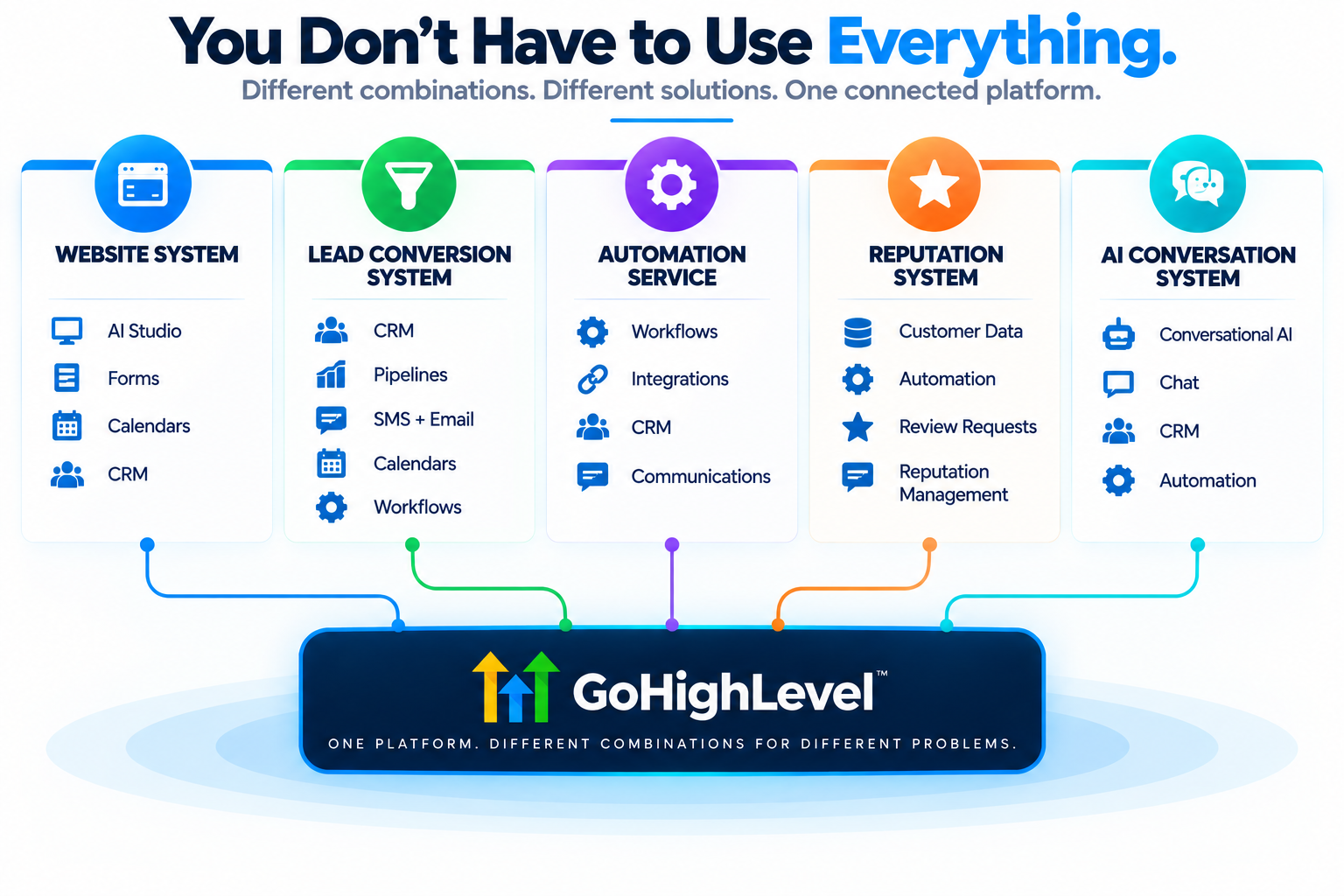
You Don't Have to Use Everything in HighLevel
This might be the most important part of this entire guide.
HighLevel is huge.
That doesn't mean your implementation needs to be.
You can use a subset of the platform to build something very specific.
Website-Focused Business
You might primarily use:
AI Studio + forms + calendars + CRM
Now you're not merely delivering a website. You can connect the website to lead capture and scheduling.
Lead-Conversion System
You might combine:
CRM + pipelines + SMS + email + calendars + workflows
Now you're building infrastructure around how inquiries become appointments and sales opportunities.
Automation Service
You might focus heavily on:
Workflows + integrations + CRM + communications
That's much closer to the type of work discussed in my guide to the best AI automation services to sell.
Reputation-Management Service
You might use a much smaller set of capabilities centered around:
Customer data + automation + review requests + reputation management
Conversational AI Service
You could build around chat and conversational AI, with CRM and automation handling what happens after the conversation.
AI Receptionist or Voice AI Offer
HighLevel's current platform also includes Voice AI capabilities that could support specialized voice or AI receptionist offers.
I haven't personally deployed HighLevel Voice AI enough to give you a meaningful firsthand review of it yet, so I'm deliberately not pretending otherwise.
But structurally, it's another example of the larger point:
HighLevel isn't really one business model. It's infrastructure you can use to support a lot of different business models.
The Platform Doesn't Decide What You Should Sell
This is where software and business strategy get mixed together.
Signing up for HighLevel gives you software.
It doesn't give you:
- A niche
- An offer
- Customers
- Positioning
- Sales ability
- Implementation expertise
- A reason for someone to pay you every month
You still need to determine what problem you're solving and who you're solving it for.
That's why I recommend thinking in terms of outcomes and systems, rather than walking into a business and trying to sell “HighLevel.”
A contractor doesn't need HighLevel.
They might need faster lead response.
A dentist doesn't need workflows.
They might need fewer appointment no-shows.
A service business doesn't wake up wanting a CRM pipeline.
They may want to stop losing estimates because nobody follows up.
The software is underneath the solution.
It isn't the solution by itself.
HighLevel gives you the tools. You still have to build the system — and the business.
Can You Outsource HighLevel Setup?
Yes.
And I did.
Almost immediately after signing up, I hired someone to help configure a lot of the backend.
I already understood websites, autoresponders, workflows, and digital marketing, but there was still a lot inside HighLevel to learn.
That taught me something useful:
You don't necessarily need to master every part of HighLevel yourself.
You should understand the systems you're selling or operating well enough to make good decisions. But depending on your business, it can make sense to get implementation help and focus your own attention on the parts where you're strongest.
Outsourcing doesn't eliminate the learning curve.
It can keep the learning curve from becoming the only thing you work on.
Is HighLevel Better for Agencies or Individual Businesses?
Both can use it.
But I think there's an important practical distinction.
For an agency, HighLevel's breadth can be an advantage because you're managing systems across multiple clients and potentially selling those systems as services.
For an average small-business owner who just wants one simple function, the same breadth can feel overwhelming.
That's why, in my experience, HighLevel makes the most obvious sense for agencies, marketers, automation businesses, and operators who are actually going to use its connected capabilities.
A small business can absolutely benefit from systems built in HighLevel.
That doesn't necessarily mean the owner should personally become the HighLevel administrator.
Sometimes the better model is for someone else to build and manage the system for them.
What Does GoHighLevel Cost?
As of September 2026, HighLevel's official monthly pricing lists three primary plans:
| Plan | Monthly Price | Best Understood As |
|---|---|---|
| Starter | $97 | Entry point with up to 3 sub-accounts |
| Unlimited | $297 | Agency plan with unlimited sub-accounts |
| Agency Pro | $497 | Advanced agency/SaaS capabilities |
Starter currently includes unlimited contacts and users along with core platform features.
Unlimited adds unlimited sub-accounts, basic API access, and certain rebilling capabilities.
Agency Pro adds capabilities including SaaS Mode, automated sub-account creation, advanced API access, and additional rebilling/reporting functionality.
Those subscription prices are not necessarily your entire cost.
Phone, messaging, email, AI usage, and other services or add-ons can create additional charges depending on what you use.
HighLevel changes quickly, so always check its current pricing before making a decision based on these numbers.
I've broken down HighLevel pricing and the plans in much more detail in my complete guide to GoHighLevel pricing.
Disclosure: Some links on this page are affiliate links. If you sign up through one of them, I may earn a commission at no additional cost to you. I only recommend tools I have personally used and believe are worth considering.
Want to Explore HighLevel Yourself?
If the connected-platform approach I've described makes sense for what you're trying to build, you can explore HighLevel directly.
Try HighLevelThis is an affiliate link. I may earn a commission if you become a customer, at no additional cost to you.
How I'd Approach HighLevel as a Beginner
Don't start by trying to learn the entire platform.
Start with a problem.
For example:
“I want to automatically respond to new leads and get more of them onto a calendar.”
Now your learning path becomes much smaller:
- Understand contacts.
- Create a pipeline.
- Set up the lead source.
- Connect messaging.
- Build the workflow.
- Configure the calendar.
- Test the entire journey.
Once that works, expand.
Maybe add reminders.
Then longer-term follow-up.
Then review requests.
Then reactivation.
That's a much better approach than spending three weeks clicking every tab because you feel like you need to “learn HighLevel.” If you want a step-by-step walkthrough of that initial configuration, read my beginner's guide to setting up GoHighLevel.
Can You Build a Business Around HighLevel?
Absolutely—but I'd change the wording slightly.
Build a business around a problem you can solve using HighLevel.
That's a healthier foundation.
You might sell websites, automation, CRM implementation, lead-conversion systems, reputation management, AI conversations, or combinations of those services.
HighLevel becomes infrastructure underneath the offer.
If you're specifically interested in that path, start with my guide on how to start an AI automation agency.
I've also created the 48-Hour AI Cashflow Stack for people who want a more structured look at building and packaging an AI-powered service business.
The important part is not how many HighLevel features you can name.
It's whether you can turn a useful combination of those features into something another business has a reason to pay for.
So, What Is HighLevel Really?
At the beginning of this guide, I called HighLevel business infrastructure.
That's still the description I like best.
You can use it to capture opportunities.
Organize them.
Communicate with people.
Automate repetitive processes.
Move prospects toward appointments or sales.
Continue the relationship afterward.
And, if you're an agency, you can build and manage variations of those systems across multiple client accounts.
You don't need every feature.
You need the right pieces connected around the problem you're trying to solve.
That's when HighLevel starts making sense.
Want to See Whether I'd Actually Choose HighLevel?
Understanding what the platform does is one question. Deciding whether it's worth paying for is another. I break down my 2.5 years of firsthand experience—including what I use, what I don't, and whether I'd choose it again—in a separate review.
Read My GoHighLevel Review