
HighLevel can do a lot.
That's useful once you know what you're trying to build. When you're staring at a new account for the first time, it can also be the problem.
CRM. Pipelines. Calendars. Forms. Workflows. Email. SMS. Websites. Funnels. Reputation management. AI. Payments. SaaS. Client accounts.
It's tempting to start clicking through everything and assume the goal is to “set up HighLevel.”
It isn't.
The goal is to set up the smallest working system your business actually needs.
That's the approach I wish more beginners took.
I've been using HighLevel for about 2.5 years, and there are still parts of it I haven't grown into yet. That hasn't stopped me from using it to run CRM, workflows, calendars, forms, email, SMS, missed-call text back, chatbots, reputation systems, AI Studio websites, and systems for clients.
You don't need to master the entire platform before you can get value from it.
You need to understand what you're building, configure the pieces that support it, and make sure the complete system actually works.
Before You Set Up Anything, Decide What You're Building
This is the step people skip.
Don't start with:
“What features does HighLevel have?”
Start with:
“What do I need HighLevel to do?”
Those are very different questions.
A local service business might need HighLevel to:
- capture website inquiries
- organize leads
- respond quickly
- schedule appointments
- send reminders
- track opportunities
- follow up automatically
An automation agency might need those same capabilities across multiple client accounts.
Someone building a SaaS business may eventually need automated account creation, rebilling, and other infrastructure that a single local business doesn't need at all.
The platform is the same. The setup shouldn't be.
As I wrote in my Complete Guide to GoHighLevel, HighLevel isn't really one business model. It's infrastructure you can use to support a lot of different business models.
Before touching workflows or importing templates, write down the actual process you want the software to support.
That one decision can save you hours of unnecessary setup.
1. Understand the Difference Between Your Agency Account and Sub-Accounts
This confused me more than I expected when I first got into HighLevel, and it's worth understanding early.
At a high level, your agency account is where you manage the broader HighLevel environment. Individual businesses operate inside sub-accounts, which HighLevel also refers to as locations.
If you're an agency, one sub-account might represent your own business while other sub-accounts represent clients.
HighLevel's current documentation also allows an agency's own internal workspace to be designated as an Agency Sub-Account.
You don't need to memorize every permission or account setting on day one.
You do need to understand one basic concept:
Keep each business's contacts, conversations, calendars, pipelines, automations, and other operational data inside the appropriate sub-account.
If you're only setting HighLevel up for one business, this is fairly straightforward.
If you're building an agency, understanding this structure early becomes much more important.
And if you're still deciding which subscription makes sense, my Starter vs. Unlimited vs. Agency Pro comparison covers the plan decision separately.
2. Configure the Basic Business Information First
Before building clever automation, get the boring stuff right.
Business name. Contact information. Users. Permissions. Time zone. Business hours. Calendar availability. Communication settings. Domains or other connections you actually plan to use.
Not every account will require the same configuration.
HighLevel has also been rolling out LaunchPad onboarding experiences that guide eligible users through setup tasks. If you see LaunchPad in your account, it can be useful for working through some of these fundamentals.
Just don't confuse completing an onboarding checklist with designing your actual business process.
The software can show you where a calendar setting lives.
It can't decide how your company should handle a new lead.
That's your job.
3. Set Up Your Contacts and CRM
HighLevel's CRM becomes much easier to understand when you stop thinking of it as a giant database and start thinking about one person moving through your business.
A prospect reaches out.
A contact record is created.
Their information, conversations, activity, appointments, and other relevant details can then stay connected to that record.
If you already have contacts elsewhere, you may eventually import them. If you're starting fresh, you may simply allow new contacts to enter as inquiries arrive.
Either way, decide what information you genuinely need.
Name, phone number, email, service requested, lead source, location, or a few relevant custom fields may matter.
Twenty-seven fields that nobody will ever use probably don't.
A clean CRM that your team understands is more valuable than a complicated CRM everyone avoids.
4. Build One Simple Pipeline
This is where the system starts becoming operational.
HighLevel uses pipelines and opportunities to help track potential deals.
A pipeline represents the sales process.
A stage represents a step within that process.
An opportunity represents a potential deal moving through it.
If you want a deeper explanation, I've written a separate guide to what a CRM pipeline is.
For a service business, a simple starting pipeline might look something like:
New Lead → Contacted → Appointment Booked → Estimate Sent → Won / Lost
That's only an example. Your stages should reflect what actually happens in your business.
Don't create 15 stages because the software allows you to.
Every stage should answer a useful question about where an opportunity currently stands.
If nobody understands the difference between “Warm Prospect,” “Engaged Lead,” “Active Opportunity,” and “Qualified Follow-Up,” you've probably overbuilt it.
Start simple.
You can add complexity later when you have a reason.
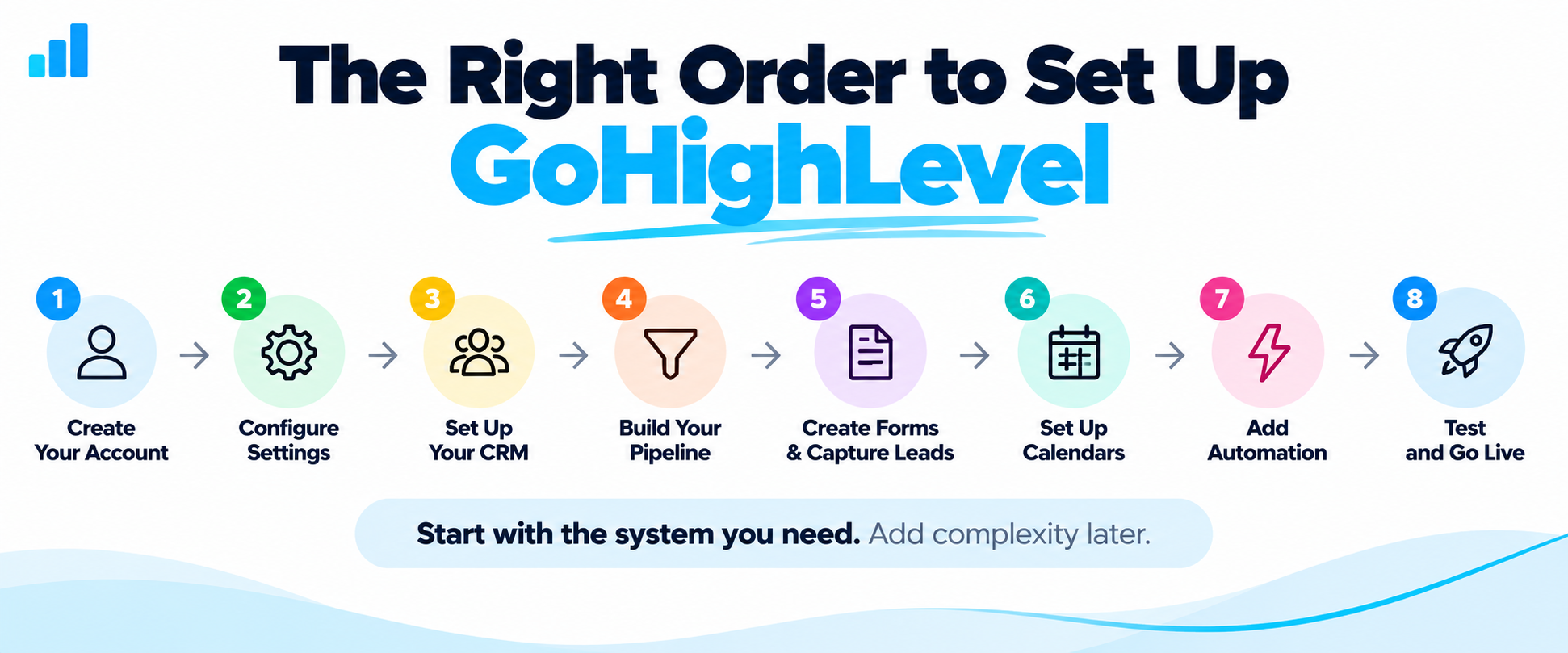
5. Decide How Leads Will Enter the System
Now you need an entry point.
Depending on your business, that might be:
- a website form
- a landing-page form
- chat
- an appointment calendar
- a phone call
- an imported contact
- another connected lead source
Don't try to connect everything simultaneously.
Pick one important lead source and make that journey work from beginning to end.
For example, if most new opportunities come through your website, start with the website form.
What happens after somebody submits it?
Does the contact get created correctly?
Does an opportunity get created?
Does the right person know about it?
Does the prospect receive a response?
That's the system.
The form itself is just the front door.
6. Configure a Calendar If Appointments Matter
If the next logical step for a lead is an appointment, consultation, estimate, demo, or sales call, configure the calendar around the real availability of the people taking those appointments.
Think through things like:
availability, appointment duration, buffers, assignment, confirmation, reminders, rescheduling, and cancellation.
The important part isn't having a fancy booking page.
It's making sure someone can go from interested to scheduled without unnecessary friction.
This is also where CRM, automation, and scheduling start working together rather than behaving like separate tools.
7. Connect the Communication Channels You Actually Need
HighLevel can support multiple communication channels, but you don't have to activate everything at once.
If your system depends on email, configure email properly.
If it depends on SMS, configure the appropriate phone and messaging setup.
If missed calls matter, you might eventually add missed-call text back.
The mistake is building workflows that depend on communication channels you haven't properly configured or tested.
An automation isn't useful because the workflow diagram looks impressive.
It's useful when the message actually reaches the right person at the right moment.
8. Build Your First Useful Workflow
Now we're ready for automation.
Not before.
HighLevel workflows are essentially built around a simple idea. (I've written a fuller guide to HighLevel workflows if you want more depth than this setup walkthrough.)
Something happens → the system performs one or more actions.
For example:
Form submitted → send confirmation → notify team → create/update opportunity
Or:
Appointment booked → send confirmation → notify assigned person → send reminder later
That's enough to create meaningful value.
You do not need a 74-step workflow with twelve branches on your first day.
In fact, I'd argue that complicated automation built before the underlying process is clear usually creates more problems than it solves.
Start with one repetitive task that should happen reliably every time.
Automate that.
Then build from there.
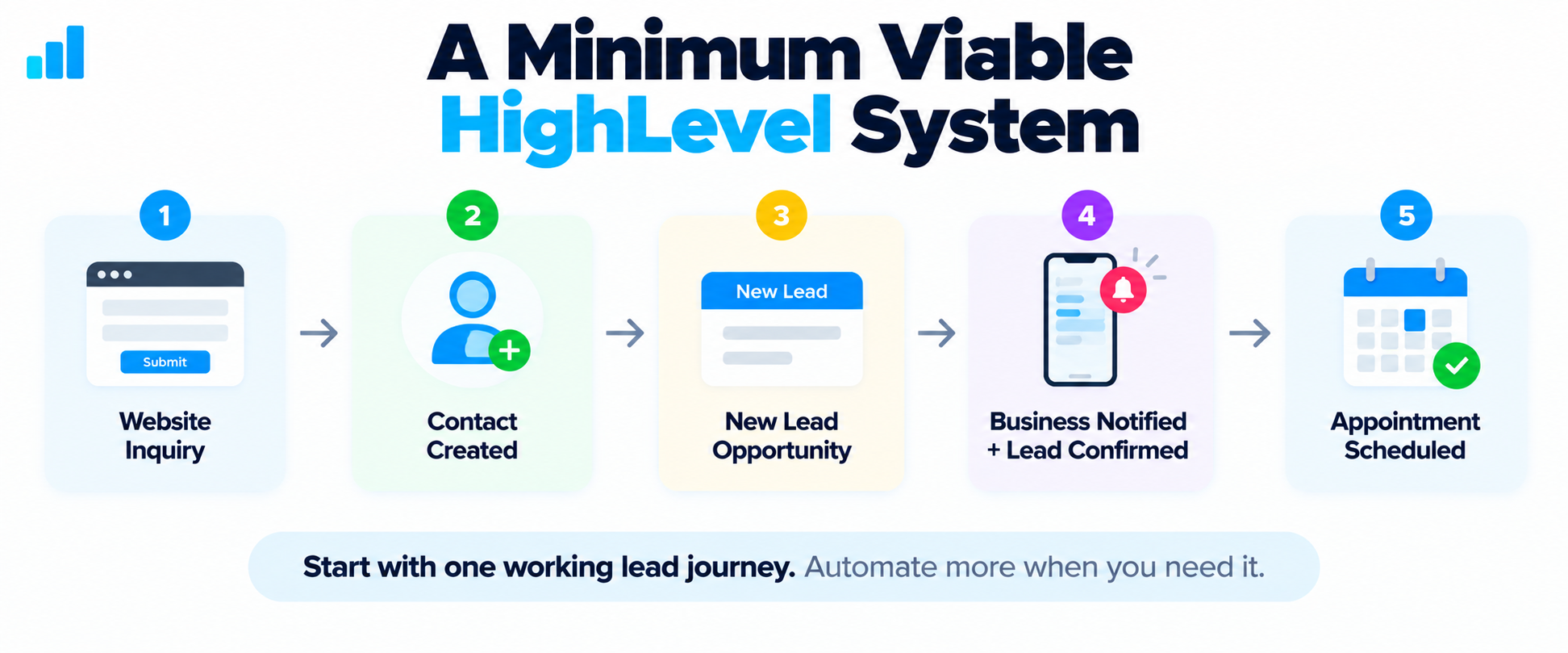
A Minimum Viable HighLevel System
Here's a hypothetical example for a service business.
A prospect visits the company's website and submits a request for an estimate.
The system could work like this:
Website form → Contact created → Opportunity added to New Lead → Business notified → Prospect receives confirmation → Human follows up → Appointment scheduled → Opportunity moves through pipeline
That's not an exotic AI system.
It isn't going to win an award for having the most workflow branches. If you want to think through what those pipeline stages should actually be, read my guide to GoHighLevel pipelines.
But it solves several very real operational problems.
The inquiry gets captured.
The business knows it arrived.
The prospect isn't left wondering whether anyone received it.
The opportunity has somewhere to live.
The team knows what needs to happen next.
And the lead can continue moving toward an appointment.
That's what I mean by building a system instead of collecting features.
9. Test the Entire Journey Yourself
This is one of the most important steps in the whole setup.
Pretend you're the lead.
Submit the form.
Use a different email address and phone number if appropriate.
Watch what happens.
Did the contact appear?
Was the opportunity created in the right pipeline and stage?
Did the notification go to the right person?
Did the confirmation message arrive?
Did the calendar work?
Did the workflow fire once—or three times?
Did the opportunity get assigned correctly?
If a workflow has a delay, branch, condition, or trigger, test it.
Then test it again.
I've worked with enough marketing and automation systems to know that something looking correct inside a builder does not mean the real-world journey works correctly.
The customer doesn't care how beautiful your workflow diagram is.
They experience the output.
10. Add Complexity Only When the Business Requires It
This may be the most important HighLevel lesson I've learned.
There is always another feature you could configure.
Another workflow.
Another integration.
Another AI tool.
Another pipeline.
Another custom field.
Another dashboard.
That doesn't mean you need it.
After roughly 2.5 years using HighLevel, there are still parts of the platform I haven't grown into yet.
And I don't consider that a problem.
I use the parts that help me operate my business and build systems that solve actual problems.
If the business eventually requires something more advanced, I'll learn it, build it, or get help with it.
That's a much healthier approach than believing you need to master HighLevel before you're qualified to use it.
Should You Hire Someone to Help Set Up HighLevel?
You can.
I did.
Even though I already had experience with websites, autoresponders, workflows, and digital marketing, I hired someone pretty early to help me with parts of the backend setup.
I found that person through a HighLevel-focused Facebook group I had access to after joining.
That worked well for me because I could find someone already familiar with the platform instead of trying to teach a general virtual assistant how HighLevel worked.
Community access and programs can change, so I wouldn't sign up assuming you'll necessarily have access to the exact same group I did.
The bigger lesson is that HighLevel-specific experience matters.
You can also look for specialists through marketplaces such as Upwork or Fiverr.
But don't hire someone merely because their profile says “automation expert.”
Ask what they've actually built in HighLevel.
Ask whether they understand contacts, opportunities, pipelines, workflows, forms, calendars, conversations, and whatever specific components your system requires.
Ask how they'll test the complete lead journey.
And ask them to document what they build.
Outsource the implementation, not the understanding
This distinction matters even more if you're planning to sell HighLevel-powered services to clients.
You don't necessarily need to personally build every workflow.
You don't need to know where every obscure setting lives.
And you don't need to become the world's foremost HighLevel technician.
But you should understand the system you're selling.
You should know:
- what is supposed to happen when a lead enters
- where that lead should go
- who should be notified
- what automation should happen
- how to recognize when something is broken
Common Setup Mistakes to Avoid
Most painful HighLevel setups I've seen come from the same handful of mistakes.
- trying to configure every feature
- building complicated workflows before defining the process
- creating too many pipeline stages
- automating a bad or undefined process
- turning on automations without testing
- sending messages before communication settings are properly configured
- installing templates or snapshots without understanding what they do
- buying a higher plan merely because it contains more features
- trying to learn the entire platform before launching anything useful
Complexity is not the goal.
A working system is.
Ready to Set Up HighLevel the Right Way?
If you've decided HighLevel fits the system you want to build, start with the smallest working version of that system and grow from there.
Explore HighLevelDisclosure: Some links on this page are affiliate links. If you sign up through one of them, I may earn a commission at no additional cost to you. I only recommend tools I have personally used and believe are worth considering.
If you'd like my broader take on the platform first, read my GoHighLevel review after roughly 2.5 years of using it, or start with the complete guide to GoHighLevel if you're still figuring out what the platform actually is.
And if you're thinking about this from the agency side, my guide on how to start an AI automation agency covers the bigger picture beyond any single tool.
