
HighLevel workflows can automate a lot.
That doesn't mean they should.
One of the easiest mistakes to make when you first discover automation is assuming that a more complicated workflow must be a better workflow. You start adding branches, waits, tags, notifications, messages, conditions, and actions until the thing looks like the wiring diagram for a small airport.
Meanwhile, the business problem you were trying to solve was:
Someone filled out a form. Make sure we follow up.
I've used HighLevel for about 2.5 years, and workflows are one of the parts of the platform I use regularly. My biggest advice for someone getting started is simple:
Don't start by asking what you can automate. Start by defining what should happen.
A good HighLevel workflow is just the software carrying out a business process that already makes sense.
What Is a GoHighLevel Workflow?
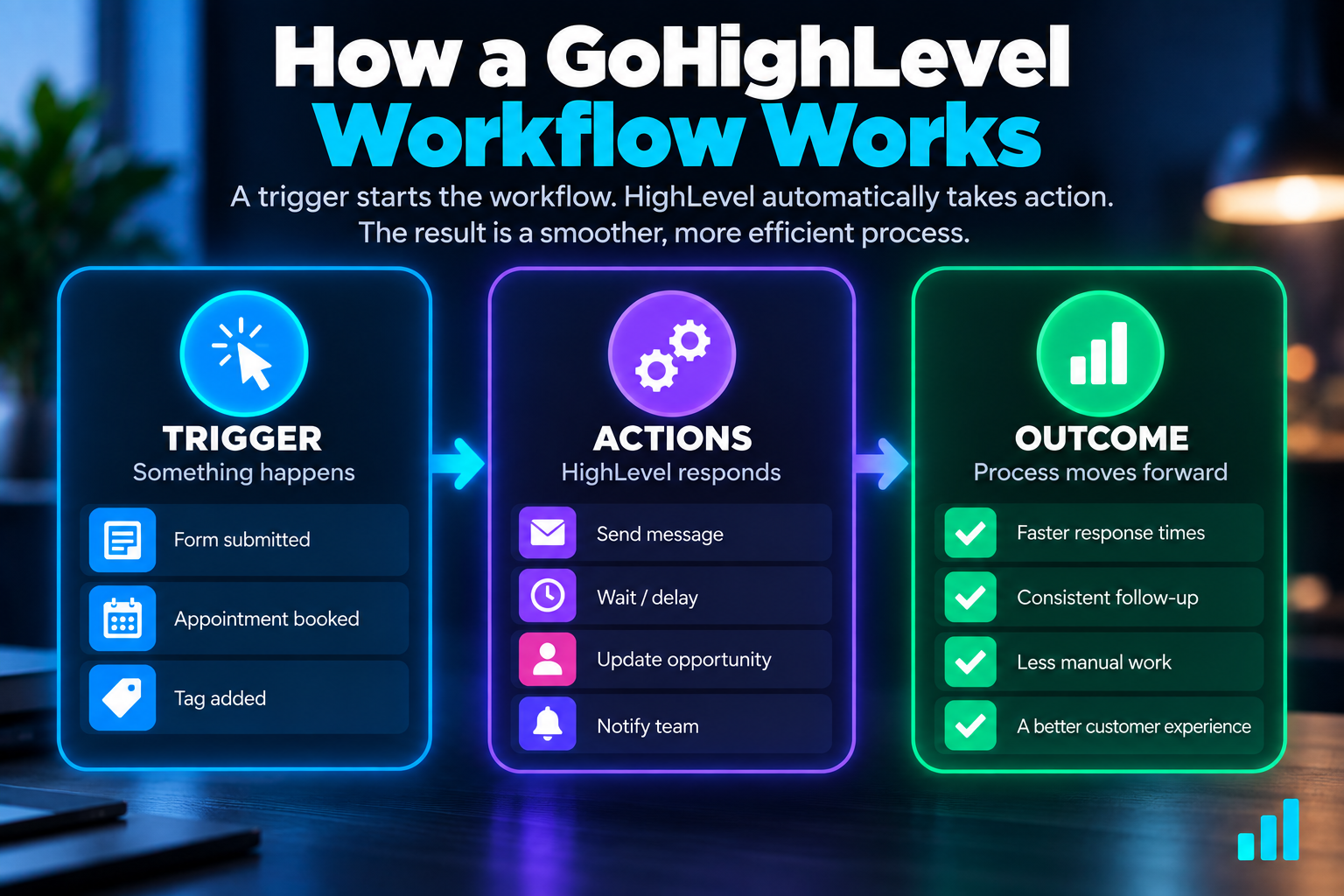
A GoHighLevel workflow is an automated sequence of actions that begins when a specific event triggers it.
At the simplest level:
Trigger → Actions → Outcome
Something happens.
HighLevel recognizes that event.
Then the system performs the actions you've told it to perform.
For example:
A prospect submits a form → HighLevel creates or updates the opportunity → the business gets notified → the prospect receives a confirmation
That's a workflow.
HighLevel can build much more sophisticated automations than that, but understanding this simple structure first makes everything else easier.
If you're still setting up the rest of your account, I'd start with my practical guide to setting up GoHighLevel before building a bunch of automations.
HighLevel Triggers vs. Actions
This is the first distinction to understand.
A trigger tells HighLevel when the workflow should start.
A trigger is an event.
Depending on what you're building, that could be something like:
- a form being submitted
- an appointment status changing
- a contact being created
- an opportunity being created or updated
- a payment event
- another supported event occurring
HighLevel currently supports triggers across many parts of the platform and connected applications.
You don't need to memorize them.
You need to identify the event that should start your process.
An action tells HighLevel what to do next.
Once the trigger fires, actions perform the work.
Those actions might:
- send an email
- send a text message
- notify someone internally
- create or update an opportunity
- update contact information
- assign something to a user
- wait before continuing
- evaluate a condition
- perform another supported operation
Put those concepts together and the workflow becomes much easier to understand.
Trigger: A prospect submits an estimate-request form.
Actions: Add the opportunity to the appropriate pipeline, notify the business, and confirm to the prospect that the request was received.
You don't need to think like a programmer.
Think about cause and effect.
When this happens, what should happen next?
Start With the Business Process, Not the Workflow Builder
This is where I think a lot of automation projects go sideways.
Someone opens the workflow builder and immediately starts asking:
“What can I add?”
Wrong question.
Before opening the builder, write down what should happen without using any HighLevel terminology.
For a hypothetical service business, it might be:
- A prospect asks for an estimate.
- We save their information.
- We put the opportunity into our sales process.
- Someone on our team needs to know about it.
- The prospect needs to know we received the request.
- We need to follow up if necessary.
- We want to move the opportunity toward an appointment.
That's the business process.
Only then should you translate it into HighLevel.
This is also why understanding what a CRM pipeline is matters. Automation becomes much more useful when it supports an organized sales process instead of operating separately from it.
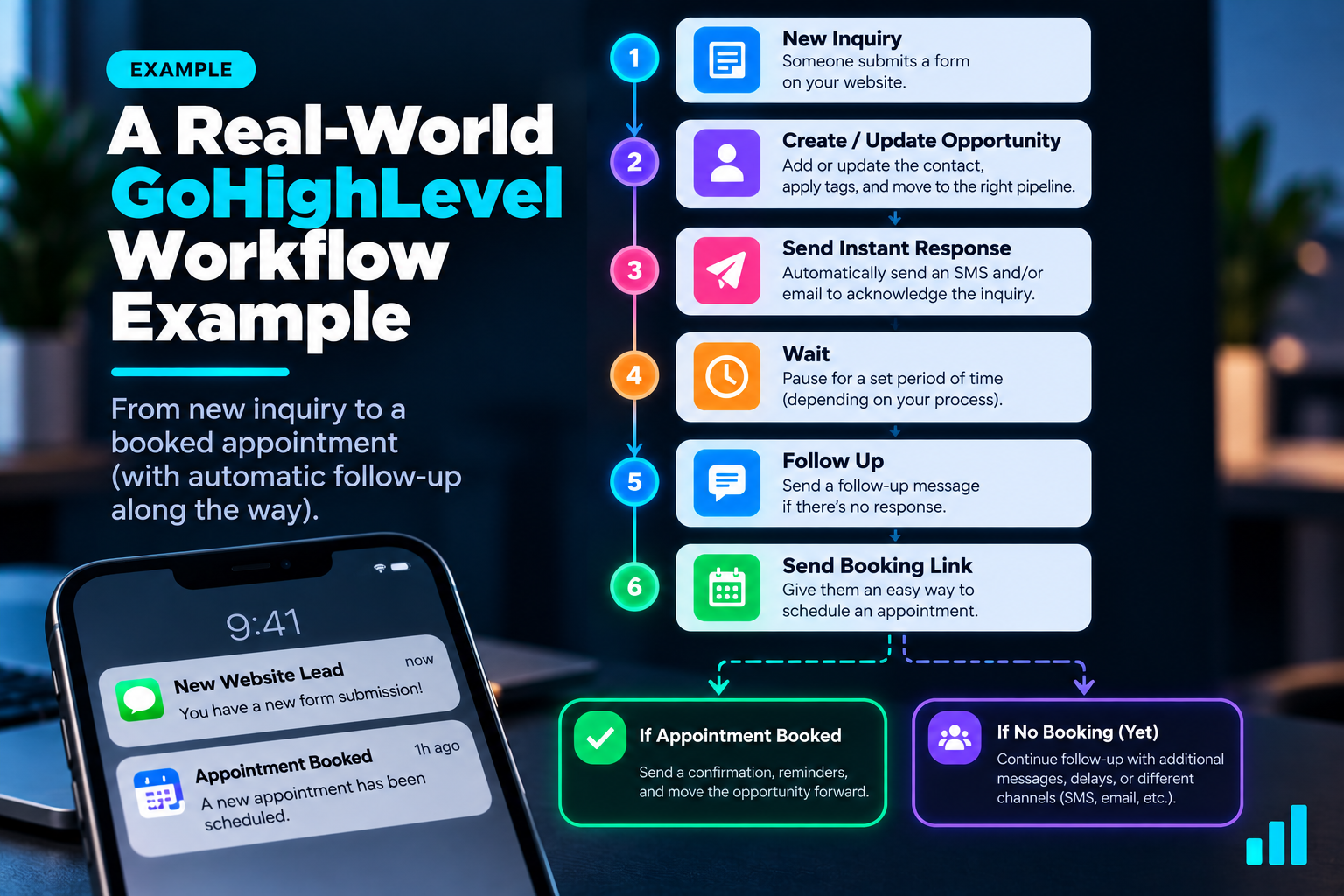
A Simple GoHighLevel Workflow Example
Let's turn that service-business process into a basic workflow.
This is a hypothetical example, not a universal template.
Trigger: Form Submitted
The prospect submits the business's estimate-request form.
That starts the workflow.
Action: Create or Update the Opportunity
The lead can be placed into the appropriate pipeline and stage, such as:
New Lead
Now the inquiry isn't sitting in an inbox waiting for someone to remember it exists.
Action: Notify the Business
The appropriate person or team can receive an internal notification.
The goal is simple:
Someone needs to know a new opportunity just arrived.
That's especially important when fast lead response matters.
Action: Confirm the Inquiry
The prospect can receive a simple confirmation letting them know the request was received.
This isn't necessarily the entire sales conversation.
It's acknowledgment.
There's a big difference between useful automation and pretending a generic automated message has completed the sales process.
Action: Continue Follow-Up When Appropriate
If the prospect hasn't moved forward, the workflow might continue with additional follow-up.
That's where automated lead follow-up becomes useful.
The exact timing and number of attempts should depend on the business and the type of inquiry. I've covered that separately in how many times you should follow up with a lead.
The workflow's job isn't to bombard someone.
It's to prevent a legitimate opportunity from being forgotten.
Add Logic When the Process Actually Needs Logic
Eventually, you'll want the workflow to respond differently depending on what happens.
That's where conditions and branches become useful.
Imagine a follow-up workflow.
After the initial response, you might need to know:
Did the lead respond?
If yes, continuing to fire the same automated messages may be unnecessary—or actively annoying.
If no, another follow-up may make sense.
Conceptually:
Lead responded?
YES → change or stop automated follow-up
NO → continue the appropriate follow-up
The exact implementation can vary, but the principle matters more than the button you click.
Good automation should react to reality.
Bad automation keeps running because nobody told it when to stop.
Not Every Workflow Action Should Happen Immediately
Timing is another place where workflows become useful.
Some things should happen right away.
A new-lead notification is a good example.
An acknowledgment that an inquiry was received may also make sense immediately.
Other actions might need a delay.
For example:
Inquiry received → immediate confirmation → wait → follow-up if still appropriate
HighLevel gives you the ability to build timing into workflows so everything doesn't have to fire at once.
But don't confuse having a wait step with having a good follow-up strategy.
The timing should reflect the customer journey and the type of interaction.
A missed call, an estimate request, an appointment reminder, and a six-month-old lead should not automatically receive the same cadence.
What Should You Automate First in HighLevel?
I'd start with something boring.
Seriously.
Pick a repetitive process that:
- happens frequently
- has a clear trigger
- has predictable next steps
- is easy to verify
- creates a real operational benefit when it happens consistently
New-lead acknowledgment is a great example.
Internal lead notification is another.
Appointment confirmation and reminders can be another good starting point.
A missed-call text back can solve a very specific communication gap.
None of these needs a massive workflow.
That's the point.
Get one small automation working correctly before trying to automate half the company.
Can AI Build GoHighLevel Workflows for You?
Increasingly, yes.
HighLevel now has a Workflow AI Builder that can generate and edit workflows from plain-language instructions.
Instead of manually assembling every piece from scratch, you can describe what you want the automation to accomplish and have AI create a starting structure.
For example, you might describe a workflow like this:
When a prospect submits our estimate request form, create or update an opportunity in the New Lead stage, notify the assigned user, send the prospect a confirmation message, wait, and continue follow-up if appropriate.
That's useful.
It does not mean you should hit publish without understanding what was created.
HighLevel's own current documentation recommends manually reviewing AI-generated workflows and notes that some configurations may still require adjustment. It also makes clear that AI doesn't replace workflow testing.
That's exactly how I'd approach it.
Use AI to reduce the amount of clicking.
Don't use AI to outsource judgment.
You still need to inspect:
- the trigger
- every action
- the messages
- timing
- conditions
- assignments
- opportunity settings
- anything else that affects the real customer journey
AI can build the structure.
You still need to know whether the structure makes sense.
How to Test a GoHighLevel Workflow
Testing isn't the final annoying step after you're done building.
It's part of building.
HighLevel currently provides workflow testing tools inside the Workflow Builder. Its documentation also cautions that testing a workflow with a contact inside the builder isn't necessarily a perfect substitute for testing how the automation behaves through the real trigger.
I agree with that approach.
If the workflow starts when someone submits a website form, submit the website form.
If it starts with an appointment, test the appointment journey.
Experience the automation the way an actual lead would.
Then check the backend.
Did the correct trigger fire?
Did the right contact get affected?
Did the opportunity land in the correct pipeline and stage?
Did the right person receive the internal notification?
Did the prospect receive the correct message?
Did personalized information populate correctly?
Did waits and conditions behave the way you expected?
Did the workflow run once—or accidentally multiple times?
And perhaps most importantly:
Does the automation know when it should stop?
A workflow that technically “works” but keeps messaging someone after they've already spoken with a salesperson isn't working very well.
The Customer Never Sees Your Workflow Diagram
This is worth remembering when you start getting deeper into automation.
Your customer doesn't care whether your workflow has six steps or sixty.
They experience the output.
They notice whether someone responded.
They notice whether they got the appointment confirmation.
They notice whether the reminder arrived.
They notice whether you keep sending automated follow-ups after they've already told you they're not interested.
They notice whether the process feels organized or chaotic.
That's why I don't think complexity is a useful measure of automation quality.
The customer never sees your workflow diagram. They experience what the workflow does.
Common GoHighLevel Workflow Mistakes
Automating a process that hasn't been defined
If nobody can explain what should happen manually, automating it usually doesn't make the process better.
It makes the confusion happen faster.
Choosing the wrong trigger
A workflow that begins at the wrong moment can create duplicate actions, missed opportunities, or strange customer experiences.
Understand exactly what should start the automation.
Building one giant workflow
Large workflows aren't automatically bad, but beginners often create unnecessary complexity because they try to solve every possible scenario in one automation.
Smaller, clearly defined systems are usually easier to understand and troubleshoot.
Forgetting about replies
Follow-up shouldn't blindly continue regardless of what the prospect does.
Think through what should happen when someone responds or a human takes over.
Sending too many messages
Automation makes sending messages easy.
That doesn't make every message useful.
Ignoring the pipeline
Communication automation is more useful when the opportunity itself stays organized in a pipeline.
Otherwise, you may have excellent automated texts and no idea where the actual deal stands.
Trusting a template or snapshot without understanding it
Templates can save time.
They can also import somebody else's assumptions into your business.
Understand the logic before relying on it.
Trusting AI-generated workflows without reviewing them
AI Workflow Builder can save time too.
Same rule.
Understand what it built.
Testing only inside the builder
Use the testing tools, but also test the real journey whenever practical.
Do You Need to Learn Every HighLevel Workflow Feature?
No.
I've used HighLevel for roughly 2.5 years, and there are still parts of the platform I haven't grown into yet.
That's not preventing me from using workflows, CRM, calendars, forms, email, SMS, missed-call text back, chatbots, reputation tools, AI Studio, and other pieces that matter to what I'm actually building.
You don't need to memorize every trigger.
You don't need to master every integration.
You don't need to create complicated conditional logic just to prove you understand automation.
Learn enough to build the process in front of you.
Then expand your skills as the systems you're building become more sophisticated.
HighLevel Workflows Are Tools, Not Strategy
This distinction matters if you're thinking about offering automation as a service.
Businesses aren't paying because you know where the workflow button is.
They're paying because something isn't happening reliably.
Leads aren't being followed up with.
Calls are being missed.
Appointments aren't being confirmed.
Opportunities aren't organized.
Old leads are sitting untouched.
Staff members are repeating tasks that software could handle.
The value comes from identifying the problem and designing a better process.
HighLevel gives you the infrastructure to implement it.
That's one reason I think the platform can be so useful for someone learning how to start an AI automation agency.
But the software isn't the business.
Knowing what to automate, why to automate it, and what outcome the automation should create is the business skill.
A Better Way to Build Your First Workflow
Before you open HighLevel, answer five questions:
What happened?
That's probably your trigger.
What should happen immediately afterward?
Those are your first actions.
Does anything depend on what the lead does next?
That's where logic may be needed.
Should anything happen later instead of now?
That's where timing comes in.
What outcome tells me this workflow did its job?
That's the reason the automation exists.
Then build the simplest version capable of producing that outcome.
Test it.
Fix it.
Use it.
Only then start making it smarter.
Ready to Explore HighLevel?
If you're looking for a platform where CRM, pipelines, forms, calendars, communication, and automation can work together, explore HighLevel.
Get Started With HighLevelThe important part isn't how many workflows you can build. It's whether you can build systems that solve real business problems.
Disclosure: Some links on this page are affiliate links. If you sign up through one of them, I may earn a commission at no additional cost to you. I only recommend tools I have personally used and believe are worth considering.
Want to Build a Business Around Automation?
If you're less interested in automating your own business and more interested in turning automation, CRM, websites, follow-up, and related systems into a service businesses will pay for, the 48-Hour AI Cashflow Stack is the better next step. It focuses on building the business around the tools—not simply learning more software.
Get the 48-Hour AI Cashflow Stack