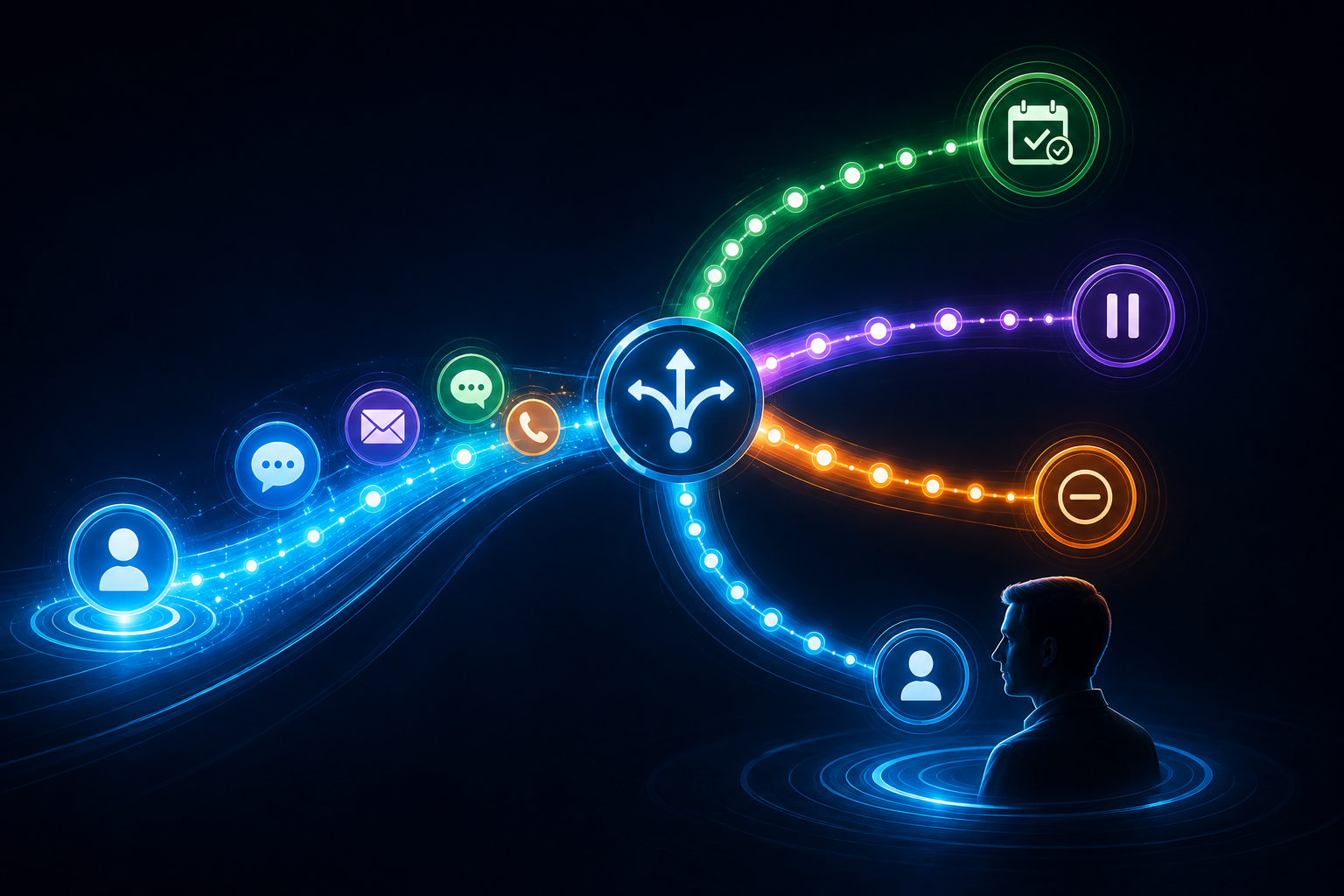
A prospect contacts your business.
You respond.
They don't answer.
Now what?
For a surprising number of businesses, the answer is:
Wait.
Hope they call back.
Maybe remember to follow up tomorrow.
Maybe don't.
That's where automated lead follow-up can help.
But there's a bad version of this idea too.
Someone submits one form and suddenly gets three texts, four emails, two calls and enough "just checking in" messages to make them regret ever asking for an estimate.
That's not good follow-up.
That's a robot with attachment issues.
Automated lead follow-up is a system that uses triggers, timing, lead status and other conditions to help determine when appropriate follow-up should happen, what should happen next, and when automation should stop or hand the conversation to a person.
The important word there is not automated.
It's appropriate.
Automated Follow-Up Is More Than a Message Sequence
When people hear "automated follow-up," they often picture something like:
Day 1 → Text
Day 2 → Email
Day 3 → Text
Day 5 → Email
Day 7 → Final message
That can technically be automation.
It isn't necessarily a good follow-up system.
A better system pays attention to what is actually happening.
Did the prospect respond?
Did they book?
Did they say no?
Did a salesperson take over?
Did they ask a question?
Did they opt out?
Did the opportunity move into a different stage?
Those events should matter.
Good automation isn't simply:
Message → wait → message → wait → message
It's closer to:
Trigger → action → observe what happens → determine the appropriate next step
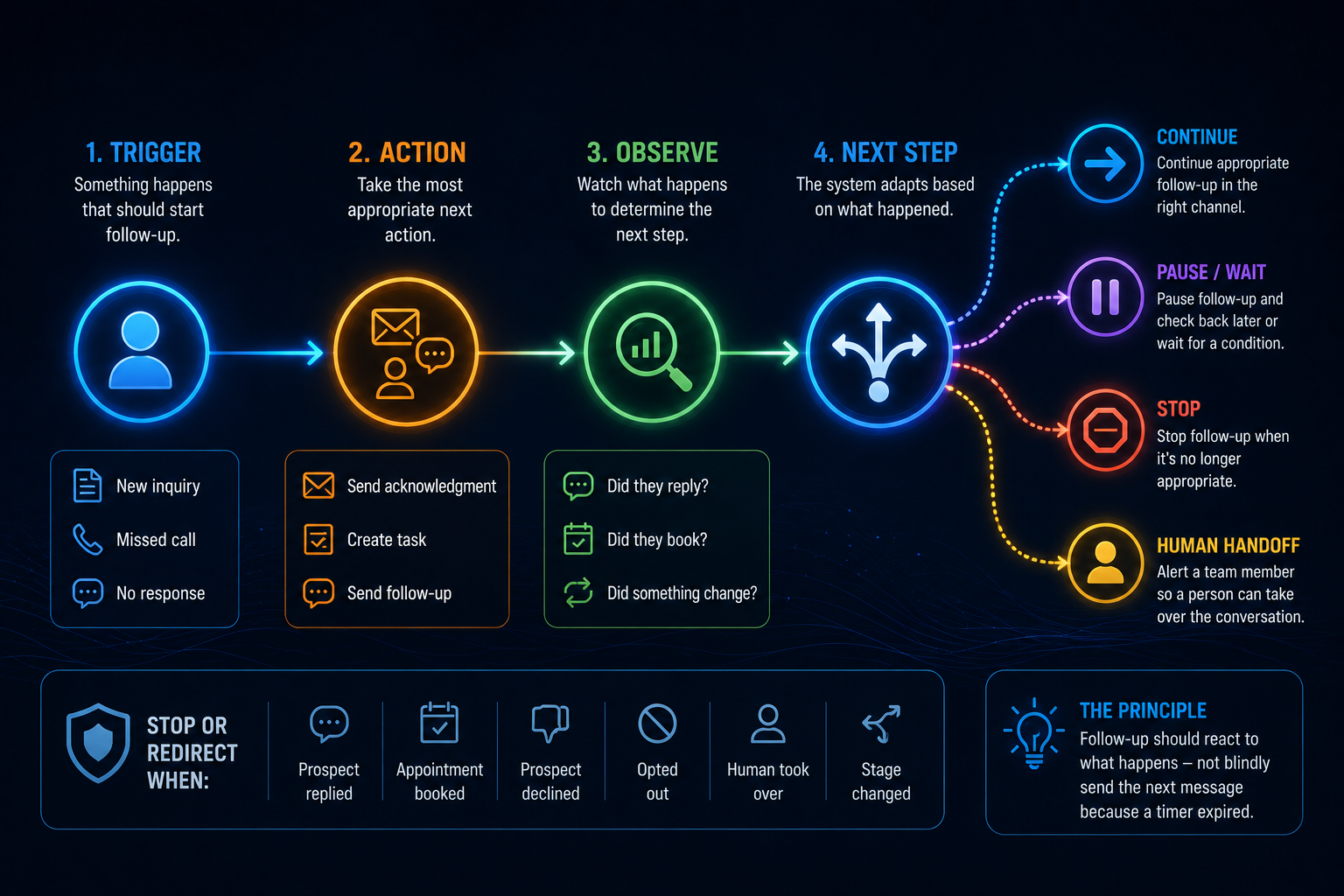
That difference matters.
Why Follow-Up Gets Missed in Service Businesses
Most service-business owners don't wake up planning to ignore leads.
They're busy running the business.
A contractor may be on a job site.
A landscaper may be operating equipment.
A technician may be inside someone's home.
An owner may be driving between appointments.
An office manager may already be handling three customers at once.
The problem isn't always effort.
It's that manual follow-up depends heavily on someone remembering what needs to happen next.
And memory is a lousy CRM.
A system can help make the next action more consistent without requiring someone to mentally track every open conversation.
That's where automation earns its keep.
Speed to Lead Handles the Beginning. Follow-Up Handles What Comes Next.
In our guide to speed to lead, we looked at the time between someone expressing interest and the business responding.
That's the beginning of the opportunity.
But plenty of prospects won't immediately respond to the first message.
Others will respond but aren't ready to schedule.
Some need information.
Some get distracted.
Some need to talk with a spouse, manager or business partner.
Some genuinely aren't ready yet.
That's where follow-up begins.
Speed to lead asks: How quickly did we appropriately respond?
Lead follow-up asks: What should happen if the opportunity still hasn't reached its next step?
You need both.
What Can Trigger Automated Follow-Up?
A follow-up system needs something to tell it when to act.
That's the trigger.
Common examples can include:
New Website Inquiry
Someone submits a quote, contact or service-request form.
The system may:
- create or update the contact
- organize the inquiry in the CRM
- acknowledge receipt
- notify the appropriate person
- begin the relevant workflow
Missed Call
Someone calls but nobody answers.
An appropriate workflow might acknowledge the missed call and provide another way to continue the conversation while a person prepares to call back.
No Response After Initial Contact
The business responded, but the prospect hasn't replied.
Instead of relying on someone to remember, the system can schedule an appropriate follow-up.
Incomplete Booking
Someone starts moving toward an appointment but doesn't finish.
Depending on the context and permissions involved, a reminder may be appropriate.
Estimate or Proposal Follow-Up
A prospect received an estimate or proposal but hasn't made a decision.
That deserves a very different message from someone who submitted a website form five minutes ago, which is why knowing how to follow up after sending an estimate matters as its own conversation.
Appointment Status
A booked appointment may trigger confirmations, reminders or instructions.
A canceled or missed appointment may require a different next step.
Pipeline Stage Change
Moving an opportunity from one stage to another can trigger tasks, notifications or communication relevant to that stage.
Older Lead Reactivation
Some older opportunities may be appropriate for future re-engagement, and a thoughtful approach to reactivating old leads can bring dormant opportunities back into the conversation.
That doesn't mean every old contact should be dumped into a giant text blast.
Consent, context, relevance and the nature of the prior relationship still matter.
The point isn't to automate every possible trigger.
It's to identify the moments where something useful should happen and currently doesn't happen consistently.
The Most Important Part of Follow-Up Automation: Knowing When to Stop
This is where a lot of automation gets stupid.
Imagine you've been exchanging texts with a company.
You book an appointment.
Seven minutes later:
Just checking in! Would you like to schedule a time?
Then tomorrow:
We haven't heard from you...
You have heard from me.
I'm literally on your calendar.
That's not a messaging problem.
It's a logic problem.
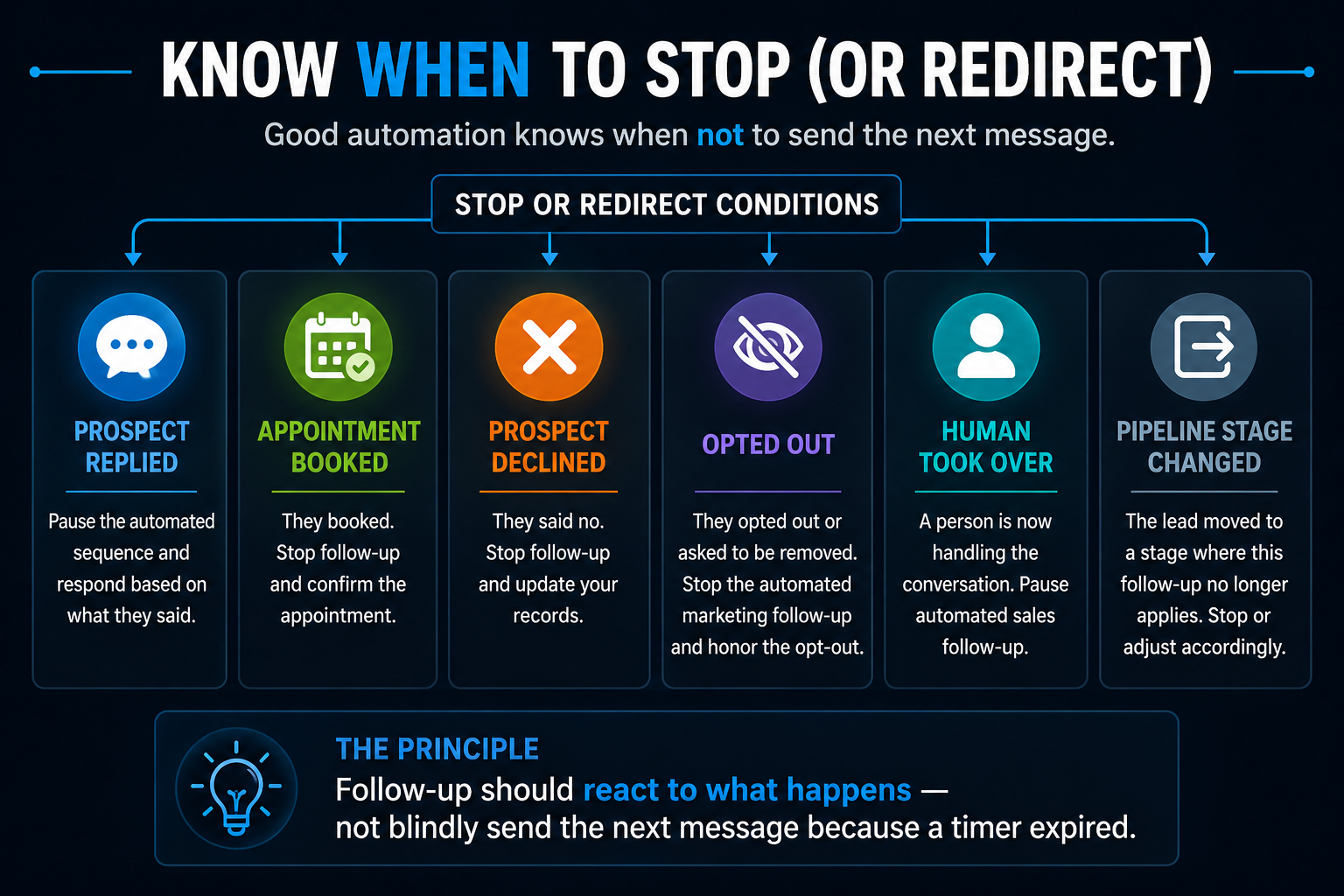
A good automated follow-up system needs stop conditions.
The workflow may need to pause or end when:
- the prospect replies
- an appointment is booked
- the prospect declines
- the prospect opts out
- the lead becomes unqualified
- a human takes ownership of the conversation
- the opportunity changes pipeline stages
- the lead moves into an appropriate longer-term nurture process
The exact rules depend on the business.
But the principle is universal:
Automation should respond to what the prospect does, not blindly continue because a timer expired.
That one idea separates useful automation from automated annoyance.
What Makes Automated Follow-Up Annoying?
Usually, it's not automation itself.
It's bad automation.
Too Many Messages
More follow-up isn't automatically better follow-up.
Eventually persistence becomes noise.
No Awareness of Previous Responses
If someone already answered your question, don't send a message asking the same question again.
Repeating the Same Message
"Just following up."
"Checking in."
"Wanted to follow up again."
"Circling back."
By message four, the prospect knows you're following up.
Give the communication a reason to exist.
Wrong Channel
A detailed estimate may make more sense by email.
A simple scheduling question might work well through text.
A complicated project discussion may deserve a phone call.
The best channel depends on what you're trying to accomplish.
Bad Timing
Context matters.
A non-emergency business probably doesn't need to send promotional follow-up messages in the middle of the night just because the workflow technically can.
Ignoring Opt-Outs
If someone tells you to stop contacting them, the system needs to listen.
Immediately.
Pretending Automation Is Human
Automation doesn't need to play dress-up.
If AI or automation is being used, design the experience around usefulness rather than trying to trick someone into believing every message was personally typed by an employee.
How Often Should You Follow Up With a Lead?
There is no universal number.
Anyone telling every service business to send exactly five messages over exactly seven days is pretending HVAC repair, luxury remodeling, landscaping, legal services and elective healthcare all have identical buying cycles.
They don't.
A sensible cadence depends on things like:
- urgency
- lead source
- service
- customer intent
- sales cycle
- communication channel
- previous engagement
- business hours
- what the prospect has already done
An emergency service inquiry may justify faster follow-up.
A six-figure remodeling project may involve a much longer decision process.
The useful question isn't:
How many messages should we send?
It's:
What would be an appropriate next action if we haven't reached the next step yet?
Sometimes that's another message.
Sometimes it's a phone call.
Sometimes it's waiting.
Sometimes it's moving the opportunity into longer-term nurture.
And sometimes it's stopping.
Every Follow-Up Should Have a Job
This is a simple rule I like:
Don't send a follow-up just because the workflow says it's Tuesday.
Send it because there's a reason.
A follow-up might:
- answer a common question
- clarify the next step
- ask for missing information
- remind someone about an unfinished action
- provide scheduling options
- confirm whether the project is still active
- provide relevant information
- make it easy to continue the conversation
- close the loop respectfully
That makes the communication useful instead of repetitive.
Compare:
Just checking in to see if you're still interested.
with:
You mentioned you're hoping to complete the project before November. If that's still the goal, we can help you figure out the next step.
Same basic purpose.
Much more context.
Text, Email, Phone or AI: Which Follow-Up Channel Is Best?
There isn't one universal winner.
Each channel has strengths.
SMS / Text
Text can be useful for short, conversational communication such as:
- acknowledgments
- simple questions
- scheduling
- reminders
- brief follow-up
But businesses need appropriate permission and opt-out handling for automated texting.
Email works well when communication needs more room.
For example:
- detailed information
- proposals
- project explanations
- educational material
- longer updates
Phone
Some conversations are simply better spoken.
Complex projects, high-value opportunities, technical questions and relationship-driven sales may deserve a call.
AI-Assisted Conversation
AI can help when understanding language or conversational context adds value.
For example:
- answering appropriate common questions
- gathering basic information
- interpreting what someone is asking
- helping route the conversation
- assisting with scheduling
But AI doesn't automatically make a follow-up system better.
Use it where it earns its place.
Human Follow-Up
Humans remain important when the conversation requires:
- judgment
- expertise
- negotiation
- sensitivity
- unusual circumstances
- relationship-building
- complex sales discussion
The goal isn't to choose between automation and humans.
It's to let each handle the work it's best suited for.
Traditional Automation vs. AI Follow-Up
This distinction gets blurred constantly.
Not every automation needs AI.
If the rule is:
If appointment booked → stop follow-up sequence
you do not need artificial intelligence.
That's ordinary automation.
If the system needs to understand:
"I'm interested, but my wife wants to wait until after hurricane season. Can someone call me next month?"
Now language understanding may actually be useful.
A practical way to think about it:
Traditional automation handles predictable rules.
AI helps when language and context need interpretation.
Humans handle situations requiring judgment, expertise or relationship.
Use the simplest tool that can do the job well.
Follow-Up Should Change When the Prospect Responds
This sounds painfully obvious.
Yet it's one of the biggest differences between a sequence and a system.
Suppose a prospect receives:
Are you still interested in scheduling an estimate?
They reply:
Yes, but I can't do anything until next month.
A rigid sequence might send tomorrow:
We haven't heard from you. Are you still interested?
A better system recognizes that something changed.
Now the appropriate next action might be:
- update the opportunity
- pause the short-term sequence
- create a future task
- schedule an appropriate later follow-up
- notify a person if needed
The prospect gave you information.
Use it.
What Should Happen When a Human Takes Over?
Automation should know when to get out of the way.
If a salesperson, estimator or owner begins actively communicating with the prospect, blindly continuing automated sales messages can create a bizarre customer experience.
Imagine speaking with a contractor at 2:00 PM and receiving this at 2:04:
Hi! We'd love to connect and learn more about your project.
We just did.
A human-handoff rule might:
pause automated sales follow-up
↓
keep the CRM record updated
↓
allow appropriate operational automation to continue
↓
resume another workflow later only if appropriate
Notice the distinction.
Pausing sales follow-up doesn't necessarily mean shutting down every automation.
Appointment reminders may still be useful.
Internal notifications may still be useful.
CRM updates may still be useful.
The system should understand what changed.
Automated Follow-Up and Your CRM
A CRM should be more than a digital address book.
For follow-up, it can become the system's memory.
It can help track:
- who the prospect is
- what they asked about
- where the lead came from
- previous conversations
- current opportunity stage
- appointments
- tasks
- follow-up status
- assigned staff
- whether communication should continue
That context is what makes more intelligent automation possible.
Without it, automation tends to become:
Send message because timer says so.
With useful CRM data, it can become:
Take the next action because the current situation calls for it.
That's a meaningful difference.
A Simple Automated Follow-Up Framework
You don't need to automate your entire sales process tomorrow.
Start with five questions.
1. What Happened?
What event should trigger the workflow?
A form?
Missed call?
No response?
Proposal sent?
Appointment canceled?
2. What Should Happen Next?
What is the most appropriate next action?
Message?
Email?
Call task?
Reminder?
Nothing yet?
3. What Are We Waiting For?
A reply?
Booking?
Information?
Human action?
A certain date?
4. What Changes the Workflow?
What should pause, stop or redirect the automation?
Reply?
Booking?
Opt-out?
Pipeline change?
Human takeover?
5. When Does a Person Need to Get Involved?
Define this before building the automation.
Don't wait for the robot to discover its own limitations.
That framework alone will prevent a lot of bad automation.
A Note About Consent and Automated Messaging
Automated communication isn't just a workflow question.
There are legal and compliance considerations too.
In the United States, automated calls and texts can be subject to the Telephone Consumer Protection Act and FCC rules governing consent and revocation.
The FCC has specifically addressed consent requirements for certain marketing robocalls and robotexts and has clarified consumers' ability to revoke consent through reasonable methods, including common opt-out replies to text messages.
The practical takeaway for a business owner is straightforward:
- obtain appropriate consent where required
- make consent language clear
- honor opt-outs promptly
- keep accurate records
- don't assume one inquiry gives unlimited permission for future marketing
- get qualified legal or compliance guidance for your specific messaging practices when necessary
This isn't legal advice.
It's simply another reason follow-up automation needs rules.
A system that doesn't know when it's legally or operationally supposed to stop isn't much of a system.
Where Automated Follow-Up Fits Into a Lead Conversion System
Automated follow-up is one part of the larger lead conversion system.
The broader path may look something like:
Lead Capture → Acknowledgment → Response → Follow-Up → Conversation → Qualification → Scheduling → Human Handoff
Follow-up helps prevent opportunities from disappearing simply because nobody remembered the next action.
But it shouldn't exist in isolation.
It needs information from the rest of the system.
Did the person respond?
Did they schedule?
What service do they need?
Who owns the conversation?
What stage are they in?
That's why CRM organization, communication and scheduling matter alongside automation.
How This Connects to an AI-Powered Website
An AI-powered website shouldn't stop being useful the second someone submits a form.
The website can be the beginning of a larger connected process.
For example:
Visitor submits inquiry
↓
Contact enters CRM
↓
Inquiry acknowledged
↓
Appropriate follow-up begins
↓
Conversation continues
↓
Human joins when needed
↓
Next step becomes clear
The website captures the opportunity.
The connected systems help manage what happens afterward.
That's a much more useful definition of an AI-powered website than simply saying AI helped design the page.
How Booked Calendar System™ Handles Follow-Up
At Boost Local Biz, automated follow-up is one part of Booked Calendar System™.
The larger objective is to create a connected path between an incoming opportunity and the appropriate next step.
Depending on the business, that can involve:
- lead capture
- acknowledgment
- automated follow-up
- AI-assisted conversations
- CRM organization
- missed-call response
- pipeline management
- scheduling
- reminders
- internal notifications
- human handoff
Not every business needs every component.
And not every lead should experience the same workflow.
That's the point.
The system should support how the business actually sells and communicates instead of forcing every prospect through the same automation maze.
The Best Follow-Up Doesn't Feel Like a Sequence
Good automated follow-up should feel surprisingly unremarkable to the customer.
They reached out.
The business responded.
The next communication made sense.
They replied.
The system adjusted.
A person stepped in when needed.
The messages stopped when they were supposed to.
That's it.
No automation circus required.
Behind the scenes, there may be workflows, CRM triggers, AI, pipeline logic and scheduling rules doing plenty of work.
But from the customer's perspective?
The business simply seems organized.
And that's probably the highest compliment a follow-up system can get.
Want to Improve Your Lead Follow-Up Process?
If your business already generates inquiries but follow-up still depends heavily on someone remembering who needs another call, text or email, there's probably room to improve the system.
Booked Calendar System™ is designed to connect response, follow-up, conversations, CRM organization and scheduling so opportunities have a clearer path forward.
Boost Local Biz can help you identify:
- where leads stop moving
- which follow-up tasks can be automated
- where AI may be useful
- where humans should take over
- what should stop a workflow
- how your CRM and scheduling process should connect
The goal isn't more automation.
It's better follow-up.
Explore the Booked Calendar System™ and see where your current follow-up process may be breaking down.
