A little chat bubble in the corner of a website doesn't automatically make the website intelligent.
Sometimes it's live chat.
Sometimes it's a glorified contact form.
Sometimes it's a decision tree that asks you to press buttons until you finally give up and call the company.
And increasingly, it's an AI chatbot capable of having an actual conversation.
But even that doesn't answer the question that matters to a business owner:
What should an AI website chatbot actually do for the business and its customers?
For a service business, the answer isn't simply "talk to website visitors."
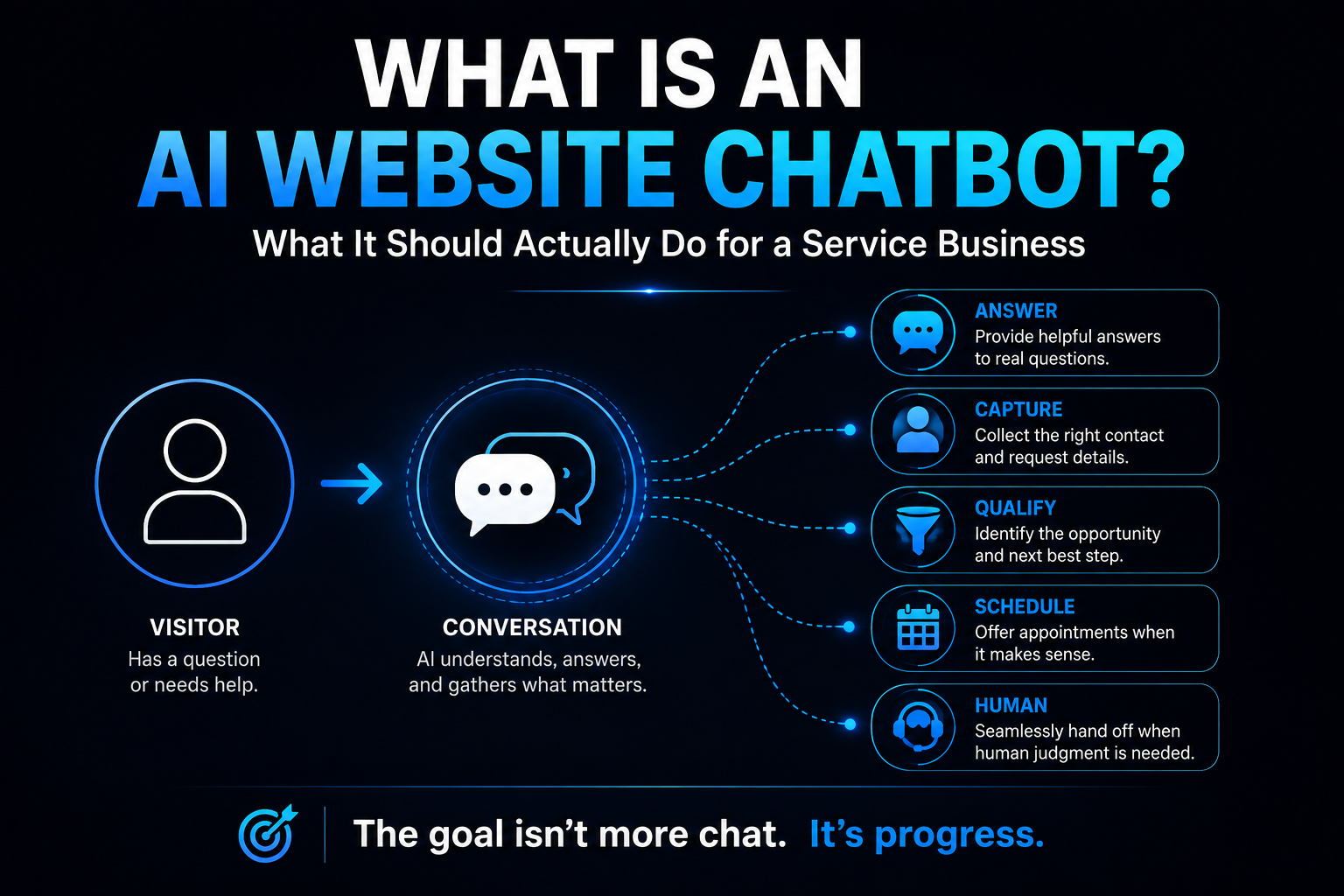
A useful AI website chatbot should help someone get the information they need and move toward the right next step—while capturing enough context for the business to continue the conversation intelligently.
That distinction matters.
What Is an AI Website Chatbot?
An AI website chatbot is a conversational tool embedded into a website that uses artificial intelligence to understand visitor questions and respond in natural language.
Unlike a basic scripted chatbot, it doesn't necessarily require the visitor to follow a rigid sequence of predefined buttons.
A capable implementation may be able to understand variations of questions, use approved business information to formulate answers, collect information from the visitor, and interact with other business systems.
But there's an important word in that sentence:
May.
Not every AI chatbot can do everything described in this article.
The actual capabilities depend on the platform, the information it's given, its integrations, the business rules behind it, and how well the system has been implemented.
AI Chatbot vs. Live Chat vs. Scripted Chat
These tools are often lumped together, but they aren't the same thing.
Live chat connects the website visitor with a human.
Scripted chat follows predefined rules, buttons, questions, or decision trees.
AI chat interprets natural-language input and generates responses based on its instructions, available knowledge, and capabilities.
There can also be overlap.
An AI chatbot might begin a conversation and then hand it to a human through live chat.
A scripted workflow might collect a few pieces of information before AI becomes involved.
The labels matter less than what the experience actually accomplishes.
If you want a broader comparison of where chat fits alongside other website conversion tools, see Website Forms vs. Chat vs. Online Scheduling.
The Wrong Goal: Keep People Talking to the Bot
One of the easiest mistakes is measuring chatbot success by conversation volume.
More conversations aren't necessarily better.
Longer conversations aren't necessarily better either.
If someone visits a plumber's website at 9:30 at night because water is coming through the ceiling, they probably aren't hoping to develop a meaningful relationship with a chatbot.
They want help.
The chatbot's job is to reduce the distance between:
"I need something"
and
"Here's what happens next."
Sometimes that requires a conversation.
Sometimes it requires two questions and a phone number.
Sometimes it means offering an appointment.
Sometimes it means getting a human involved.
Conversation is the interface. Progress is the objective.
What Should an AI Website Chatbot Actually Do?
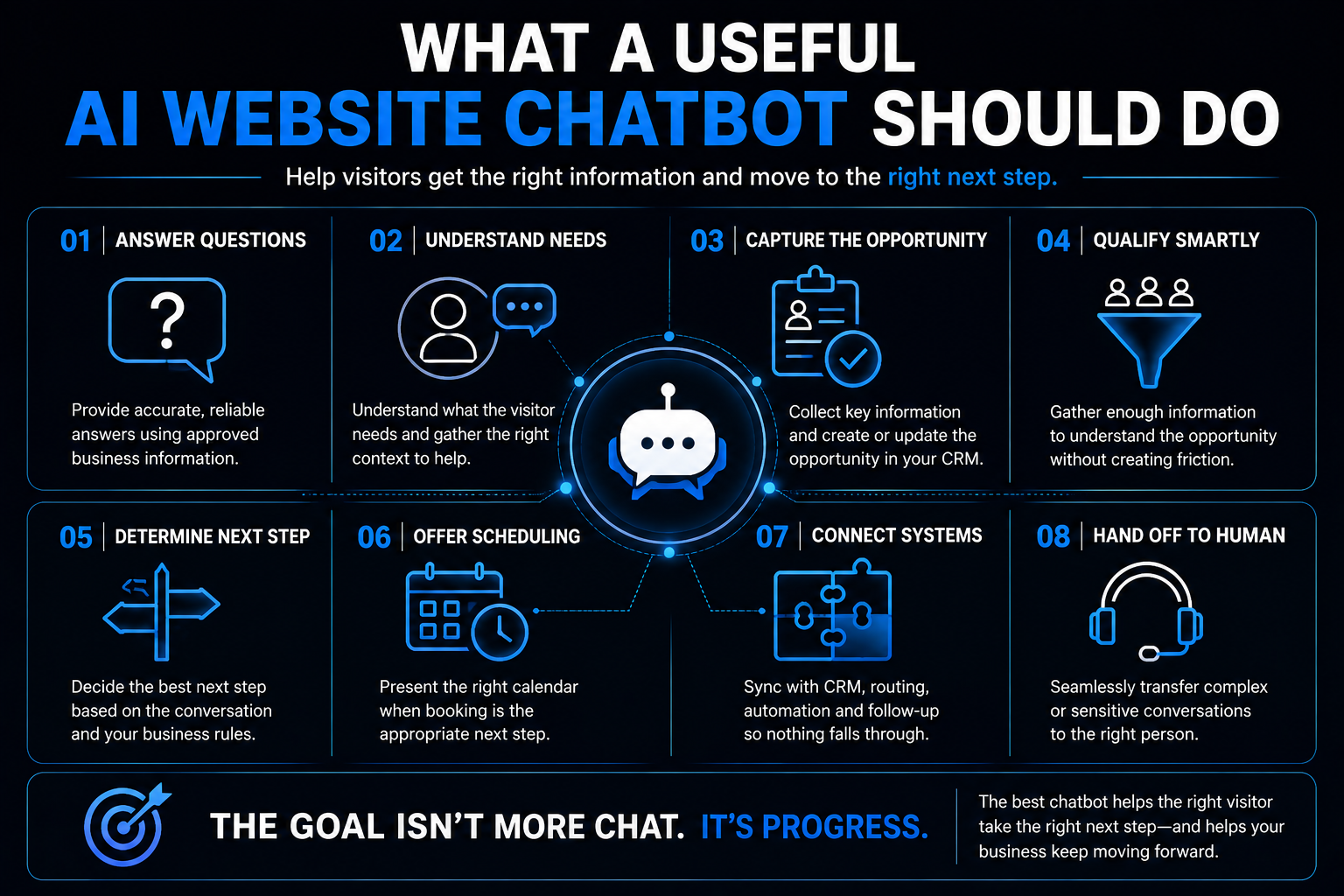
The exact workflow will vary by business, but there are several useful jobs an AI chatbot can potentially perform.
1. Answer Real Customer Questions
This is the obvious one.
Visitors arrive with questions:
- Do you provide this service?
- Do you serve my area?
- Are you available on weekends?
- How does the process work?
- Do you handle this type of project?
- What should I expect next?
- Can I schedule a consultation?
A useful chatbot can help answer appropriate questions using reliable business information.
The key phrase is reliable business information.
If the system doesn't know the answer, making one up isn't customer service.
It's hallucination with a logo next to it.
The chatbot needs boundaries around what it knows, what it can reasonably answer, and when it should say:
I need to get someone from the team involved.
2. Understand What the Visitor Needs
Website visitors don't always know which service page they should read.
They know the problem.
My pool deck is cracked and looks terrible.
My AC stopped cooling upstairs.
I need to renovate a commercial space before we open.
A conversational interface can help translate that problem into useful context for the business.
That doesn't mean diagnosing complicated technical issues through a chatbot.
It means understanding enough about the request to move the visitor in the right direction.
3. Capture the Opportunity
A conversation that disappears when the visitor closes the browser isn't especially useful to the business.
When appropriate, the chatbot should be able to collect information such as:
- name
- phone number or email
- service needed
- location
- relevant project or request details
That information can then become part of the business's lead-management process rather than living inside an isolated chat transcript.
This is one reason an AI-Powered Website should be thought of as more than a collection of pages.
The website can become part of the operating system behind customer acquisition and conversion.
4. Help Qualify the Inquiry
Not every inquiry needs the same next step.
A chatbot may be able to gather enough context to determine things such as:
- whether the requested service is offered
- whether the location is within the service area
- what the person needs
- how urgent the request is
- whether additional information is needed
But qualification shouldn't turn the chat into an interrogation.
As we covered in What Is Lead Qualification?, many service businesses are better served by progressive qualification.
Start the conversation.
Collect enough information to understand the opportunity.
Then gather more context when it becomes useful.
Don't make a high-intent prospect answer 17 questions before they're allowed to talk to somebody.
5. Determine the Right Next Step
This is where the chatbot becomes much more useful than an FAQ box.
Depending on what it learns, the next step might be:
- answer another question
- collect additional information
- offer an appointment
- route the inquiry to a particular person or team
- trigger follow-up
- alert someone
- hand the conversation to a human
- politely explain that the business isn't the right fit
The objective isn't to force every visitor through the same funnel.
It's to determine what should happen next.
Should an AI Chatbot Book Appointments?
It can—when scheduling is the appropriate next step.
That's different from saying every chatbot conversation should end with:
BOOK NOW.
Imagine two visitors.
Visitor A knows exactly what they need, is within the service area, and wants to schedule a consultation.
Giving that person access to the calendar may be useful.
Visitor B has a complicated question about whether the company can handle an unusual project.
Forcing Visitor B onto a calendar before answering the question may create more friction, not less.
This is why forms, chat, and scheduling shouldn't be treated as competing conversion tools.
They solve different problems.
The better question is:
What does this particular visitor need next?
What Happens Behind the Chat Matters More Than the Chat Bubble
This is where a lot of chatbot implementations fall apart.
The conversation looks impressive.
Then nothing happens.
The visitor provides their information, the chatbot says somebody will be in touch, and the opportunity lands in an inbox nobody checks until tomorrow afternoon.
AI didn't fix the conversion process.
It just gave the delay a more futuristic interface.
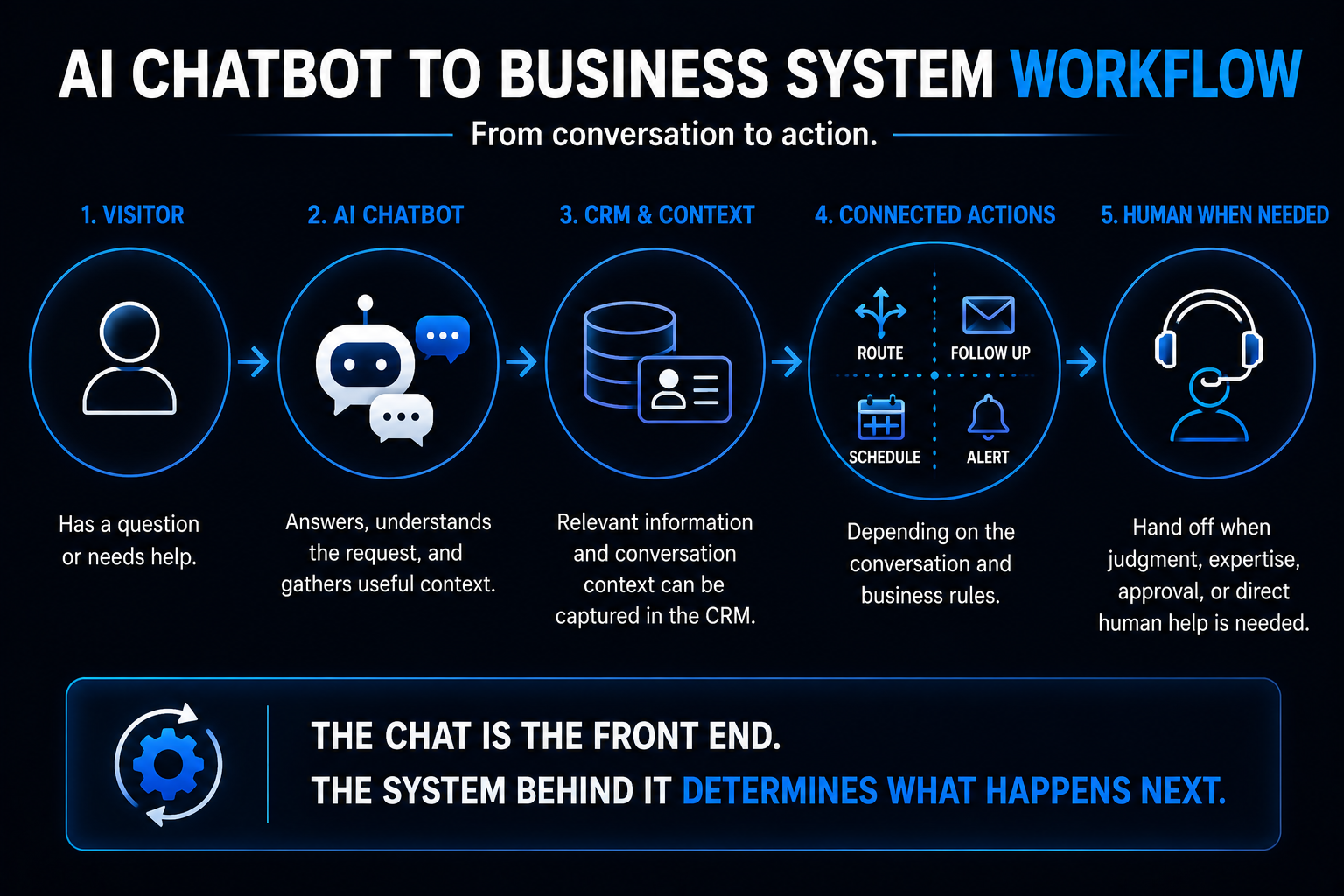
The real value increases when the conversation connects to the systems behind the website.
Depending on the implementation, that could include:
CRM
Create or update the contact and opportunity.
Conversation history
Preserve what the visitor already explained so the next person doesn't make them start over.
Routing
Send the opportunity to the appropriate person, team, location, or workflow.
Scheduling
Offer the correct calendar when an appointment makes sense.
Follow-up
Trigger an appropriate response or follow-up process when the visitor leaves before completing the next step.
Notifications
Alert a human when the conversation requires attention.
This is also where the distinction between a chatbot and a more capable AI agent starts to matter.
OpenAI's practical guide to building AI agents describes tools that allow agents to retrieve information and take actions through connected systems. It also emphasizes human intervention when the system reaches limits or encounters situations requiring oversight.
That's a useful principle for website AI too:
Give the system enough capability to be useful—and enough boundaries to know when it shouldn't act alone.
When Should a Human Take Over?
A good AI implementation doesn't hide the humans.
It uses them intelligently.
Human involvement may be appropriate when:
- the visitor explicitly asks for a person
- the chatbot doesn't understand the request
- the conversation becomes unusual or complex
- judgment is required
- pricing or commitments require approval
- the visitor becomes frustrated
- the system reaches a defined operational limit
There isn't one universal handoff rule.
A plumbing company, law firm, luxury remodeler, medical practice, and commercial contractor shouldn't all use identical escalation logic.
The business needs to decide where automation is useful and where human judgment matters.
Should an AI Chatbot Give Prices?
Sometimes.
But this is another area where implementation matters.
If a business has clear, standardized pricing that can safely be communicated, the chatbot may be able to provide it.
If pricing depends on:
- site conditions
- project scope
- measurements
- material selections
- inspections
- technical requirements
- custom estimates
then pretending the chatbot knows the final price can create problems.
It may be more appropriate to explain how pricing works, collect useful information, and move the visitor toward an estimate or consultation.
AI should make the buying process clearer.
Not confidently invent numbers because somebody asked nicely.
What Information Should the Chatbot Know?
The quality of the conversation depends heavily on the quality of the information behind it.
Useful knowledge may include:
- services offered
- service areas
- business hours
- common customer questions
- scheduling rules
- basic process information
- policies
- appropriate pricing information
- qualification rules
- escalation rules
- contact information
That information also needs maintenance.
If the business changes its hours, stops offering a service, expands its territory, or changes a policy, the chatbot shouldn't continue confidently repeating last year's information.
AI doesn't eliminate information management.
It makes accurate information more valuable.
Should the Chatbot Ask for Contact Information Immediately?
Not necessarily.
There are situations where asking early makes sense.
There are also situations where it feels like the digital equivalent of someone asking for your phone number before answering whether the store carries what you're looking for.
Context matters.
A visitor asking a simple service-area question might deserve an answer before being asked for their life story.
A visitor saying:
I need somebody to come out as soon as possible.
has already signaled much stronger intent.
The conversation should adapt.
This is another reason progressive information collection works well.
Ask for information when there's a reason to ask for it.
What If the Visitor Leaves the Chat?
This is where capturing the opportunity becomes important.
If the visitor has provided appropriate contact information and consent for the relevant communication, the business may be able to continue the conversation through another channel.
That's where automated lead follow-up can become part of the larger system.
The website conversation doesn't necessarily need to be the entire customer journey.
It can be the beginning of one.
Can an AI Website Chatbot Route Leads?
Potentially, yes.
If the system has enough context and the appropriate integrations, the information gathered during the conversation can help determine where the opportunity should go.
That might depend on:
- service requested
- geographic area
- location
- urgency
- department
- project type
- other business-defined criteria
That's different from qualification.
Qualification helps determine what kind of opportunity this is and what should happen next.
Lead routing determines where the opportunity should go.
A well-designed system can connect the two.
What Makes an AI Website Chatbot Bad?
Usually not the AI itself.
The problem is the implementation.
Common examples include:
It Pretends to Know Things It Doesn't
Confidently wrong answers destroy trust quickly.
It Traps the Visitor
If someone keeps asking for a human and the bot keeps saying:
I understand! How can I assist you today?
we have officially entered chatbot purgatory.
It Asks Too Many Questions
Qualification should create context, not an obstacle course.
It Doesn't Connect to Anything
A sophisticated conversation that ends in an unattended email inbox isn't much of a system.
It Has No Handoff Plan
The chatbot should not be forced to improvise forever.
Nobody Maintains Its Information
Yesterday's business information produces today's wrong answers.
How Do You Know Whether the Chatbot Is Actually Helping?
Don't measure success by how many messages it sends.
Look at what happens because of the conversations.
Depending on the business, useful questions might include:
- Are visitors getting appropriate answers?
- Are qualified opportunities being captured?
- Are conversations reaching the correct team?
- Are people successfully reaching appropriate scheduling options?
- Are humans receiving enough context when they take over?
- Are visitors repeatedly asking questions the chatbot can't answer?
- Are conversations producing unnecessary friction?
- Are opportunities being followed up appropriately?
The goal isn't maximum automation.
It's a better customer journey and a better lead-conversion process.
Where Does an AI Chatbot Fit Into an AI-Powered Website?
Chat is one component.
It isn't the entire strategy, and a chatbot is just one of many other business processes AI can help automate.
A service-business website still needs:
- clear positioning
- useful service information
- strong calls to action
- trust
- good mobile usability
- fast performance
- accessible forms
- scheduling where appropriate
- search visibility
- analytics
- lead-management systems behind it
AI chat can make that website more interactive.
But putting a chatbot on a weak website doesn't magically fix the website.
That's why our definition of an AI-Powered Website focuses on what the website can do before, during, and after someone makes contact—not simply whether AI appears somewhere on the page.
Where the Booked Calendar System™ Fits
The chatbot can help start and structure the conversation.
The larger lead-conversion system determines what happens with the opportunity.
That may involve:
Chat → CRM → qualification → routing → follow-up → scheduling → reminders → human involvement
Not every lead will follow every step.
That's the point.
A good system responds to the opportunity rather than forcing every person through an identical sequence.
The Booked Calendar System™ is designed around that broader problem: connecting marketing and inquiries to actual business opportunities.
The chatbot is one possible doorway into that system.
Not the system itself.
If you're weighing whether to add one, it helps to understand how much an AI website chatbot costs before committing.
