If you're trying to figure out how your small business should use AI, don't start with AI.
Start with the annoying stuff.
The inquiry that sat unanswered for three hours.
The customer question your team has answered 47 times.
The estimate nobody followed up on.
The appointment that disappeared from the calendar.
The spreadsheet somebody manually updates every Friday.
The lead sitting in your CRM under a status last touched during the Obama administration.
Those are better places to look.
The best AI automation ideas usually aren't impressive because they use the most advanced AI.
They're useful because they remove friction from a process that already matters.
What Is AI Automation in a Small Business?
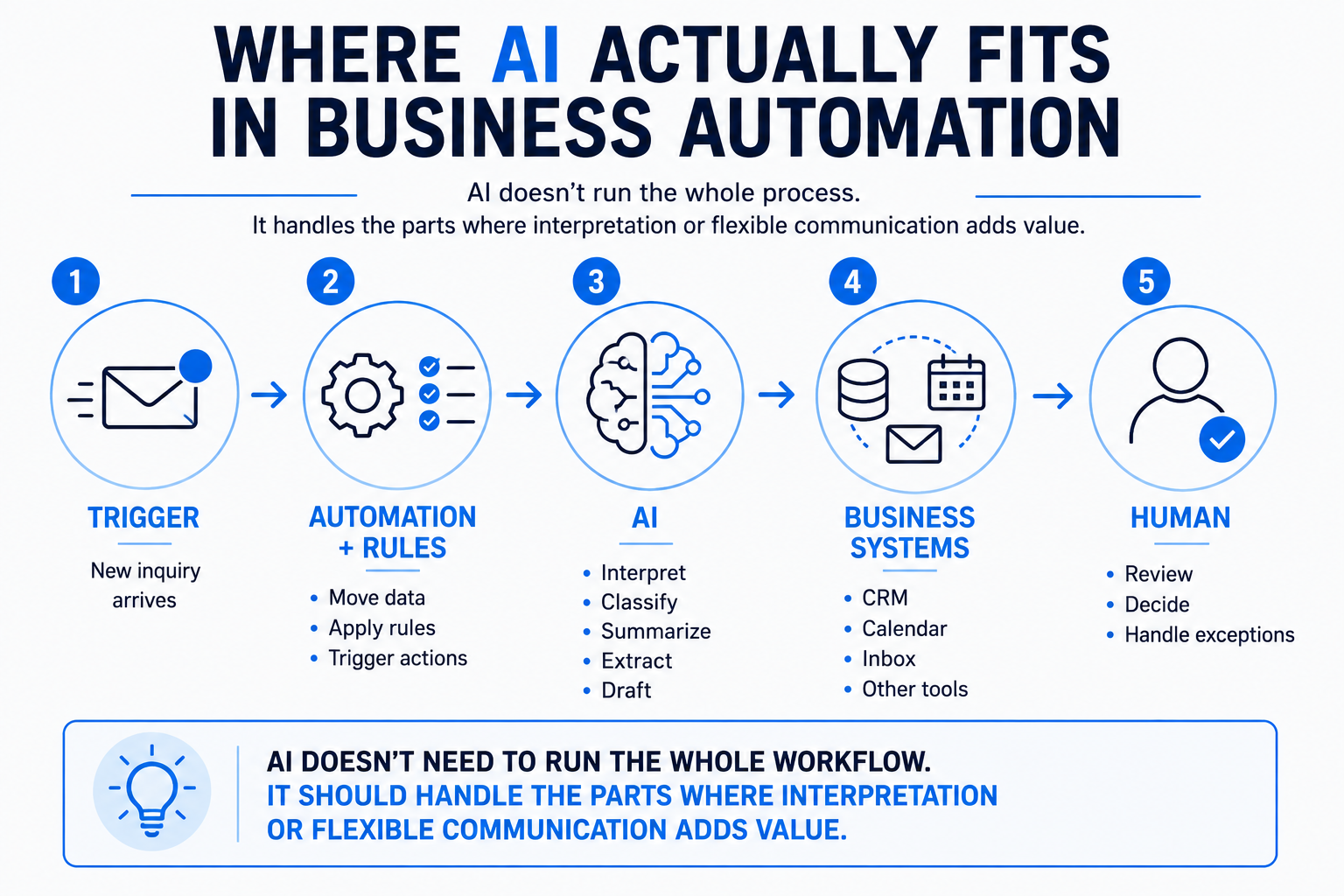
AI automation combines automation, business rules, software integrations and artificial intelligence to help complete a business process.
The AI doesn't necessarily run the whole thing.
For example:
New inquiry arrives → contact is added to CRM → AI interprets what the person needs → business rules determine routing → response is sent → human is notified when necessary.
Only one part of that workflow may actually require AI.
That's fine.
Use AI where interpretation helps. Use ordinary automation where ordinary automation works.
Otherwise you can end up paying an artificial intelligence model to perform the technological equivalent of turning a light switch on.
15 Practical AI Automation Ideas
Here are 15 places worth investigating.
Not every business needs all 15.
Please don't read this as a challenge.
The goal is to find one process where automation would remove meaningful friction, prove that it works, and expand from there.
1. Respond to New Leads Faster
The problem: A prospect submits a form, sends a message or otherwise identifies themselves, but nobody responds until someone becomes available.
The automation: Create or update the contact, acknowledge the inquiry, notify the appropriate person and initiate the agreed next step.
Where AI helps: Interpreting an open-ended inquiry, identifying what the prospect needs, drafting a contextual response or determining which category the inquiry belongs to.
Where a human matters: Complex questions, pricing exceptions, unusual requests and situations requiring judgment.
This is where speed-to-lead becomes a process rather than an instruction to “remember to call people faster.”
2. Recover Missed Calls
The problem: Someone calls while your team is busy or unavailable and hangs up without leaving enough information.
The automation: Send an immediate text acknowledging the missed call and make it easy for the caller to continue the conversation.
Where AI helps: Understanding the caller's reply and helping determine the appropriate next step.
Where a human matters: Urgent situations, complaints, complex requests or anything the automation shouldn't resolve independently.
We cover the mechanics in What Is Missed-Call Text Back? and the actual messaging in our missed-call text-back examples.
3. Qualify New Inquiries
The problem: Your team spends time chasing inquiries that aren't a fit—or fails to identify the good ones quickly enough.
The automation: Collect relevant information, evaluate defined qualification criteria and route the opportunity appropriately.
Where AI helps: Interpreting natural-language answers, extracting useful details and summarizing the inquiry.
Where a human matters: Borderline opportunities and situations where qualification requires judgment rather than a clean rule.
Good lead qualification isn't about making AI decide who deserves to become a customer.
It's about helping the business understand what came in.
4. Route Leads to the Right Person
The problem: Every inquiry goes into the same inbox and somebody has to figure out who owns it.
The automation: Route opportunities based on service, location, urgency, salesperson, department or other defined rules.
Where AI helps: Classifying messy or open-ended inquiries before the routing logic runs.
Where a human matters: Exceptions, unclear ownership and high-value situations requiring manual assignment.
This is a practical extension of lead routing.
The AI can help interpret the request.
The routing rules should still reflect how the business actually operates.
5. Answer Common Website Questions
The problem: Visitors need information before they're ready to call, schedule or submit a form.
The automation: Provide conversational answers based on approved business information and help the visitor move toward an appropriate next step.
Where AI helps: Understanding different ways people ask the same question and generating a natural response from approved information.
Where a human matters: Complaints, unusual pricing situations, sensitive issues and questions outside the approved knowledge.
A properly implemented AI website chatbot can do more than repeat an FAQ page.
But it should also know when to stop talking.
6. Automate Lead Follow-Up
The problem: A prospect doesn't respond to the first message and the opportunity quietly disappears.
The automation: Send an approved sequence of follow-up messages over time and stop or change the sequence when the prospect responds or reaches another outcome.
Where AI helps: Personalizing or adapting communication based on the conversation and interpreting replies.
Where a human matters: Buying signals, objections, unusual questions and conversations that have clearly become sales conversations.
Automated lead follow-up should create consistency.
It shouldn't create a robot that continues sending “Just checking in!” while the customer is actively talking to your salesperson.
7. Follow Up After an Estimate or Proposal
The problem: The business sends an estimate and waits.
And waits.
And then somebody remembers it three weeks later.
The automation: Trigger an appropriate follow-up process after an estimate is sent, with messages changing or stopping based on the prospect's response.
Where AI helps: Interpreting replies, summarizing objections and helping draft contextual responses.
Where a human matters: Negotiation, scope changes, pricing questions and closing conversations.
Our guide to following up after sending an estimate goes deeper into this specific workflow.
The important part is that automation supports the sales conversation rather than pretending to be the salesperson.
8. Schedule Appointments and Send Reminders
The problem: Staff spends time going back and forth about availability, and some scheduled appointments are forgotten.
The automation: Connect qualified prospects or customers to the appropriate calendar, send confirmations and trigger reminders before the appointment.
Where AI helps: Understanding scheduling requests, gathering preliminary information or determining which appointment type may be appropriate.
Where a human matters: Complex scheduling conflicts, unusual service requirements and exceptions.
Reminders can also become part of a broader strategy to reduce appointment no-shows.
9. Reactivate Old Leads
The problem: Your CRM contains people who previously showed interest but never became customers.
The automation: Segment appropriate contacts, send a reactivation message and route engaged responses back into an active process.
Where AI helps: Classifying replies, summarizing previous context and helping personalize the conversation.
Where a human matters: Genuine renewed interest, complex questions and sales conversations.
Before buying another batch of leads, it may be worth asking whether there are opportunities already sitting in the database.
That's the thinking behind lead reactivation.
10. Request and Route Customer Reviews
The problem: Happy customers rarely remember to leave a review unless someone asks.
The automation: After an appropriate completion event, send the customer a review request and track whether follow-up is needed.
Where AI helps: Drafting contextual messaging, categorizing feedback or helping summarize customer comments for internal review.
Where a human matters: Negative feedback, disputes, sensitive customer issues and decisions about how the business should respond.
Automation can make the request consistent.
It should not manufacture reviews, manipulate sentiment or impersonate customers.
11. Triage Customer Service Messages
The problem: Customer questions, support requests, billing issues and sales inquiries all land in the same place.
The automation: Categorize incoming messages, assign them to the appropriate queue or person and create a concise summary.
Where AI helps: Classification, summarization and extracting key details from unstructured messages.
Where a human matters: Complaints, refunds, contractual issues, unusual circumstances and sensitive decisions.
This is a great example of AI doing something humans are good at but shouldn't necessarily have to do manually 80 times a day:
“What is this message actually about?”
12. Turn Calls and Meetings Into Action Items
The problem: Important decisions happen during conversations and then disappear into somebody's notebook.
The automation: Transcribe or summarize an approved recording, identify action items and place those tasks or notes into the appropriate system.
Where AI helps: Summarization, extraction and organizing unstructured conversation.
Where a human matters: Confirming that the summary is accurate and deciding which actions should actually be taken.
AI is very good at producing a draft of:
Here's what was discussed. Here's what appears to need action.
That is different from giving it permission to execute every action it detects.
13. Extract Information From Documents
The problem: Someone repeatedly reads incoming documents and manually copies information into another system.
The automation: Receive the document, extract defined information, structure it and send it to the appropriate destination or review queue.
Where AI helps: Reading less-structured documents and extracting relevant information.
Where a human matters: Low-confidence extraction, financial decisions, legal documents, unusual formats and consequential errors.
Potential examples include:
- intake forms
- invoices
- work orders
- applications
- inspection documents
- service requests
The best candidate is usually a document your team sees repeatedly and handles in roughly the same way.
14. Keep CRM Records and Pipelines Cleaner
The problem: Contacts get duplicated, opportunities sit in the wrong stage and notes aren't consistently recorded.
The automation: Update defined fields, create tasks, move opportunities when specific events occur and flag records that need attention.
Where AI helps: Summarizing conversations, extracting structured information from messages and identifying likely categories.
Where a human matters: Decisions about deal status, ambiguous records and anything where changing the data could materially affect the customer relationship.
A CRM pipeline becomes far more useful when it reflects what's actually happening.
Automation can help maintain it.
It should not turn the CRM into an extremely organized collection of incorrect information.
15. Create Internal Summaries and Alerts
The problem: The information exists, but nobody has time to assemble it into something useful.
The automation: Pull defined information from approved systems and create a recurring summary or alert.
Examples might include:
- new opportunities requiring attention
- appointments scheduled
- unanswered conversations
- estimates awaiting follow-up
- customer issues requiring review
- pipeline changes
- recurring operational exceptions
Where AI helps: Summarizing information, highlighting patterns and turning raw activity into readable language.
Where a human matters: Deciding what the information means and what the business should do about it.
An AI-generated morning summary can tell you:
“These five opportunities may need attention.”
It probably shouldn't independently decide:
“Fire Steve.”
Steve gets a meeting first.
Which AI Automation Should You Build First?
Not the coolest one.
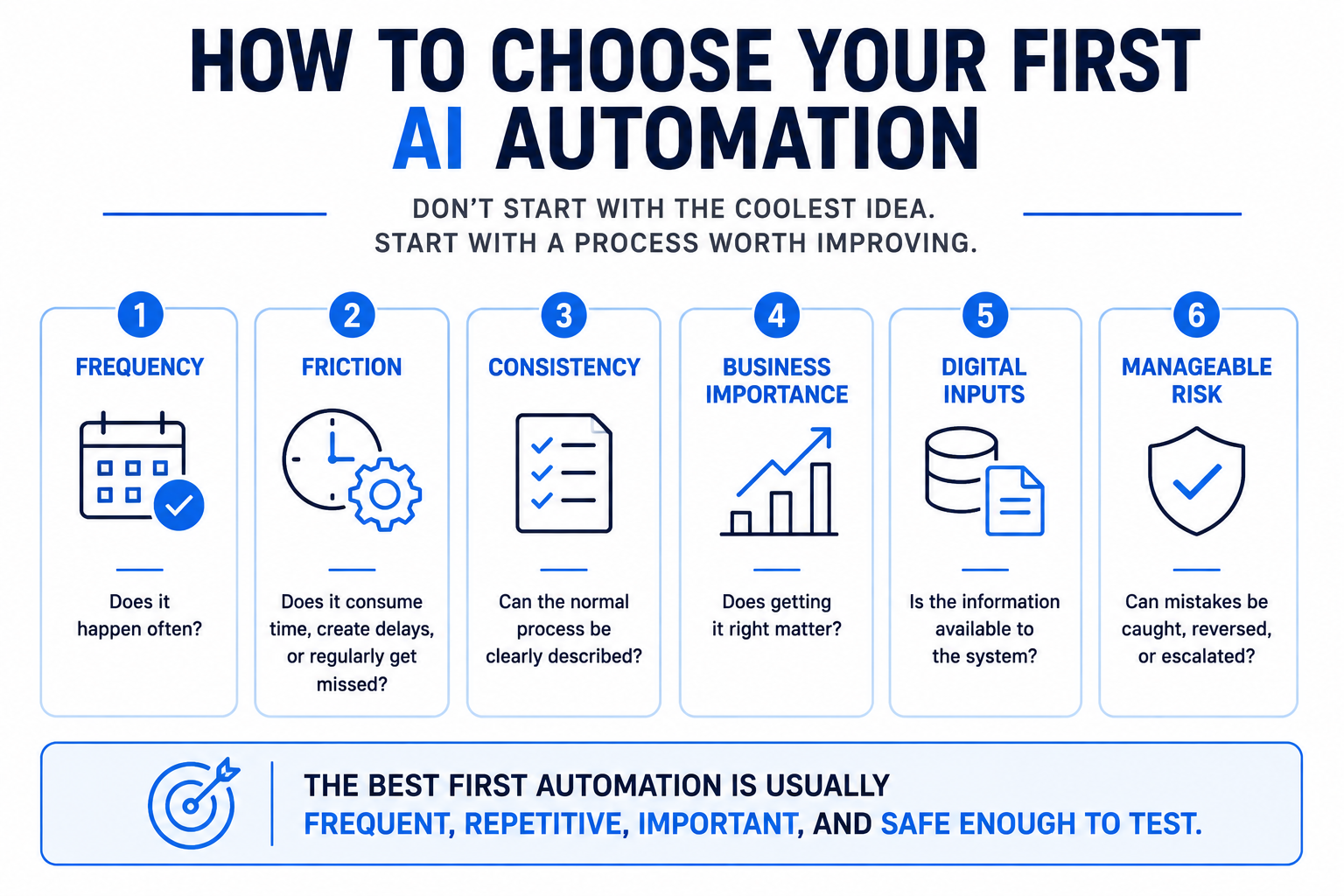
Choose a workflow with a combination of:
Frequency — Does this happen often?
Friction — Does it consume time, create delays or regularly get missed?
Consistency — Does the process follow reasonably understandable rules?
Business importance — Does getting it right matter?
Digital inputs — Does the information already exist somewhere the system can access?
Manageable risk — Can mistakes be caught, reversed or escalated?
A repetitive process that happens 100 times per month and annoys everyone may be a better first automation than an elaborate AI agent that performs an impressive task twice a year.
A Simple Automation Scorecard
Take a process you're considering and score each factor from 1 to 5.
| Factor | Question |
|---|---|
| Frequency | How often does this process happen? |
| Manual effort | How much repetitive work does it create? |
| Delay | Does manual handling slow down an important outcome? |
| Consistency | Can the normal process be clearly described? |
| Business value | Would improving it meaningfully help the business? |
| Risk | Can the automation be designed with reasonable safeguards? |
Don't pretend the total score is scientific.
It isn't.
The point is to compare several ideas using the same questions instead of choosing whichever AI demo looked coolest on LinkedIn.
Where Should AI Not Be the Decision Maker?
The more consequential the decision, the more carefully you should think about human involvement.
Examples may include:
- significant financial decisions
- legal or contractual decisions
- hiring and firing
- sensitive complaints
- unusual refunds
- safety-related situations
- high-value pricing exceptions
- decisions based on incomplete information
AI can still assist.
It might summarize the situation.
Extract relevant information.
Draft a response.
Flag something for attention.
But assistance and authority are different things.
That's an important distinction when automating a real business.
Don't Automate a Broken Process
If nobody can explain how a process is supposed to work, automating it usually doesn't solve the underlying problem.
It makes the confusion faster.
Before building anything, ask:
- What starts the process?
- What information is required?
- What normally happens next?
- What decisions are made?
- What exceptions occur?
- Who owns the outcome?
- What does “done” look like?
If the team gives you four completely different answers, congratulations:
You found the project before the automation project.
Fix the process first.
You May Not Need AI at All
This is worth saying in an article about AI automation.
Some processes just need automation.
If:
Form submitted → create contact → notify salesperson
works perfectly with deterministic rules, adding an AI model may create additional cost and complexity without adding useful capability.
AI becomes more interesting when the system needs to:
- interpret open-ended language
- summarize
- classify
- extract information
- draft flexible communication
- work conversationally
Use AI because the workflow benefits from it.
Not because the workflow might feel insecure without a futuristic acronym.
Start With One Workflow
A small business does not need an AI transformation roadmap before it can automate something useful.
Pick one process.
Map what happens today.
Identify the repetitive part.
Decide what can happen automatically.
Define where a person needs to remain involved.
Test the normal path.
Test the weird path.
Then measure whether the new process is actually better.
If it is, improve it.
Then find the next bottleneck.
That's how useful automation compounds.
Not by connecting every application in your business to an autonomous agent on Tuesday afternoon.
The Goal Isn't More AI
The goal is a better-running business.
AI can help a small team respond faster, organize information, follow processes more consistently and reduce repetitive work.
But the technology should disappear behind the outcome.
A customer doesn't care that their inquiry passed through a large language model, a webhook and three APIs.
They care that somebody understood what they needed and helped them take the next step.
That's also why we believe more leads aren't always the answer.
Sometimes the better opportunity is already inside the business:
A lead that needs a response.
A customer who needs help.
An estimate that needs follow-up.
A process that needs to work better.
That's where I'd start.
