A new inquiry comes in.
Three people get an email.
Someone sees it.
Someone else assumes the first person handled it.
The owner notices it two hours later and asks, "Did anybody call this person?"
Nobody knows.
That's technically lead distribution.
It is not particularly good lead routing.
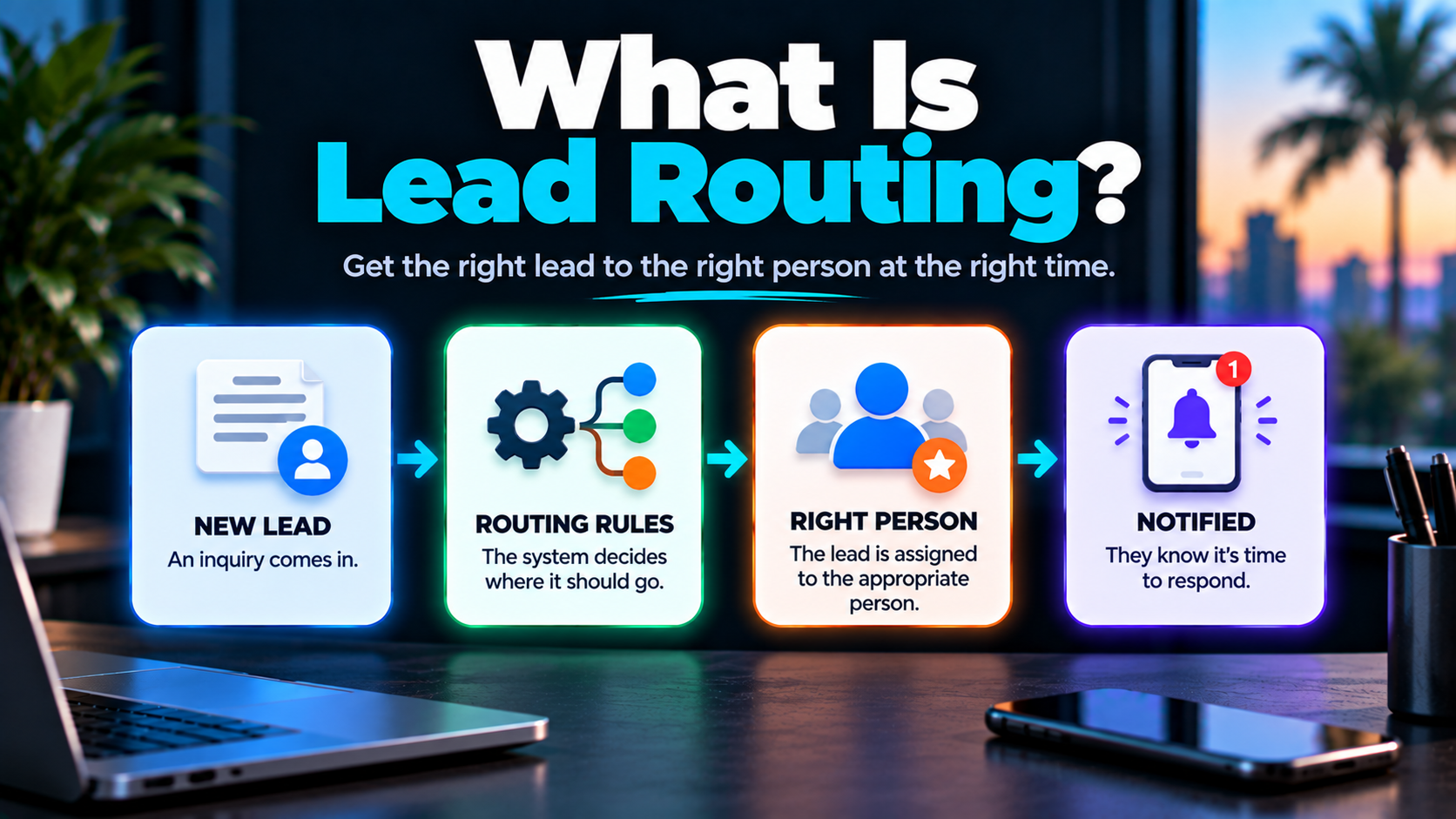
Lead routing is the process of determining where an incoming lead or inquiry should go, who should be responsible for it, and what should happen next based on relevant information and business rules.
For a small service business, that might be incredibly simple.
For a larger operation with several services, locations or salespeople, it may require more logic.
Either way, the objective is the same:
Get the opportunity to the appropriate person or process with as little unnecessary delay and confusion as possible.
Lead Routing Is More Than Assigning a Salesperson
When people hear "lead routing," they often picture a CRM automatically assigning a new lead to a salesperson.
That's part of it.
But routing can answer several different questions:
- Where did this inquiry come from?
- What does the person need?
- Do we serve their location?
- Are they already a customer?
- Is there already an open opportunity?
- Who should be responsible?
- Who needs to be notified?
- What should happen next?
- What happens if nobody acts?
That's why routing belongs inside a larger lead conversion system.
The contact entering your CRM isn't the finish line.
Somebody—or some process—needs to know what to do with it.
Why Lead Routing Matters
Fast response is useful.
But sending an inquiry to the wrong person quickly doesn't solve much.
Imagine a home-services company that offers roofing, impact windows and remodeling.
A roofing inquiry goes to the remodeling estimator.
The estimator forwards it to the office.
The office forwards it to the roofing salesperson.
By the time the correct person sees it, the company has created its own delay.
That's a routing problem.
The same thing can happen when:
- an inquiry sits in a general inbox
- everyone receives the same notification
- nobody knows who owns the lead
- a salesperson is unavailable
- an existing customer gets routed through the new-lead process
- a contact is assigned to two people
- the requested service isn't identified
- the business doesn't serve the prospect's location
The goal isn't routing for routing's sake.
It's removing unnecessary friction between incoming opportunity and appropriate action.
Where Do Routed Leads Come From?
Lead routing can begin with many different inbound channels.
Depending on the business, that might include:
- website forms
- phone calls
- missed calls
- web chat
- text messages
- advertising campaigns
- referrals
- scheduling requests
Not every inbound contact is necessarily a sales lead.
That's an important distinction.
A phone call might come from an existing customer.
An email might be from a vendor.
A form submission might be a job applicant.
A text could be spam.
Good routing uses the information available instead of automatically deciding:
New contact = new sales opportunity.
What Information Can Determine Where a Lead Goes?
The appropriate routing criteria depend on how the business operates.
Here are some common ones.
Requested Service
If someone requests pool remodeling, that inquiry may belong with a different person than someone asking about driveway pavers.
Service selection can make routing relatively straightforward.
Geographic Area
A business serving multiple territories may assign inquiries based on ZIP code, city, county or service area.
This can also help identify inquiries outside the company's coverage area.
Lead Source
Some businesses handle referral inquiries differently from paid-ad inquiries or existing-customer requests.
Lead source can also determine which workflow should begin.
Existing vs. New Customer
An existing customer calling about an active project probably shouldn't enter the same process as a brand-new prospect.
Urgency
Some requests may require faster internal escalation than others.
Urgency should be based on meaningful business context, not arbitrary labels.
Team Responsibility
Different people may own different services, territories, customer types or stages of the process.
Existing Relationship
If someone has already been speaking with a particular employee, automatically assigning the contact to somebody new can create a strange customer experience.
Availability or Capacity
Depending on the business and technology, routing may account for whether someone is currently able to handle another opportunity.
That doesn't mean every small business needs sophisticated capacity algorithms.
Sometimes "Mike handles roofing leads" is plenty.
Common Lead Routing Methods
There isn't one best routing method for every company.
The right approach depends on team structure, services, volume and sales process.
1. Direct Assignment
This is the simplest model.
Certain inquiries always go to a specific person or team.
For example:
Commercial project inquiry → Commercial estimator
or:
Warranty request → Customer service
Direct assignment works well when responsibilities are already clearly divided.
2. Round-Robin Routing
Round-robin routing distributes eligible leads among team members in rotation.
For example:
Lead 1 → Alex
Lead 2 → Maria
Lead 3 → James
Lead 4 → Alex
This can help distribute opportunities across a team.
But equal distribution isn't automatically intelligent distribution.
If Maria specializes in commercial work and James handles residential projects, rotating every inquiry equally may make no sense.
Round-robin works best when the people receiving the leads are genuinely interchangeable for that type of opportunity.
3. Rule-Based Routing
Rule-based routing uses defined conditions to determine what should happen.
For example:
Service = Kitchen Remodeling → Remodeling Team
ZIP Code = Territory B → Salesperson B
Existing Customer = Yes → Customer Service Workflow
Lead Source = Referral Partner → Assigned Account Manager
This can be extremely useful.
It can also become unnecessarily complicated if the business tries to create a rule for every imaginable scenario.
The best routing system isn't the one with the most logic.
It's the one that reliably reflects how the business actually operates.
4. Availability or Capacity-Based Routing
Some businesses may want to consider who is available or has capacity to handle an opportunity.
If one salesperson is on vacation, continuing to assign them new leads probably isn't ideal.
More sophisticated systems may account for:
- availability
- workload
- territory
- working hours
- current assignments
But again, complexity should solve a real problem.
Don't build air-traffic control for a two-person sales team.
5. Manual Routing
Automation isn't always the answer.
Some inquiries are ambiguous.
Some opportunities are unusual.
Some projects are valuable enough that an owner or manager may want to review them before assigning responsibility.
In those cases, the appropriate workflow might be:
Inquiry received
↓
Manager notified
↓
Human reviews context
↓
Lead assigned
Manual routing can still be part of a well-designed system.
The objective isn't maximum automation.
It's appropriate routing.
Notification, Assignment and Ownership Are Not the Same Thing
This distinction is easy to miss.
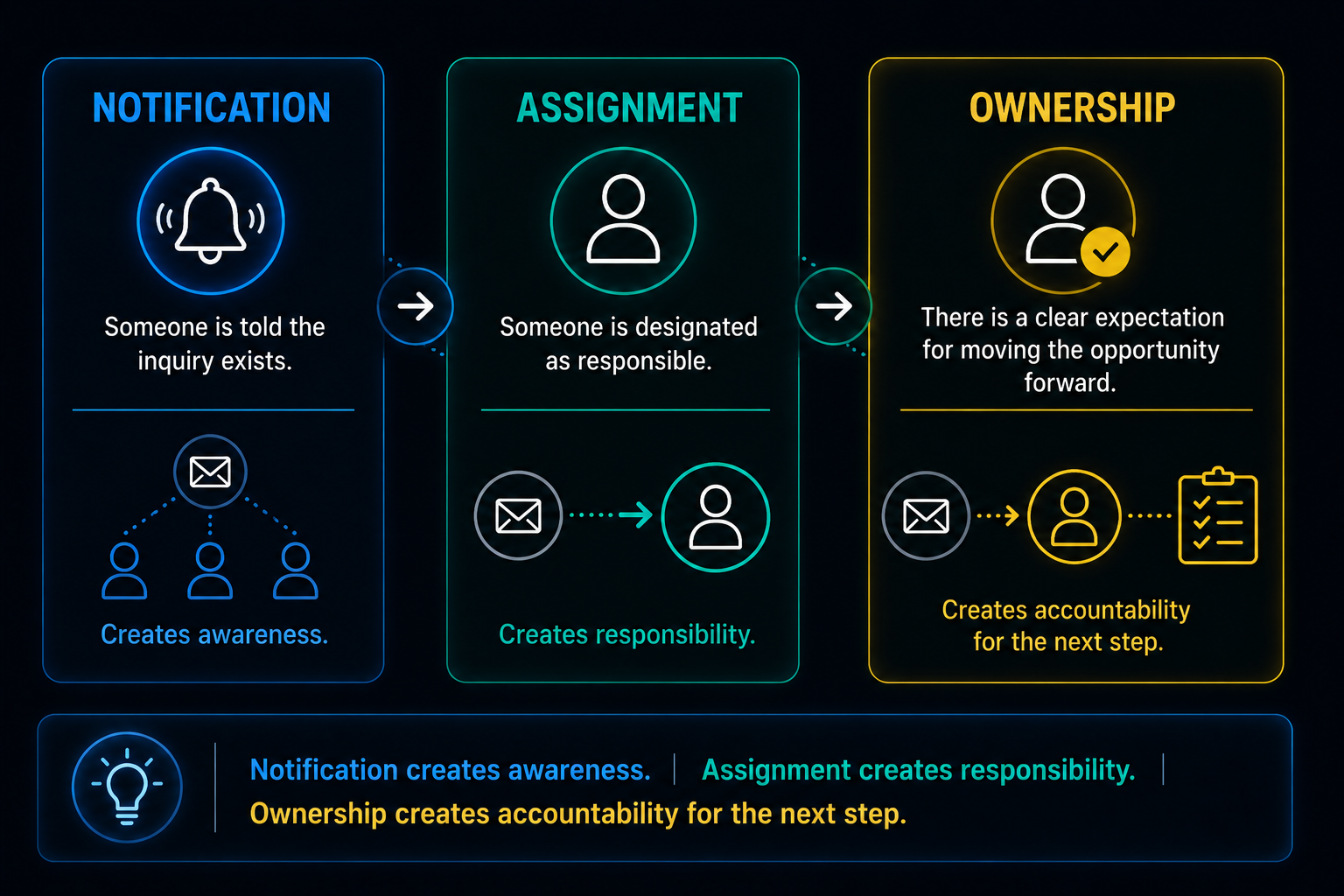
Notification
Someone is told an inquiry exists.
Assignment
Someone is designated as responsible for it.
Ownership
The business has a clear expectation about who is responsible for moving the opportunity forward.
Those aren't interchangeable.
Imagine five employees receive this notification:
New website lead received.
Who owns it?
Maybe everybody thinks:
Someone else probably has it.
That's how an automation can technically work perfectly while the business process still fails.
A stronger system might say:
New roofing inquiry assigned to Maria. Callback task created.
Now responsibility is clearer.
Notification creates awareness. Assignment creates responsibility. Ownership creates accountability for the next step.
That's a much more useful way to think about routing.
Lead Routing and Speed to Lead
Routing directly affects speed to lead.
A company can receive an inquiry instantly and still respond slowly if that inquiry spends an hour bouncing between people.
Think of response time as more than:
Lead arrived → Someone replied
There may be several internal steps:
Lead arrived
↓
Lead identified
↓
Lead routed
↓
Owner notified
↓
Owner acts
Every unnecessary handoff can introduce delay.
That doesn't mean every inquiry should be instantly dumped on the nearest available employee.
Fast routing to the wrong destination is still bad routing.
The better objective is:
Route the inquiry appropriately without introducing unnecessary delay.
What Happens After a Lead Is Routed?
Routing shouldn't end with:
Assigned to Sarah.
Now Sarah needs to know what she's responsible for doing.
Depending on the situation, the next action might be:
- call the prospect
- reply by text
- send an email
- review submitted information
- answer a question
- qualify the opportunity
- schedule an appointment
- create an estimate
- hand the inquiry to someone else
This is where routing connects to automated lead follow-up.
Routing establishes responsibility.
Follow-up helps determine what should happen while the opportunity remains active.
The two systems need to cooperate.
What If Nobody Acts on the Lead?
This is where escalation becomes useful.
Assignment doesn't guarantee action.
Someone might:
- miss the notification
- be on a job site
- be in a meeting
- be off that day
- forget
- assume someone else handled it
A routing system can account for this.
Depending on the business, an unaddressed inquiry might trigger:
- an internal reminder
- another notification
- a callback task
- reassignment
- manager notification
- an alternate workflow
There is no universal escalation timer appropriate for every company.
The important thing is defining what should happen when the expected action doesn't happen.
Otherwise the CRM can tell you exactly who owns the forgotten lead.
Which is technically informative, but not terribly useful.
Missed Calls Need Routing Too
Consider the missed-call text back process.
Someone calls.
Nobody answers.
An automated text acknowledges the missed call.
The caller replies:
I'm looking for an estimate on a new roof.
Now what?
The text-back system has done its job.
The communication channel is open.
But the inquiry still needs to reach the appropriate person.
The system might:
identify the service
↓
create or update the contact
↓
assign the roofing salesperson
↓
notify them
↓
create a callback task
That's lead routing working alongside missed-call response.
Neither component replaces the other.
Existing Contacts Shouldn't Be Treated Like Strangers
Imagine a homeowner has already spoken with Maria about a remodeling project.
They submit another form from the website two days later with an additional question.
A poorly designed system creates:
New lead
and assigns it to James.
Now James contacts them while Maria is already handling the project.
The homeowner gets to explain everything again.
Wonderful.
A better routing process checks available context.
Is this person already in the CRM?
Is there an active opportunity?
Does somebody already own the relationship?
Is there an ongoing conversation?
The answers may change what happens next.
This is why CRM data matters.
Routing without context can create duplicate work and a fragmented customer experience.
Duplicate Leads Can Create Duplicate Follow-Up
The same person may contact a business through multiple channels.
They might:
- Submit a website form.
- Call five minutes later.
- Reply to a missed-call text.
- Start a web-chat conversation.
Those aren't necessarily four separate leads.
They're potentially four interactions from one person.
If each channel independently creates a new opportunity and assigns it to a different employee, things get messy fast.
Good routing should account for existing contacts and active opportunities where possible.
The objective is a more complete picture of the relationship.
Not a CRM filled with clones.
Where Does AI Fit Into Lead Routing?
Most lead routing does not require AI.
Traditional automation can handle predictable rules very well.
For example:
Form selection = Commercial Roofing
↓
Assign Commercial Team
No artificial intelligence required.
Or:
ZIP code outside service area
↓
Route to appropriate alternate process
Again, simple logic.
AI becomes more useful when the information isn't neatly structured.
Suppose someone types:
We bought an older house and the windows are original. A couple leak when it rains and we're wondering whether it makes sense to replace all of them.
The person didn't select:
Impact Window Replacement
from a dropdown.
Language interpretation may help categorize what they're asking about.
AI can potentially assist with:
- understanding free-form inquiries
- identifying likely service intent
- extracting useful context
- categorizing messages
- helping determine an appropriate next step
But AI shouldn't be forced into decisions that ordinary rules can handle reliably.
Use rules when the decision is predictable. Use AI when understanding language or context genuinely helps. Use people when judgment is required.
When Should a Human Route the Lead?
Not everything should be decided automatically.
Human review may make sense when:
- the inquiry is ambiguous
- several services are involved
- the opportunity is unusual
- the potential project requires specialized expertise
- the available information is incomplete
- an existing relationship matters
- business judgment is required
The system can still help.
It can capture the inquiry, organize the information and notify the right manager.
Then the person makes the decision.
That's still automation doing useful work.
It just knows where to stop.
Common Lead Routing Mistakes
Lead routing can create problems when the underlying logic doesn't match reality.
Everyone Gets Notified, Nobody Owns It
Awareness isn't ownership.
Define responsibility.
The Wrong Person Gets the Lead
Fast assignment isn't useful if the recipient can't handle the inquiry.
Existing Customers Enter the New-Lead Pipeline
Use available CRM context before treating every interaction as a brand-new opportunity.
Duplicate Opportunities Get Created
Multiple channels can represent one person and one underlying opportunity.
Leads Sit Unassigned
Someone should own the next action—or the system should clearly identify that human review is required.
Unavailable Employees Keep Receiving Leads
Routing rules need to reflect operational reality.
Automation Keeps Running After Human Takeover
Once someone actively owns the conversation, automated sales communication may need to pause or change.
The Rules Become Too Complicated
Every additional condition creates something else that can break.
Complexity should earn its place.
Bad Information Produces Bad Routing
If the prospect selects the wrong service or provides incomplete information, rigid automation can confidently route the inquiry to the wrong place.
Automation can make a good process faster.
It can also make a bad process faster.
A Simple Lead Routing Framework
You don't need to map every possible scenario on day one.
Start with six questions.
1. Where Do Inquiries Enter?
List the actual channels:
Website?
Phone?
Text?
Chat?
Email?
Ads?
Scheduling?
2. What Information Determines Where They Belong?
Service?
Location?
Customer status?
Source?
Existing relationship?
Something else?
3. Who Should Own Each Type of Inquiry?
Define responsibility.
Not just who gets notified.
4. What Should That Person Do Next?
Call?
Text?
Review?
Schedule?
Qualify?
5. What Happens If They Don't Act?
Define the escalation path.
6. What Should Change the Routing?
Human takeover?
Existing opportunity discovered?
Appointment booked?
Wrong service?
Employee unavailable?
The answers give you the beginnings of an actual routing system.
Keep the First Version Simple
There's a temptation with automation to design for every theoretical possibility.
Don't.
If you have one salesperson, your first routing workflow might literally be:
New qualified inquiry
↓
Create/update contact
↓
Assign salesperson
↓
Notify salesperson
↓
Create follow-up task
That's a routing system.
You don't need twelve branches, three AI agents and a digital command center.
Build complexity when reality demands it.
Not because your software has buttons you haven't clicked yet.
Where Lead Routing Fits Into Booked Calendar System™
Lead routing is one component of Booked Calendar System™.
The broader system can connect:
Lead Capture
↓
Acknowledgment
↓
Routing
↓
Ownership
↓
Response
↓
Follow-Up
↓
Conversation
↓
Scheduling
↓
Reminders
↓
Human Handoff
Routing answers an important question inside that process:
Who or what should handle this opportunity next?
But routing alone isn't the system.
Assigning a lead perfectly doesn't help if nobody responds.
Responding doesn't help if follow-up disappears.
Scheduling doesn't help if reminders and handoffs are disconnected.
The value comes from connecting the pieces appropriately.
Good Lead Routing Should Feel Boring
The customer shouldn't need to know your routing system exists.
They submit an inquiry.
The appropriate person receives it.
That person understands why they're responsible.
The conversation moves forward.
That's it.
Behind the scenes, the CRM may have evaluated the service, location, source, existing contact record, ownership and workflow.
But to the customer?
The business just seems organized.
That's the point.
Want to Improve How Your Business Handles New Opportunities?
If incoming leads currently land in shared inboxes, group notifications, sticky notes or somebody's memory, the problem may not be lead generation.
It may be what happens after the opportunity arrives.
Booked Calendar System™ is designed to connect lead capture, routing, response, follow-up, CRM organization and scheduling into a clearer process.
Boost Local Biz can help identify:
- where inquiries currently enter
- who should own different opportunities
- which routing decisions can be automated
- where human judgment should remain
- what should happen when nobody responds
- how routing should connect to follow-up and scheduling
The goal isn't complicated automation.
It's making the next step clearer.
