A business owner checks the calendar on Friday.
Three appointments booked this week.
Is that good?
Maybe. But without knowing how many inquiries came in, how quickly they received a response, and what happened to the people who didn't book, that number doesn't tell you very much.
You might have booked three appointments from five legitimate inquiries. Or three from fifty.
Those are two very different situations.
Lead tracking should show you what happens between someone contacting your business and an appointment appearing on the calendar. Not just how many names landed in your CRM.
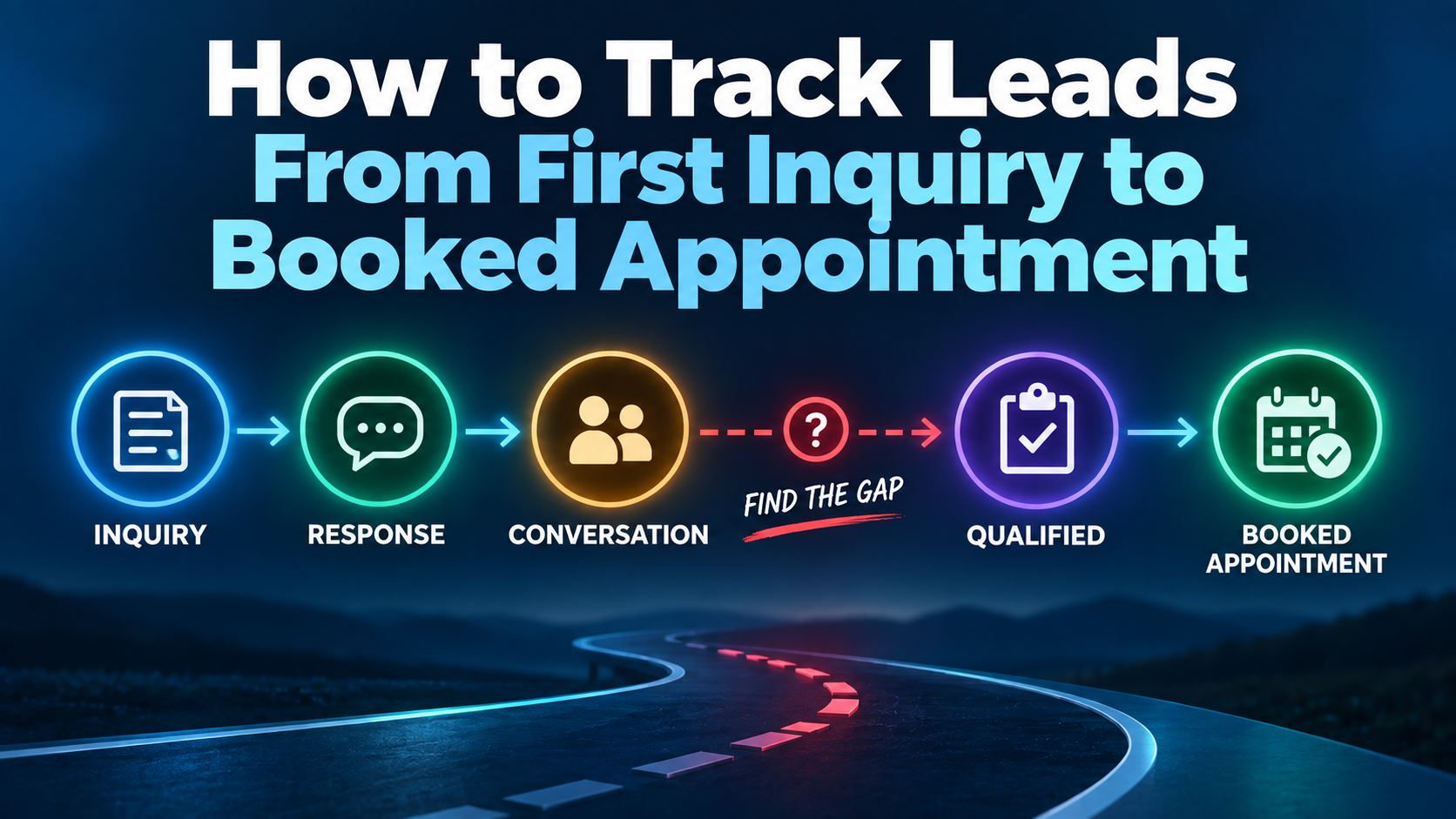
For a service business, that means following each inquiry through a clear process: capture, response, conversation, qualification, follow-up, and booking.
You don't need an elaborate analytics department to do this. You need consistent definitions, a place to record each opportunity, and a process your team will actually use.
What Does It Mean to Track a Lead From Inquiry to Appointment?
Tracking a lead from inquiry to appointment means recording the important steps between a potential customer contacting your business and confirming a time to meet, speak, or receive service.
At a minimum, you should be able to answer:
- Where did the inquiry come from?
- When did it arrive?
- Who was responsible for responding?
- Did anyone respond?
- Did a two-way conversation happen?
- Is the person a potential fit for your services?
- What is the next step?
- Was an appointment actually booked?
The goal isn't to document every message for the sake of documentation.
It's to make sure a legitimate opportunity doesn't quietly disappear between a website form, a missed call, an inbox, and someone's memory.
Start by Defining What You're Counting
Before building a dashboard, make sure everyone means the same thing when they say lead.
A website form submission isn't necessarily a qualified opportunity. A phone call isn't necessarily a new prospect. A conversation isn't an appointment. And a requested appointment isn't the same as a confirmed booking.
Here's a practical starting point:
| Term | What it means |
|---|---|
| Inquiry | Someone contacts the business through a call, form, chat, message, or other channel. |
| Lead | An identifiable person or business that may have a relevant need. |
| Contacted | Your business has made a response attempt or sent a response. |
| Conversation | There has been meaningful two-way communication. |
| Qualified opportunity | The prospect appears to fit the services you provide and has a potential next step. |
| Appointment requested | Someone has expressed interest in scheduling, but no time is confirmed yet. |
| Appointment booked | A specific appointment has been confirmed. |
| Appointment completed | The scheduled interaction actually happened. |
These are working definitions, not universal industry rules. Adjust them to fit your sales process, then use them consistently.
For example, a contractor might count a confirmed estimate visit as an appointment. A consultant might count a discovery call. An emergency service company might need to track dispatched jobs separately from scheduled appointments.
The important thing is not to combine unlike events and call the resulting number a conversion rate.
Step 1: Capture Every Inquiry in One Place
Lead tracking breaks down before it begins when inquiries are scattered across different channels.
A local service business might receive potential customers through:
- Website contact forms
- Phone calls and missed calls
- Website chat
- Google Business Profile interactions
- Advertising landing pages
- Social media messages
- Direct scheduling
You don't necessarily need to force customers to use one contact method.
You need a reliable way for the business to see and manage the inquiries those methods produce.
What should be recorded?
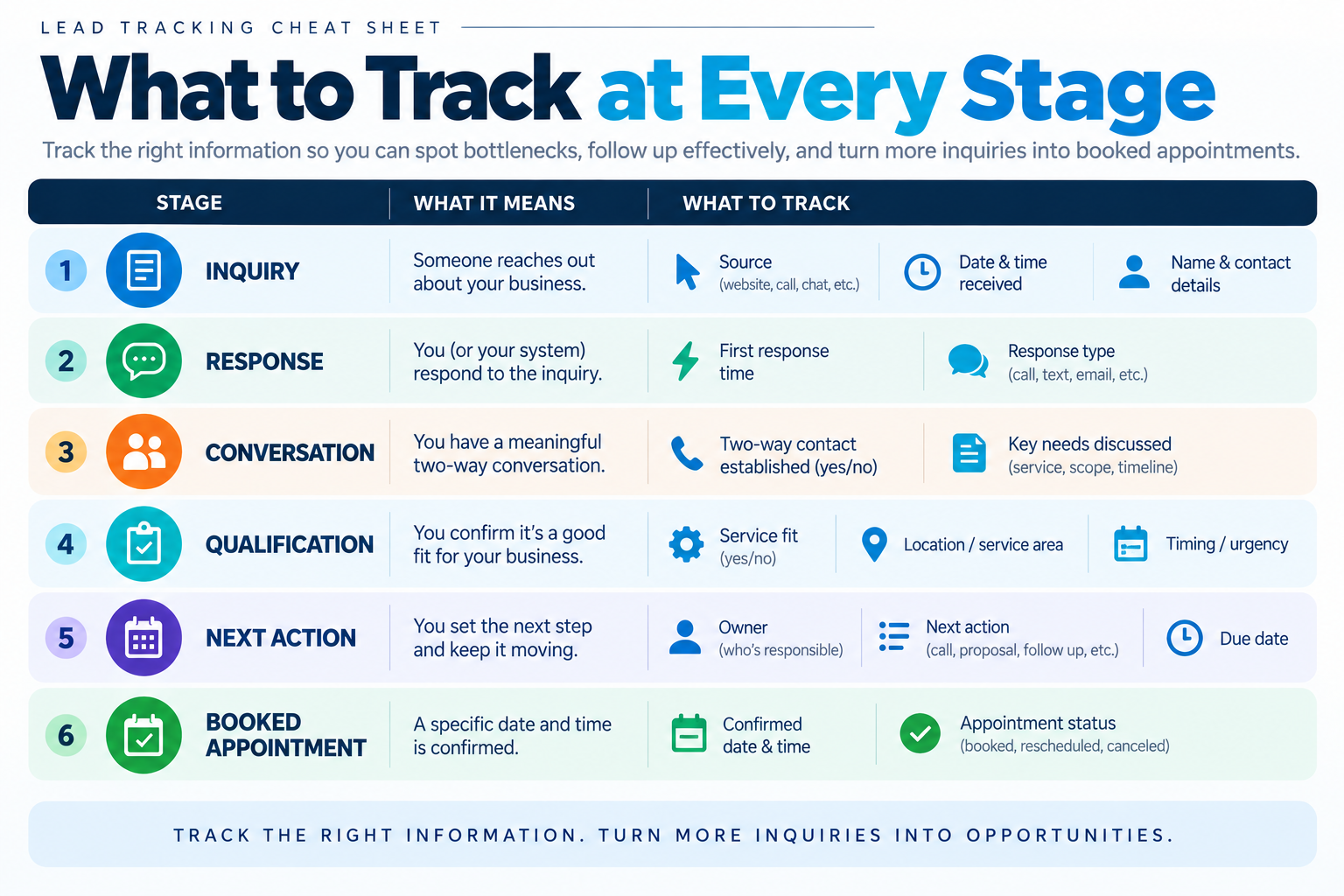
For each new inquiry, aim to capture:
Contact information: Name and a usable way to respond.
Inquiry source: Where the person contacted you, when that information is available.
Arrival time: When the inquiry was received.
Reason for contacting you: The service, problem, or request.
Owner: Who is responsible for the next action.
Status: Where the inquiry currently stands.
Next action: What should happen next, and when.
A CRM can help organize this, but a CRM isn't the strategy. The strategy is making sure every inquiry has a clear next step.
If you need to improve the website side first, read how to turn website visitors into leads and what should happen after someone fills out your website form.
Step 2: Track the First Response
A captured inquiry can still be a missed opportunity if nobody acts on it.
This is why response status and response time should be separate fields.
Consider these three records:
| Inquiry | First response |
|---|---|
| A | Automatic acknowledgment sent immediately |
| B | Employee called back 12 minutes later |
| C | No response recorded |
All three inquiries were captured.
Only two received a response, and the first received an acknowledgment—not necessarily a conversation with someone who could help.
That distinction matters.
Track automation and human follow-up separately
An automated response can confirm receipt, answer an appropriate initial question, or help the prospect take the next step.
It doesn't always mean the business has handled the inquiry.
For example, a website form might trigger:
- An immediate acknowledgment.
- A notification to the assigned employee.
- A task to call the prospect.
- A follow-up sequence if no conversation occurs.
You should be able to see whether the automation ran and whether the next required human action happened.
Otherwise, a dashboard may show that every lead received a message while customers are still waiting for a meaningful response.
Our guides to speed to lead and how fast to respond to a new lead explore the response side in more detail.
Step 3: Record Whether Contact Became a Conversation
This is one of the most useful distinctions in the entire process.
A response attempt is not the same as reaching the prospect.
Your employee might call and leave a voicemail. An automated text might be delivered. An email might be sent.
Those actions matter, but none confirms that the prospect has engaged.
A simple tracking system might distinguish:
- New inquiry
- Response attempted
- Waiting for prospect
- Conversation started
- Follow-up needed
You don't need dozens of statuses. You need enough detail to distinguish a lead that hasn't received attention from one that has received attention but hasn't responded.
Why this matters
Suppose a business receives 30 inquiries.
Its team responds to all 30, but only 12 turn into conversations.
The immediate question is no longer simply, “Why aren't we booking more appointments?”
It's, “What is preventing the other 18 inquiries from becoming conversations?”
Possible explanations include inaccurate contact details, poor timing, weak initial messaging, low-intent inquiries, or insufficient follow-up.
The tracking system doesn't establish which explanation is correct. It tells you where to investigate.
Step 4: Separate Qualified Opportunities From Every Inquiry
Not everyone who contacts a business is a realistic customer.
Someone may be outside your service area, looking for a service you don't provide, contacting you about an existing job, or asking a question that doesn't require an appointment.
If you treat every inquiry as an equally viable sales opportunity, your conversion numbers can become misleading.
Qualification helps you distinguish people who may reasonably move forward from those who aren't a fit.
For a service business, useful qualification information might include:
- Service needed
- Location
- Project type
- Timing
- Whether the business can perform the work
- Whether the prospect wants a quote, consultation, or appointment
Only collect what you need to decide the next step.
And don't turn qualification into a barrier that makes legitimate customers answer a dozen questions before anyone will help them.
Read what lead qualification means for service businesses for a deeper explanation.
Step 5: Give Every Open Opportunity a Next Action
This is where many tracking systems become glorified contact lists.
A prospect's name is in the CRM. The notes say “interested.” Nobody knows who is supposed to do what next.
A useful opportunity record should answer three questions:
Who owns it? What happens next? When should that happen?
For example:
| Current situation | Next action |
|---|---|
| New inquiry received | Assigned employee reviews and responds |
| Called, no answer | Follow up through an appropriate channel |
| Prospect asked for information | Send it and establish the next check-in |
| Estimate sent | Follow up on the estimate |
| Interested but not ready | Set an appropriate future follow-up |
| Wants an appointment | Offer or confirm a scheduling option |
The goal isn't to keep every lead in an endless sequence.
It's to prevent an interested prospect from being abandoned simply because the first attempt didn't produce an appointment.
Automated reminders and tasks can support this process. So can a clearly assigned employee.
For the underlying approach, see automated lead follow-up and how many times to follow up with a lead.
Step 6: Track Requested, Booked, and Completed Appointments Separately
A prospect saying “Tuesday might work” is not the same as having a confirmed appointment.
Likewise, a confirmed appointment is not the same as a completed one.
Track these events separately when they matter to your business:
Appointment requested: The prospect wants to schedule.
Appointment booked: A specific time has been confirmed.
Appointment completed: The meeting, estimate, consultation, or visit happened.
Canceled or rescheduled: The original booking changed.
No-show: The appointment time passed without the expected attendance.
This gives you visibility into two different problems.
If many qualified prospects want appointments but few get booked, investigate scheduling availability and the handoff to the calendar.
If appointments are booked but often don't happen, investigate confirmation, reminders, expectations, and rescheduling.
Those are not the same problem, so they shouldn't be measured as one.
See how to reduce appointment no-shows for the post-booking side of the process.
Step 7: Use a Pipeline That Reflects the Actual Sales Process
A CRM pipeline is useful because it makes the status of each opportunity visible.
But the stages should reflect real business decisions—not every automated action or every message sent.
A straightforward service-business pipeline might look like this:
New Inquiry → Contact Attempted → Conversation Started → Qualified → Appointment Booked
You may need additional stages for estimates, proposals, jobs won, or lost opportunities.
That's fine. Just avoid creating a pipeline so complicated that employees stop updating it.
What about leads that aren't ready?
Not every legitimate opportunity moves directly toward an appointment.
Some prospects need information. Others are waiting for a project date, comparing options, or not ready to proceed.
Use a defined follow-up or nurturing status rather than forcing them into “lost” or leaving them in “new inquiry” forever.
The pipeline should help someone understand what to do next.
It should not require a detective to reconstruct the conversation.
If you want the mechanics of stages and opportunity records, see what a CRM pipeline is. The related GoHighLevel pipelines guide covers one platform-specific implementation.
The Numbers Worth Reviewing Each Week
Once the process is consistent, you can build a small dashboard.
You do not need every metric a CRM can calculate.
Start with numbers that reveal whether opportunities are being handled.
| Metric | Question it answers |
|---|---|
| New inquiries | How many contacts came in? |
| Inquiries with a recorded response | Are new inquiries receiving attention? |
| Time to first response | How quickly are we responding? |
| Conversations started | Are response attempts turning into engagement? |
| Qualified opportunities | How many inquiries appear to be a fit? |
| Appointments booked | How many opportunities reached a confirmed booking? |
| Appointments completed | How many bookings actually happened? |
| Open opportunities without a next action | Where might someone be falling through the cracks? |
A few simple rates can make those counts more useful.
Response rate
Inquiries with a recorded response ÷ total inquiries × 100
Conversation rate
Inquiries that reached a conversation ÷ total inquiries × 100
Inquiry-to-booking rate
Booked appointments ÷ total inquiries × 100
Qualified-opportunity-to-booking rate
Booked appointments from qualified opportunities ÷ total qualified opportunities × 100
These definitions are examples. If you choose a different denominator, label it clearly and keep the definition consistent.
Also decide how you'll handle repeat inquiries, spam, existing customers, canceled appointments, and inquiries that arrive near the end of the reporting period.
Otherwise, your weekly numbers can move because the counting rules changed—not because the business improved.
A Hypothetical Example: Finding the Actual Bottleneck
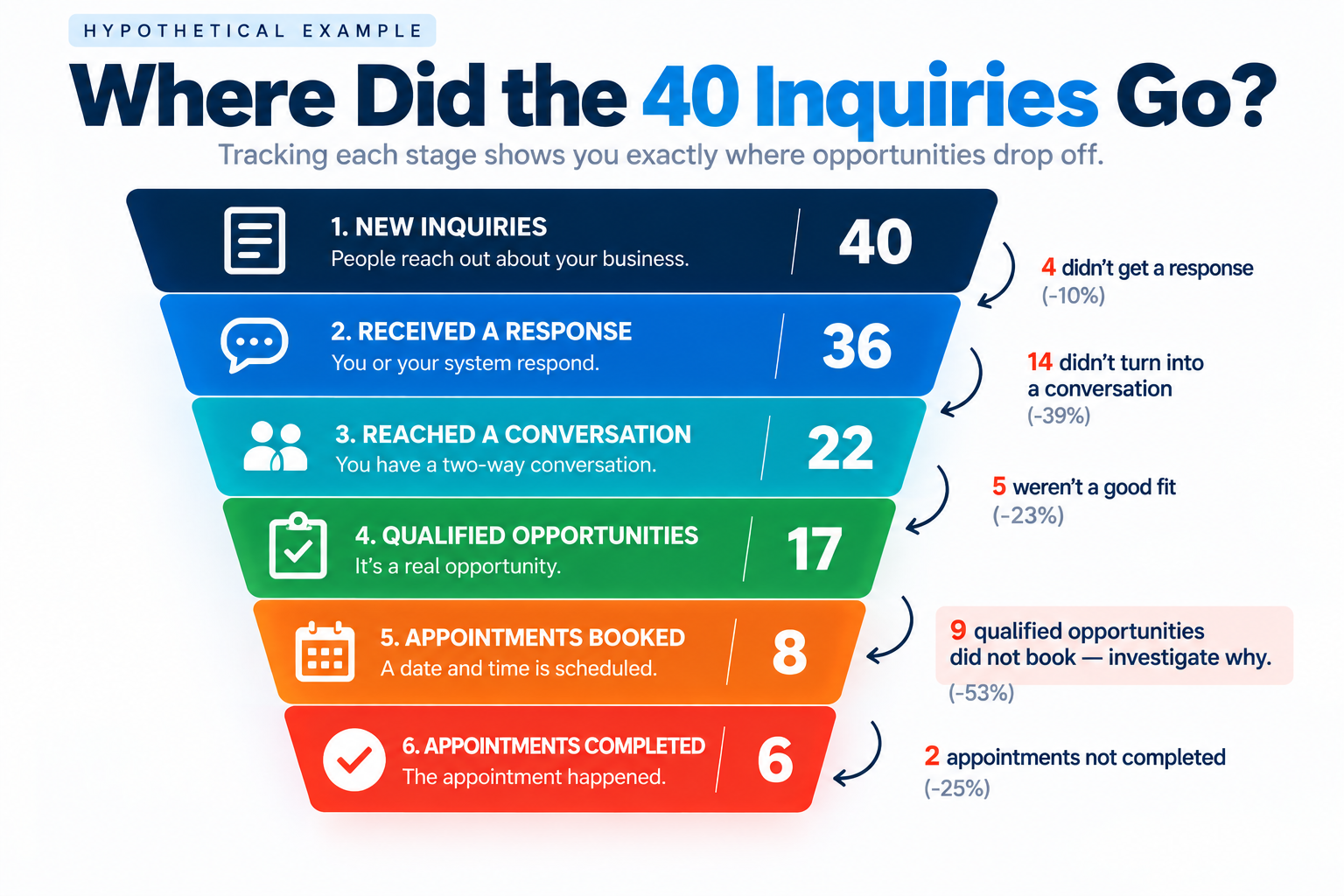
Imagine a contractor receives 40 new inquiries in one month.
Here's the hypothetical tracking report:
| Stage | Count |
|---|---|
| New inquiries | 40 |
| Received a response | 36 |
| Reached a conversation | 22 |
| Qualified opportunities | 17 |
| Appointments booked | 8 |
| Appointments completed | 6 |
A report that only shows “40 leads, 8 bookings” leaves a lot unanswered.
The stage-by-stage view gives the owner several specific questions to investigate.
Four inquiries have no recorded response. Were they missed, incorrectly assigned, or simply not logged?
Fourteen responded-to inquiries never became conversations. Did the team make enough appropriate attempts? Were contact details usable? Did prospects receive relevant messages?
Nine qualified opportunities didn't book. Were they waiting for scheduling options, not ready yet, or stuck without a next action?
Two booked appointments didn't happen. Were they canceled, rescheduled, or no-shows?
None of those numbers automatically identifies the cause.
But now the owner knows where to look instead of making the default assumption that the business needs more leads.
The Biggest Tracking Mistakes to Avoid
Counting every form submission as a qualified lead
A submission tells you someone used a form. It doesn't establish that they're a fit or ready to book.
Treating an automated acknowledgment as a completed response process
Automation can start the interaction. It doesn't necessarily finish the job.
Moving opportunities without recording what happened
If employees move cards around without consistent rules, the pipeline becomes difficult to trust.
Measuring bookings without looking at completed appointments
A full calendar isn't the same as completed estimates, consultations, or jobs.
Building a dashboard nobody uses
If the owner only needs to know which inquiries haven't received attention and which qualified opportunities lack a next step, start there.
A simple report used every week is more valuable than a complicated dashboard nobody opens.
You Don't Need More Software Before You Fix the Process
A business can start tracking this with a shared spreadsheet, a basic CRM, or an existing system it already pays for.
The first priority is agreement on the process.
Who captures the inquiry?
Who responds?
Who owns the opportunity?
What counts as qualified?
What counts as booked?
Who checks for stalled opportunities?
Once those answers are clear, automation becomes much more useful.
Forms can create contact records. Notifications can alert the right person. Workflows can support appropriate follow-up. Calendars can record bookings. Pipelines can show what still needs attention.
But software cannot make an undefined process clear on its own.
The Bottom Line
Lead tracking isn't about collecting more numbers.
It's about knowing whether the opportunities your marketing already creates are getting a fair chance to become conversations and appointments.
Start by capturing inquiries reliably. Record the response. Distinguish attempts from conversations. Qualify appropriately. Give open opportunities a next action. Track confirmed bookings separately from completed appointments.
Then review where people stop moving forward.
The most useful lead-conversion question isn't always “How do we get more leads?” Sometimes it's “What happened to the leads we already received?”
Find Out Where Your Leads Are Getting Stuck
If your business receives inquiries but you can't clearly see which ones get a response, which need follow-up, or which become booked appointments, that's worth examining before spending more to generate additional leads.
A Free Lead Conversion Assessment is a starting point for looking at the process between inquiry and appointment.
Explore the Booked Calendar System™
The Booked Calendar System™ connects inquiry capture, response, follow-up, CRM visibility, and scheduling into a more organized path toward booked opportunities.
