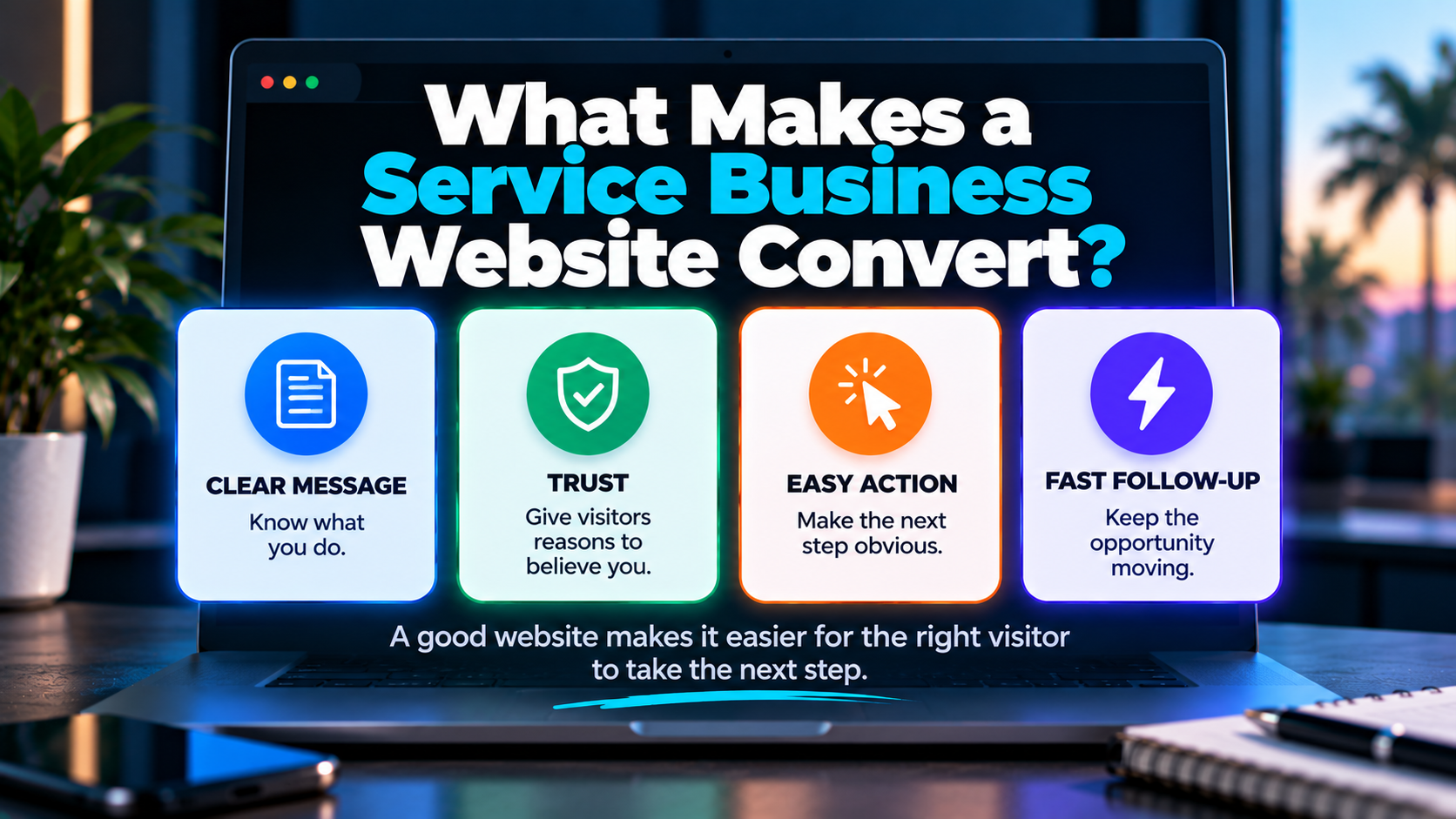
A service business website can look fantastic and still do a lousy job of generating business.
Beautiful photography.
Smooth animations.
Sharp branding.
Then a prospective customer lands on the page and spends the next 30 seconds trying to figure out what the company actually does, whether it serves their area and how they're supposed to contact someone.
That's not really a design problem.
It's a conversion problem.
A service business website converts when it helps the right visitor understand that they're in the right place, see that the business can potentially solve their problem, develop enough trust to continue, and take an appropriate next step without unnecessary friction.
And there's another piece that gets overlooked:
What happens after they take that step matters too.
Because generating a form submission that nobody responds to isn't much of a victory.
What Is a Website Conversion?
A website conversion is a meaningful visitor action that supports a business objective.
For a service business, that might be:
- calling the company
- submitting a contact form
- requesting an estimate
- scheduling a consultation
- starting a chat
- requesting an appointment
- taking another qualified scheduling action
The specific conversion depends on the business.
A roofing contractor may care primarily about estimate requests and phone calls.
A consultant might prioritize scheduled consultations.
A remodeling company may want prospective clients to complete a more detailed project inquiry.
There isn't one universal website conversion.
And not every button click deserves to be treated like one.
More Conversions Aren't Automatically Better
Suppose Website A generates 50 form submissions.
Website B generates 25.
Which website performs better?
You don't know yet.
What if 40 of Website A's submissions are outside the service area, looking for jobs, requesting services the company doesn't offer or otherwise poor fits?
Meanwhile, 18 of Website B's 25 inquiries are legitimate potential projects.
Raw conversion volume doesn't tell the whole story.
Neither does conversion rate.
This connects to a larger BLB principle we've discussed before: more leads aren't always the answer.
The goal isn't to make every visitor fill out a form.
The goal is to help appropriate visitors take appropriate next steps.
The Five Questions Your Website Needs to Answer
Most service-business visitors are trying to resolve some version of five questions.
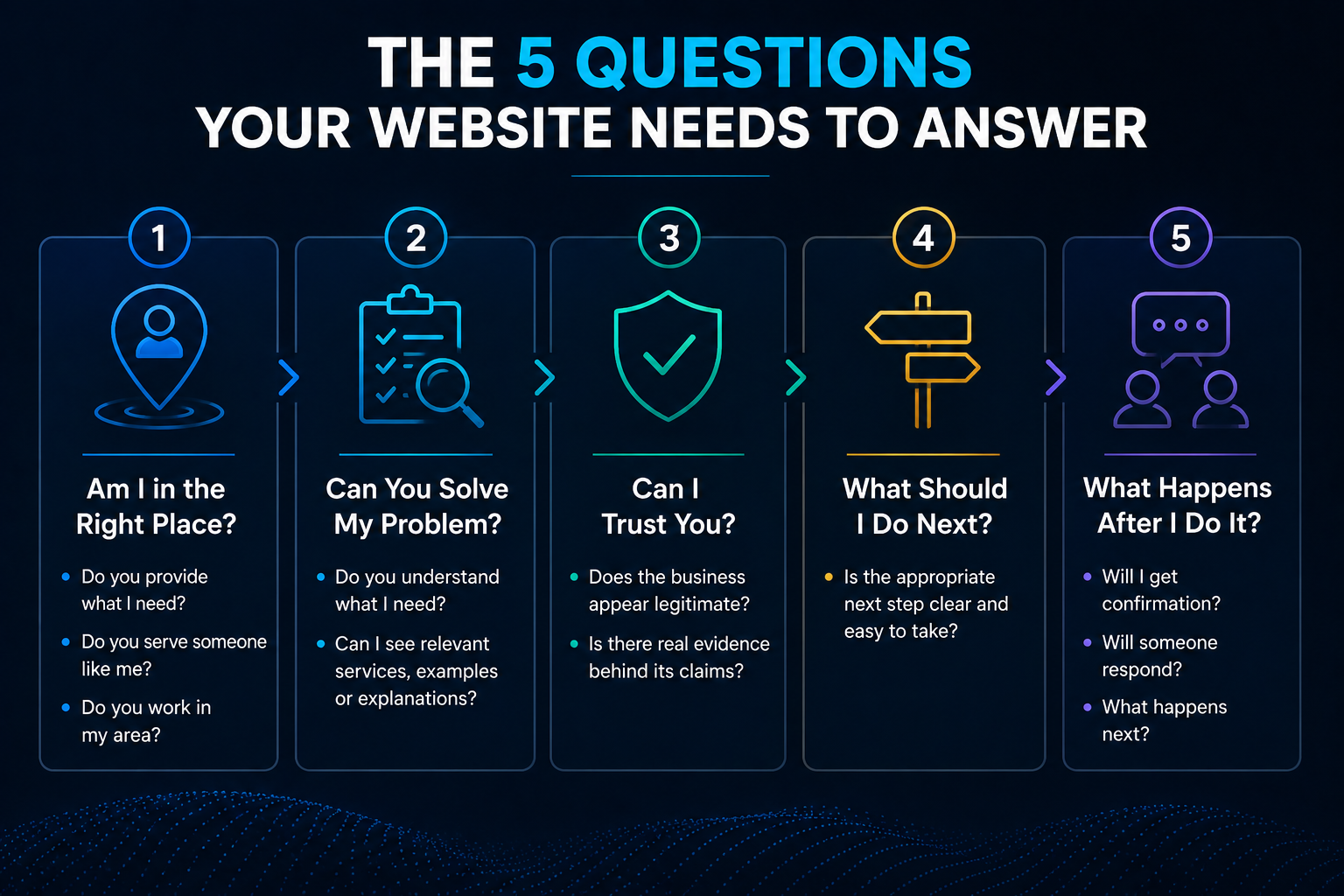
1. Am I in the Right Place?
Do you provide what they need?
Do you serve someone like them?
Do you work in their area?
2. Can You Solve My Problem?
Does the page demonstrate that you understand what they're looking for?
Can they see relevant services, examples or explanations?
3. Can I Trust You?
Does the company appear legitimate?
Can visitors verify who they're dealing with?
Is there evidence behind the claims?
4. What Should I Do Next?
Call?
Request an estimate?
Schedule?
Ask a question?
Visitors shouldn't need a scavenger hunt to find the next step.
5. What Happens After I Do It?
Will somebody respond?
Can they schedule?
Will they get confirmation?
Does the inquiry disappear into an inbox?
That fifth question is where website conversion starts connecting to business operations.
We'll come back to it.
Clarity Usually Beats Cleverness
One of the easiest ways to hurt conversion is making visitors decode your marketing.
Imagine the homepage says:
Transforming Tomorrow Through Innovative Excellence.
Excellent.
What do you sell?
A prospective customer shouldn't need to scroll halfway down the page to discover that you install impact windows.
For most service businesses, clarity is more valuable than trying to sound profound.
A strong page should make it reasonably easy to understand:
- what service is being offered
- who it is for
- where it's available when location matters
- why the company may be worth considering
- what the visitor can do next
That doesn't mean your copy needs to be boring.
It means creativity shouldn't come at the expense of comprehension.
Clarity before cleverness.
Your Above-the-Fold Section Has a Specific Job
The first visible portion of a page doesn't need to explain everything.
It does need to help the visitor orient themselves.
Depending on the page, that may include:
- the primary service or value proposition
- the audience or location
- a useful differentiator
- a primary call to action
- supporting trust information
There is no magic hero-section formula.
Not every website needs:
Headline + Subheadline + Two Buttons + Three Trust Badges
because somebody on LinkedIn said so.
The better question is:
What does this particular visitor need to understand before deciding whether to continue?
A homepage may need broad positioning.
A service page can be more specific.
A paid-ad landing page may need extremely tight message alignment with the ad that brought the visitor there.
Design around the visitor's context.
Trust Has to Be Earned on the Page
Service businesses frequently ask visitors to make decisions involving their homes, businesses, money or time.
Trust matters.
Useful trust signals can include:
- legitimate customer reviews
- real project photography
- accurate licenses or certifications
- real team or company information
- project examples
- clearly stated service areas
- transparent contact information
- a clear process
- genuine warranties or guarantees
- recognizable business branding
Not every business has every one of these.
That's fine.
Use what's real.
Don't manufacture credibility.
Fake testimonials, fake countdown timers, fabricated review widgets and unsupported claims might make a page look more "optimized."
They can also make it look like you're trying too hard to convince somebody.
Real evidence beats decorative persuasion.
Real Images Can Do More Than Stock Photography
There are places where high-quality stock photography works perfectly well.
But for many service businesses, real imagery can answer questions stock photos can't.
A prospective customer may want to see:
- actual completed projects
- the quality of the work
- the team
- equipment
- materials
- the showroom
- the type of properties the company works on
A remodeling contractor showing actual kitchens they've completed is providing evidence.
A generic stock photo of a smiling couple holding blueprints isn't.
Use imagery to help visitors evaluate the business.
Not just to fill empty rectangles in the design.
Calls to Action Should Match Visitor Intent
"Contact Us" isn't illegal.
It's just often vague.
A stronger call to action tells the visitor what they're actually doing.
Depending on the business and page, that might be:
- Request an Estimate
- Schedule a Consultation
- Call Now
- Ask a Question
- Check Availability
- Start a Conversation
Different visitors may also prefer different ways to communicate.
Someone ready to hire may want to call.
Someone researching after business hours may prefer a form.
Someone with a quick question may use chat.
This is where primary and secondary calls to action can help.
The page can emphasize the most important action without pretending it's the only way a human being might want to communicate.
Don't Make Every Page Fight for the Same CTA
A homepage, service page, FAQ and article don't necessarily serve the same visitor intent.
Someone reading an educational article may not be ready to:
BOOK YOUR FREE CONSULTATION NOW!!!
after paragraph two.
Relax.
Let the content do its job.
A commercial service page can appropriately make the next action more prominent.
An educational page can introduce a softer next step after providing value.
Conversion strategy should reflect intent, not just button placement.
Forms Are a Trade-Off Between Friction and Information
You'll often hear:
Shorter forms convert better.
Sometimes.
But that's not the whole question.
Suppose a contractor needs:
- name
- phone
- project type
- ZIP code
to determine whether an inquiry is even relevant.
Removing every field except email might increase form completions while making the leads less useful.
On the other hand, asking a first-time visitor to complete 22 fields before they can ask a basic question may create unnecessary friction.
The right form asks for the information needed at that stage of the relationship.
Think about:
- what information is genuinely required
- what can be collected later
- whether the fields are easy to complete on mobile
- whether expectations are clear
- whether qualification justifies additional friction
Don't optimize forms for completion rate in isolation.
Optimize them for the business process they're supposed to support.
What Happens After Someone Submits the Form?
This is where many website-conversion discussions stop too early.
The visitor clicks Submit.
Analytics records a conversion.
Everyone celebrates.
Meanwhile, the inquiry lands in an email inbox.
Nobody notices it for three hours.
That's why we've argued that what happens after a website lead matters as much as the form itself.
A stronger process may include:
Form Submission
↓
Acknowledgment
↓
CRM Capture
↓
Routing
↓
Response
↓
Follow-Up
↓
Scheduling or Appropriate Next Step
The exact workflow depends on the business.
But the principle is important:
A website can technically convert while the business still loses the opportunity afterward.
Website conversion and lead conversion are related.
They're not identical.
Phone Calls Are Still Conversions
Not everybody wants to complete a form.
For many service businesses, phone calls remain an important conversion path.
That means the website should consider:
- whether the phone number is easy to find
- click-to-call usability on mobile
- when someone is available to answer
- what happens after business hours
- what happens when nobody answers
That last one is why missed-call text back can be useful.
If a visitor chooses to call and the business can't answer, the conversion process shouldn't necessarily become a dead end.
The website and phone system are part of the same customer journey.
What About Website Chat?
Chat can reduce friction for visitors who want to ask something without calling or completing a traditional form.
But "chat" can mean several different things.
Basic Contact Widget
The visitor submits a message that someone responds to later.
Automated Workflow
Predefined questions or actions help collect information and route the inquiry.
AI-Assisted Conversation
AI interprets natural language and can potentially answer appropriate questions, gather context or help determine a next step.
Human Chat
A person communicates directly with the visitor.
None is universally best.
A simple contact widget may be enough for one business.
Another may benefit from an AI-powered website that can continue the interaction more actively.
The technology should fit the job.
AI Doesn't Fix a Bad Website
This deserves saying plainly.
Adding AI chat to a confusing website doesn't make the website good.
AI won't fix:
- unclear positioning
- weak service descriptions
- irrelevant traffic
- poor mobile UX
- lack of trust
- a bad offer
- confusing navigation
- broken internal processes
AI can potentially improve what happens after a visitor engages.
It may help:
- continue a conversation
- collect useful information
- interpret questions
- route inquiries
- trigger workflows
- connect activity to the CRM
- assist with scheduling
- support follow-up
That's useful.
But AI should amplify a solid conversion experience.
Not camouflage a bad one.
Mobile Isn't the Smaller Version of Your Website
For many visitors, the mobile experience is the website.
A page can look fantastic on a 27-inch monitor and become miserable on a phone.
Check:
- text readability
- navigation
- button size
- spacing
- click-to-call
- forms
- image sizing
- intrusive overlays
- sticky elements
- loading behavior
Try completing your own contact form with one thumb.
You'll learn things.
Mobile optimization isn't about making everything tiny enough to fit.
It's about making the experience actually usable.
Speed and Stability Reduce Friction
A visitor shouldn't have to wrestle with the website.
Slow-loading pages, shifting layouts, broken elements and delayed interactions create friction before the company has even had a conversation.
Website performance matters because it affects the experience.
That includes factors such as:
- image optimization
- unnecessary scripts
- hosting
- caching
- layout stability
- responsive implementation
- third-party widgets
Google's Core Web Vitals can provide useful technical signals about loading performance, responsiveness and visual stability.
But don't obsess over achieving a perfect score while ignoring whether the page itself is persuasive or useful.
A lightning-fast confusing website is still confusing.
Local Businesses Need Local Context
If geography determines whether someone can become a customer, the website should help them understand where the company works.
That might involve:
- service-area information
- city or regional context
- relevant project examples
- location pages where genuinely useful
- contact information
- alignment with the company's Google Business Profile
This does not mean generating 300 nearly identical pages with city names swapped into the headings.
Useful local relevance helps visitors.
Doorway-page spam doesn't.
Conversion Starts Before the Visitor Reaches the Website
The visitor's expectations were shaped by whatever brought them there.
Maybe it was:
- Google Search
- Google Maps
- an advertisement
- social media
- a referral
- an email
- another website
If an ad promises:
Same-Day Water Heater Repair
and the landing page opens with:
Your Trusted Partner for Complete Home Solutions
the visitor now has to figure out whether they're still in the right place.
That's unnecessary friction.
Traffic acquisition and conversion shouldn't operate in separate universes.
SEO, ads and other marketing channels bring visitors with expectations.
The website should continue the conversation those channels started.
SEO Traffic Is Only Valuable If the Website Can Do Something With It
Ranking higher is useful when the search traffic is relevant.
But traffic isn't the business outcome.
Imagine doubling organic visitors while:
- calls remain flat
- forms remain flat
- qualified opportunities remain flat
- the website still confuses visitors
You improved traffic.
You didn't necessarily improve the business.
This is another reason BLB doesn't treat SEO, website design and conversion as completely separate disciplines.
Relevant traffic needs somewhere useful to go.
What Is Website Conversion Rate?
Website conversion rate is typically calculated as:
Conversions ÷ Relevant Visitors × 100
For example, if a page receives 500 relevant visits and generates 25 defined conversions:
25 ÷ 500 × 100 = 5%
That calculation is easy.
Interpreting it is harder.
A conversion rate without context doesn't tell you:
- whether the visitors were relevant
- which traffic source produced them
- whether the conversions were qualified
- whether they came from mobile or desktop
- which pages produced them
- whether they became appointments
- whether they became customers
- whether tracking is accurate
There isn't one universal "good" conversion rate for every service-business website.
Context matters.
Measure More Than One Number
Useful website-conversion analysis may include:
- conversion rate
- conversion type
- lead quality
- traffic source
- landing page
- device
- calls
- form submissions
- chat conversations
- scheduled appointments where measurable
- downstream outcomes where measurable
The objective isn't to create a dashboard with 87 charts.
It's to understand where meaningful opportunities are coming from and where friction may exist.
Conversion Rate Optimization Isn't Random Redesign
Conversion rate optimization—usually called CRO—is the process of improving a website's ability to produce meaningful visitor actions.
A useful CRO process looks something like:
Observe
↓
Identify Friction
↓
Form a Hypothesis
↓
Make a Change
↓
Measure What Happens
That's very different from:
I don't like this homepage anymore. Let's redesign it.
Sometimes a redesign is justified.
Sometimes changing the message, form, CTA or mobile experience solves the actual problem.
Start with evidence.
Not Every Local Business Needs an A/B Testing Program
A/B testing can be valuable when there is enough traffic and conversion volume to learn something meaningful.
Many local service-business websites don't have that volume.
Running sophisticated experiments on 150 monthly visitors can create the appearance of scientific rigor without producing much reliable information.
Lower-traffic businesses can still improve conversion using:
- analytics
- call tracking
- form data
- session observations where appropriate
- search-query data
- sales-team feedback
- customer questions
- mobile testing
- qualitative evidence
- careful iterative changes
Use the level of experimentation the data can actually support.
The Post-Conversion Experience Is Part of the Website Strategy
This is where BLB's definition of an AI-powered website becomes broader than the page itself.
Traditionally, the website's job ended around here:
Visitor → Form Submission
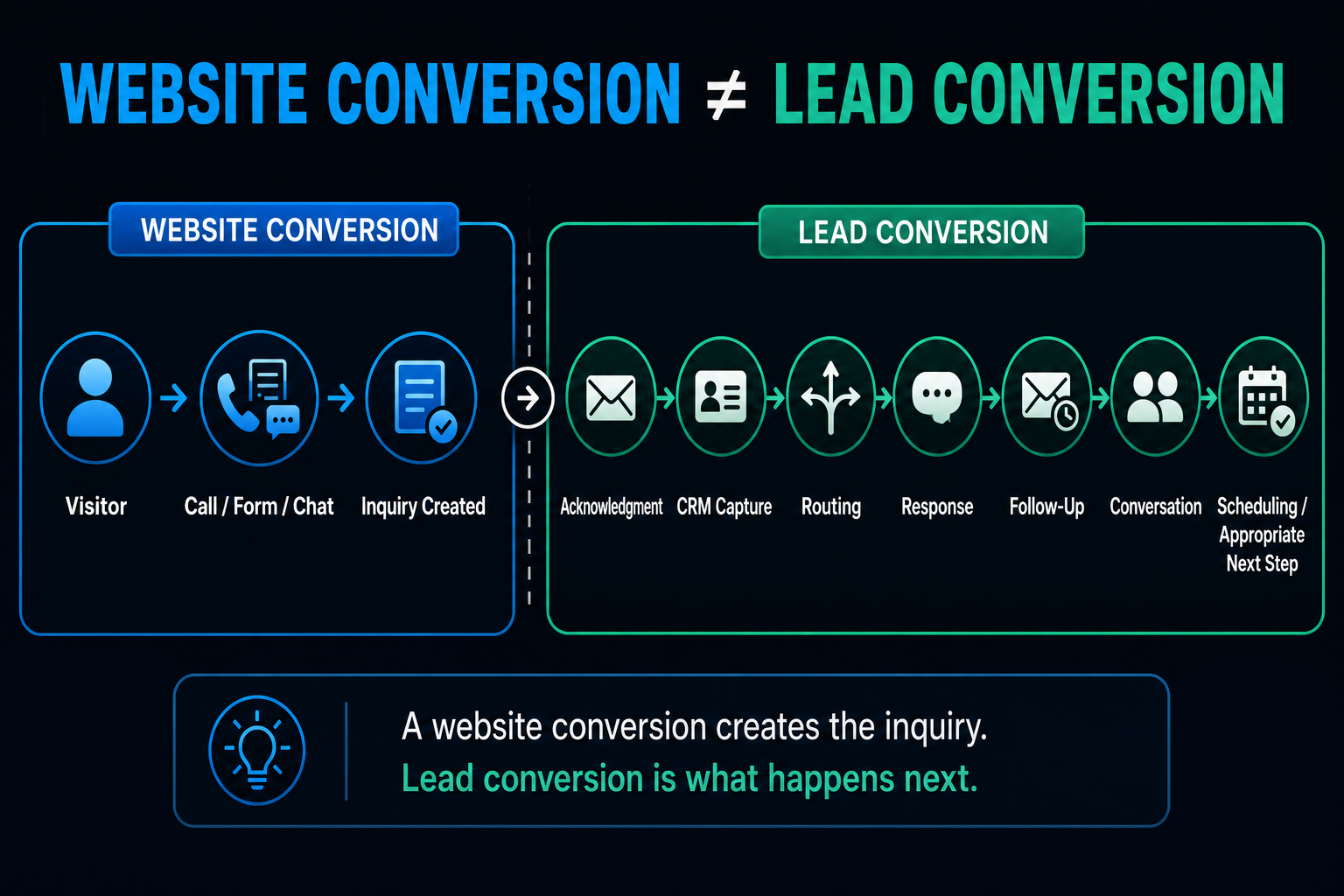
Modern systems can continue:
Visitor
↓
Inquiry
↓
Acknowledgment
↓
CRM
↓
↓
Response
↓
↓
Conversation
↓
Scheduling
↓
Human Handoff
That broader process is what we've called a lead conversion system.
The website is the front door.
But what happens behind the door determines whether the opportunity actually goes anywhere.
A Practical Service Business Website Conversion Checklist
You don't need to redesign your website tomorrow.
Start by walking through it like a prospective customer.
Can I Tell What You Do?
Within a reasonable amount of time, is the service clear?
Can I Tell Whether You Serve Me?
If location or customer type matters, is that obvious?
Can I Find Evidence That You're Legitimate?
Real reviews?
Projects?
Company information?
Credentials?
Is the Next Step Clear?
Do I know whether to call, request an estimate, schedule or ask a question?
Can I Do It Easily on My Phone?
Actually test it.
Are You Asking for Too Much Too Soon?
Review your forms and qualification process.
What Happens If I Call and Nobody Answers?
Don't ignore the phone experience.
What Happens After I Submit?
Where does the inquiry go?
Who owns it?
How quickly can the business respond appropriately?
Does Follow-Up Depend on Someone Remembering?
If so, that's part of the conversion problem.
Are You Measuring Meaningful Outcomes?
Don't stop at pageviews.
If you can't answer several of these questions, you probably found somewhere worth improving.
A Better Website Isn't Necessarily a Busier Website
More popups.
More animations.
More chat widgets.
More buttons.
More forms.
More AI.
None of those automatically improves conversion.
Sometimes the better website is the one that removes things.
Clearer message.
Cleaner navigation.
Stronger evidence.
Better mobile experience.
More appropriate CTA.
Simpler form.
Faster response after contact.
The objective isn't to make the website do more stuff.
It's to make it easier for the right visitor to move forward.
How AI-Powered Websites Fit Into the Bigger Picture
At Boost Local Biz, we think about an AI-powered website as more than a website that happened to be created using AI.
The useful question is:
What can the website and connected systems actually do for the business and its customers?
That can include:
- answering appropriate questions
- starting conversations
- capturing inquiries
- organizing contact information
- routing opportunities
- triggering follow-up
- helping with scheduling
- connecting activity to a CRM
- bringing humans into the conversation when needed
But none of that eliminates the fundamentals.
The website still needs clarity.
Trust.
Usability.
Relevant traffic.
A useful offer.
And a sensible next step.
Technology makes the system more capable.
It doesn't repeal basic marketing.
Want Your Website to Do More Than Look Good?
If your website looks professional but you're not sure what happens between:
Visitor → Inquiry → Conversation → Opportunity
that's worth examining.
Boost Local Biz builds AI-Powered Websites around the complete conversion journey—not just the page design.
That can include the website itself, conversion paths, CRM connection, automation, AI-assisted conversations, lead routing, follow-up and scheduling where appropriate.
The goal isn't adding technology for the sake of saying the website has AI.
It's building a website that helps the business handle opportunities better.
