Getting people to your website is supposed to be the hard part.
You rank for a few decent searches. Your Google Business Profile sends visitors. Maybe you’re running Google Ads, posting on social media, or getting referrals from other websites.
The traffic is there.
The leads aren’t.
And that’s usually when someone says, “We need more traffic.”
Maybe.
But if people are already reaching your website and not taking the next step, sending more visitors may just mean sending more people through the same broken process.
The better question is:
Where are you losing them?
A website can get traffic but fail to generate leads when it attracts the wrong visitors, communicates poorly, lacks trust, creates too much friction, sends people to the wrong pages, or makes the next step difficult. And sometimes the website is generating inquiries—the business is simply losing them after the customer reaches out.
Before you spend more money getting people to the site, figure out where the path from visitor to opportunity is breaking.
Before You Change Anything, Make Sure You Actually Have a Website Problem
This sounds obvious. It isn’t.
I’ve seen enough marketing setups over the years to know that what appears to be a conversion problem can sometimes be a tracking problem, a broken form, a missed notification, or an inquiry sitting somewhere nobody regularly checks.
So before redesigning anything, test the basic customer journey yourself.
Submit your contact form.
Do you get a confirmation?
Does the inquiry actually reach the right person?
Tap the phone number from your phone.
Does it call the correct number?
Try booking an appointment if you offer online scheduling.
Can you complete the process without getting confused or hitting a dead end?
Then look at your analytics and lead sources. Don’t assume a button click is the same thing as a completed inquiry, and don’t assume every visitor arriving on the website is a potential customer.
You want to establish two things:
Are qualified people actually reaching the website?
And:
Are they really failing to become leads?
Once you know the answer is yes, start looking for the leak.
1. You’re Attracting the Wrong Traffic
Not all website traffic is good traffic.
A thousand visits from people who are never going to buy from you aren’t necessarily more valuable than 100 visits from people actively looking for exactly what you sell.
This is where traffic reports can become misleading.
Imagine a pool builder in Naples publishes an article that starts ranking nationally for a broad question about swimming pool maintenance.
Traffic climbs.
Looks great in Analytics.
But most of those visitors live hundreds of miles outside the company’s service area and aren’t looking to build a pool.
The website technically has more traffic.
The business doesn’t necessarily have more opportunity.
The same problem can happen with paid advertising. Broad targeting, irrelevant keywords, weak geographic settings, or an ad that attracts curiosity rather than buying intent can produce plenty of clicks without producing many qualified leads.
So don’t just ask:
How much traffic are we getting?
Ask:
- Where is the traffic coming from?
- What did those people search for?
- What page did they land on?
- Are they in our service area?
- Does their behavior suggest they’re researching or looking to hire?
- Which traffic sources actually produce inquiries?
Traffic volume is a marketing metric.
Relevant traffic is a business asset.
If the wrong people are walking through the front door, changing the furniture probably isn’t going to fix the problem.
2. Visitors Can’t Quickly Understand What You Do
Business owners know their companies too well.
That’s not an insult. It’s a side effect of being inside the business every day.
You already know what you do, who you serve, why you’re different, and what all the terminology means.
Your visitor doesn’t.
They may have landed on your website for the first time 10 seconds ago.
If the top of the page says something like:
Quality. Integrity. Excellence.
Great.
Quality what?
Or:
Creating Solutions for a Better Tomorrow.
Wonderful.
What do you actually sell?
A visitor shouldn’t need to scroll through half the homepage to figure out whether they’ve found the right company.
For most local and service businesses, the opening portion of the website should quickly help answer some combination of:
- What do you do?
- Who do you do it for?
- Where do you provide it?
- Why should I keep looking?
- What should I do next?
Clever copy can be useful.
Clear copy is mandatory.
We’ve covered this more broadly in our guide to what a service business website should include, but the important point here is diagnostic:
If traffic arrives and repeatedly leaves before exploring the site, don’t immediately assume those people weren’t interested.
They may simply not have understood what you were offering quickly enough.
3. You Haven’t Given Them Enough Reason to Trust You
Understanding what you do doesn’t mean someone is ready to contact you.
Now they have another question:
Can I trust these people?
That question gets more important as the price, risk, or commitment of the purchase increases.
Someone hiring a contractor for a major home improvement project isn’t choosing a restaurant for lunch. They may be considering spending thousands—or tens of thousands—of dollars.
Your website has to reduce uncertainty.
Depending on the business, that might mean showing:
- genuine customer reviews
- real project photos
- before-and-after examples
- relevant licenses or credentials
- warranties or guarantees you actually offer
- recognizable manufacturers or partners
- a real team
- a real business location
- useful educational content
- clear service areas
- straightforward contact information
- evidence that you understand the work
Notice what’s not on that list:
A paragraph telling everyone you’re “the area’s premier provider of world-class service.”
Anybody can write that.
Trust is stronger when the visitor can see reasons to believe you rather than being asked to accept your claims.
This is one of the reasons a technically beautiful website can still underperform.
It looks polished.
It just doesn’t feel convincing.
4. The Next Step Isn’t Obvious
Let’s say you’ve made it through the first three hurdles.
The visitor is relevant.
They understand what you do.
They trust you enough to consider moving forward.
Now what?
You’d be surprised how many websites make this unnecessarily difficult.
The phone number is buried in the footer.
The “Contact” button disappears on mobile.
One page says “Get a Quote,” another says “Contact Us,” another says “Learn More,” and none of them make it particularly clear what will happen next.
Or the homepage gives the visitor 11 different things to click before giving them one obvious way to become a customer.
A good call to action isn’t about covering the website in giant buttons.
It’s about reducing uncertainty around the next step.
Depending on the business, that next step might be:
Request an Estimate
Schedule a Consultation
Check Availability
Call Now
Book an Appointment
Get a Quote
The wording matters less than the clarity.
If someone is ready to raise their hand, don’t make them solve a puzzle first.
That’s one of the fundamentals behind what makes a service business website convert.
5. You’re Making It Too Hard to Become a Lead
There’s another problem that happens after someone finds the call to action.
They click it.
And then you make them work for it.
Maybe the quote form looks like a mortgage application.
Maybe it asks 17 questions before the visitor has even spoken to anyone.
Maybe the form is miserable to complete on a phone.
Maybe the scheduling tool requires creating an account.
Maybe the page loads slowly, the form throws an error, or a giant popup blocks the screen before the visitor can do anything.
Every additional obstacle asks the visitor:
How badly do you want this?
Sometimes additional qualification is justified. A business may genuinely need certain information before deciding whether an opportunity is a fit.
But there’s a difference between useful qualification and unnecessary friction.
Ask yourself:
What information do we actually need from someone at this stage?
Not:
What information would be nice to have because our form builder lets us ask for it?
For many service businesses, the first goal isn’t to collect someone’s entire life story.
It’s to start a conversation with the right person.
We’ve gone deeper into this in How to Turn Website Visitors Into Leads.
The important point here is simple:
Interest does not guarantee patience.
6. The Page Doesn’t Match What Brought Them There
This one gets missed all the time.
You can attract the right person and still send them to the wrong place.
Suppose someone searches:
emergency AC repair near me
They click an ad promising fast AC repair.
And the ad sends them to the HVAC company’s generic homepage where the first thing they see is information about maintenance plans, duct cleaning, indoor air quality, commercial HVAC, financing, company history, and six other services.
The visitor may technically be in the right place.
But it doesn’t feel like it.
Compare that with landing on a page that immediately says:
Need AC Repair? Request Service
Same business.
Same visitor.
Very different experience.
This is message match.
What brought someone to the website creates an expectation about what they’ll find when they arrive.
That applies to:
- Google searches
- Google Ads
- Google Business Profile traffic
- social media
- referral links
- email campaigns
- blog content
It also explains why looking at a website-wide conversion rate can hide what’s actually happening.
Someone reading an educational article may be at a completely different stage than someone clicking an ad for a specific service.
Those visits shouldn’t automatically be judged the same way.
Look at the journey:
What did this person want when they clicked?
Then look at the destination:
Did we immediately continue that conversation?
If the answer is no, you’ve found another potential leak.
7. You’re Losing Opportunities After They Reach Out
This is where I think a lot of website advice stops too early.
The visitor submitted the form.
Success, right?
From an analytics perspective, maybe.
From the business owner’s perspective, not necessarily.
Because that person hasn’t become a customer.
They’ve raised their hand.
What happens next matters.
Imagine someone requests an estimate from three local contractors at 2:15 on a Tuesday afternoon.
Contractor A responds quickly, confirms the request, starts a conversation, and makes it easy to schedule the next step.
Contractor B replies the following morning.
Contractor C discovers the form notification three days later.
All three websites generated a lead.
Those businesses did not create the same customer experience.
This is why I don’t think website conversion should be viewed in isolation from the rest of the business.
After someone calls, submits a form, starts a chat, or requests an appointment:
- How quickly do they hear from you?
- What happens when a call is missed?
- Does someone follow up more than once?
- Does the prospect receive confirmation?
- Is scheduling easy?
- Does the inquiry enter a CRM or pipeline?
- Can your team see what happened?
- Do opportunities quietly disappear into an inbox?
We’ve covered the immediate handoff in what should happen after someone fills out your website form.
This is also where systems such as automated follow-up, CRM pipelines, scheduling, missed-call response, and the broader Booked Calendar System™ become relevant.
Not because every business needs more software.
Because generating an inquiry and converting an opportunity are two different jobs.
A website can do the first perfectly well while the business fails at the second.
And if nobody looks closely at the handoff, the conclusion becomes:
“Our website doesn’t generate enough business.”
When the real problem may be sitting somewhere after the website.
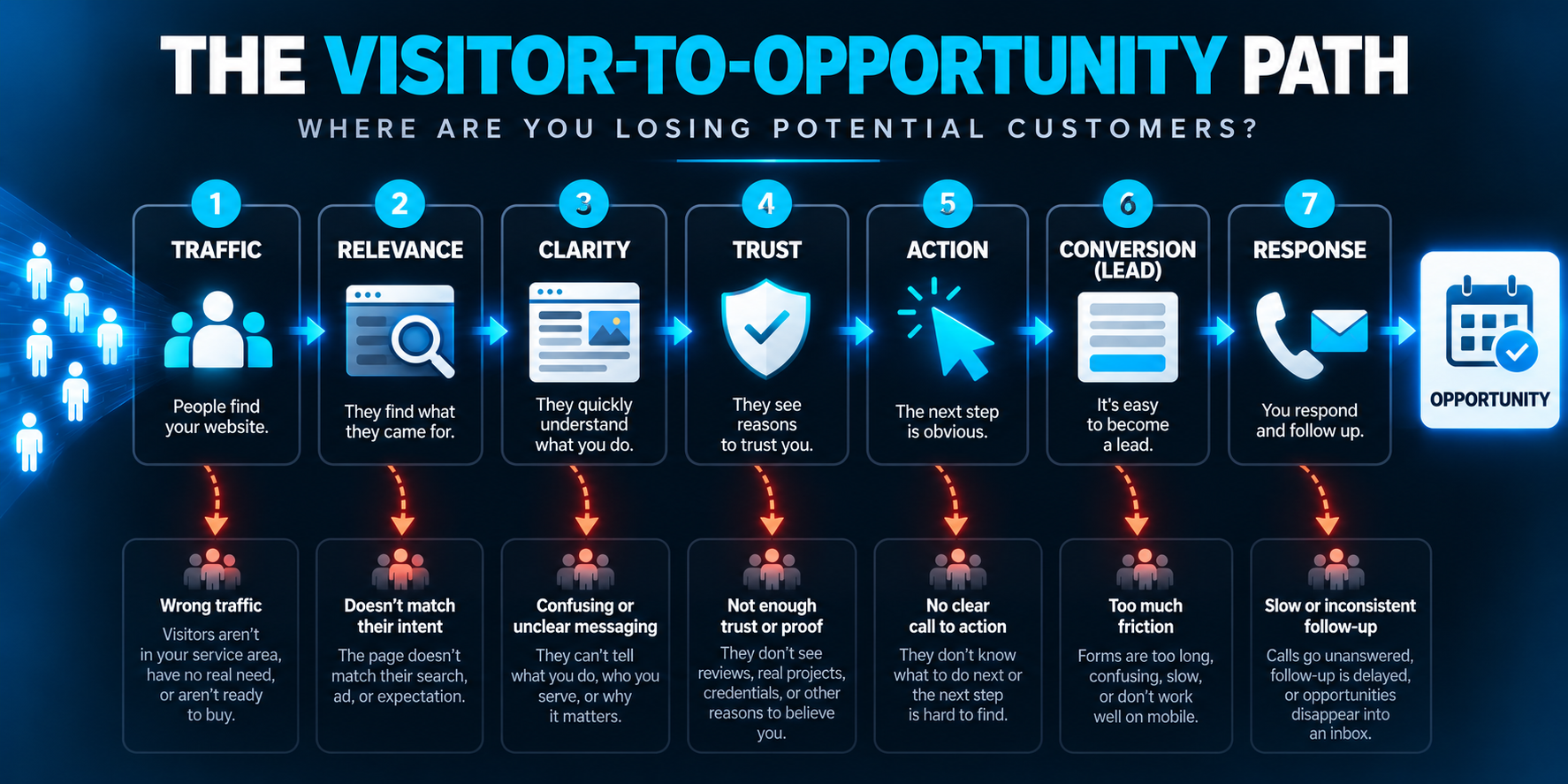
Don’t Start With More Traffic. Find the Leak.
When a website isn’t producing enough leads, buying more traffic is tempting because traffic is easy to understand.
More visitors should mean more opportunities.
And sometimes that’s exactly what’s needed.
But not always.
If your existing path looks like this:
Traffic → Confusion → Exit
more traffic gives you:
More Traffic → More Confusion → More Exits
If it looks like:
Traffic → Interest → Inquiry → No Follow-Up
more traffic gives you:
More Traffic → More Interest → More Inquiries → More Lost Opportunities
That’s why I’d diagnose the system before increasing the volume.
Look at the entire path:
Are we attracting the right people?
↓
Do they immediately understand what we do?
↓
Do they have enough reason to trust us?
↓
Is the next step obvious?
↓
Is taking that step easy?
↓
Does the page match why they came?
↓
What happens after they raise their hand?
Find the weak point.
Then fix that.
One More Test You Can Do in Five Minutes
There’s one problem with evaluating your own website:
You’ve seen it too many times.
You already know where everything is. You know what every sentence means. You know which button you’re supposed to click.
A new visitor doesn’t have any of that context.
If you want a quick way to look at the site more like a potential customer, use our 5-Minute Local Business Website Test.
It evaluates five things:
UNDERSTAND → TRUST → ACT → EXPERIENCE → RESPOND
You don’t need a 40-page website audit to spot every obvious conversion problem.
Sometimes five focused minutes will tell you plenty.
Getting Traffic but Not Enough Leads?
If people are already finding your website but not turning into enough real opportunities, the answer isn’t automatically more traffic. We’ll look at how clearly your website communicates what you do, how easy it is for potential customers to take the next step, and where the path from visitor to opportunity may be breaking.
