
You've found the client.
You've figured out what they need.
You've gone through onboarding and learned how their business actually operates.
Now you have to build the thing.
This is where AI automation can start looking much more complicated than it needs to.
Spend enough time online and you'll see enormous workflow diagrams with boxes, branches and lines running in every direction. There might be five different pieces of software, multiple AI tools and enough moving parts to make your first automation feel like you're supposed to be building mission control.
You're not.
At least, you don't have to be.
A useful client automation can start with one business problem and a relatively simple system designed to improve it.
The goal isn't to build the most impressive automation.
It's to build the simplest system that reliably improves the process.
For a beginner, a useful way to think about building client automations is:
PROBLEM → PROCESS → BUILD → TEST → IMPROVE
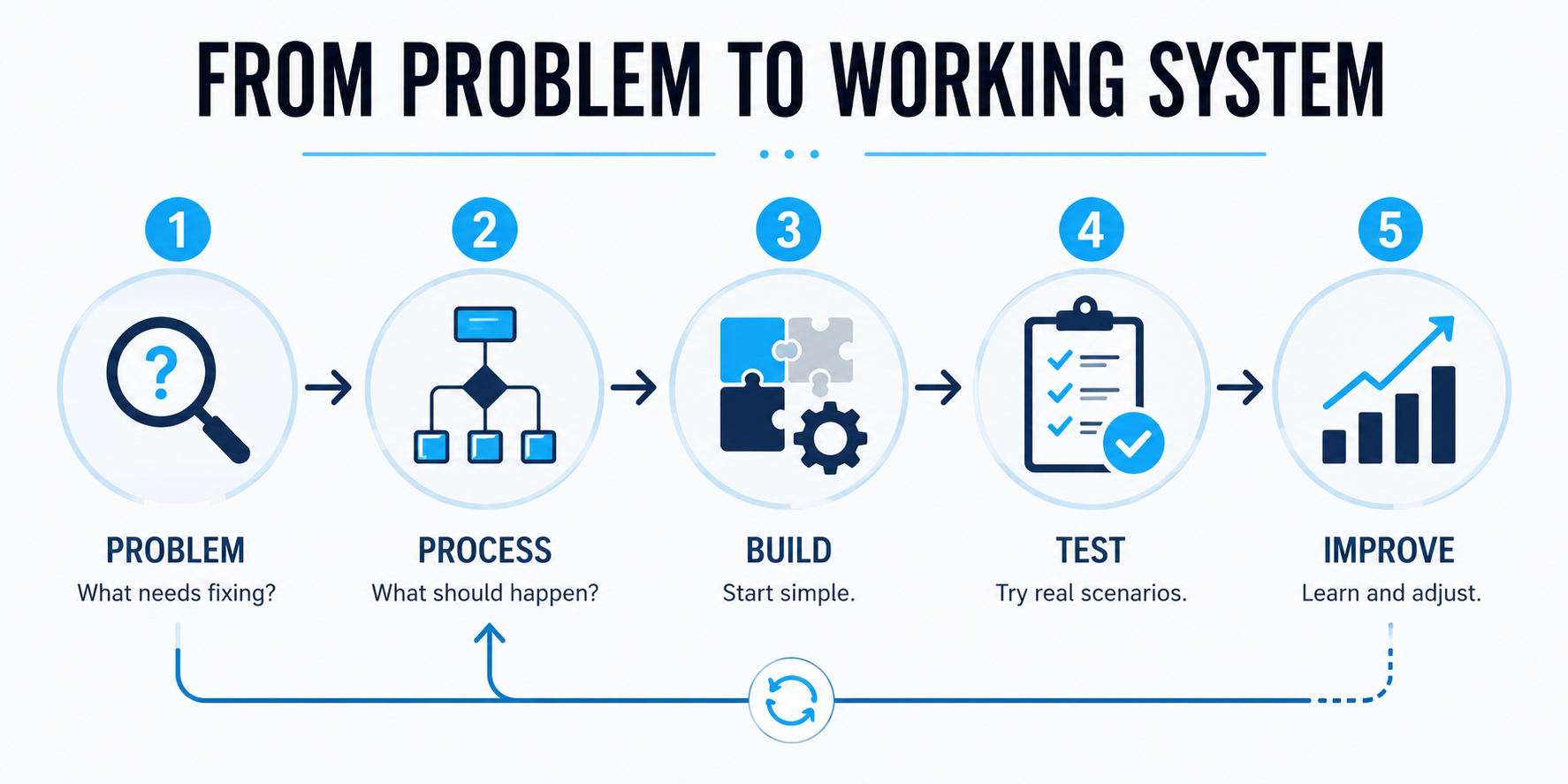
Let's walk through it using a hypothetical service business.
Our Example: An HVAC Company That Responds Too Slowly
Imagine an HVAC company that already gets inquiries through its website.
The problem isn't necessarily a lack of leads.
The problem is what happens next.
When the office is busy, a new website inquiry might sit in an inbox until someone has time to respond.
Sometimes that's ten minutes.
Sometimes it's two hours.
Sometimes someone intends to follow up later and forgets.
The owner doesn't need an "AI transformation strategy."
They have a much more understandable problem:
Potential customers are reaching out, and the business isn't always responding or following up consistently.
That's something we can work with.
Step 1: Start With the Problem
One of the easiest mistakes when you're getting into AI automation is starting with the technology.
You learn that AI can answer messages, make phone calls, summarize conversations, update software and perform all kinds of impressive tasks.
So you start asking:
What can I automate with AI?
A better question is:
What is happening inside this business that shouldn't be happening?
For our hypothetical HVAC company, saying:
"They need AI."
tells us almost nothing.
Even:
"They need lead automation."
is still pretty vague.
A clearer problem would be:
When someone submits a website inquiry and the office can't respond immediately, the potential customer may wait too long and follow-up can become inconsistent.
Now we have something specific enough to solve.
This is the same reason choosing the right AI automation service to sell starts with a meaningful business problem rather than whatever technology happens to be getting attention this month.
Get specific about what needs to improve
Before building anything, try finishing this sentence:
The business is currently ________, and we want the new process to ________.
For example:
The business is currently responding manually whenever an employee becomes available, and we want the new process to acknowledge every new website inquiry quickly and make sure each opportunity has a clear next step.
That's much better than:
Build an AI chatbot.
The first describes an outcome.
The second describes a tool.
And businesses generally care much more about the first.
Step 2: Decide What Should Happen
Once the problem is clear, map the process in normal language.
You don't need special software to do this.
You don't need to know how to code.
You don't even need to know exactly which automation platform you'll use yet.
Ask:
When this happens, what should happen next?
For our HVAC company, the basic process could look like this:
Customer submits website form
↓
Contact information is saved
↓
Customer receives an immediate response
↓
System learns what type of help they need
↓
Customer gets an appropriate next step
↓
They can schedule when appropriate
↓
If they don't move forward, follow-up continues
↓
If the situation needs a person, the team gets involved
That's already the beginning of an automation.
Notice what's missing:
No code.
No giant technical diagram.
No discussion about complicated AI infrastructure.
We're simply deciding what a better customer journey should look like.
If you can't explain it simply, don't build it yet
This is a useful rule:
If you can't explain the automation in plain English, you probably aren't ready to build it.
The software will eventually need instructions.
But first, you need to understand those instructions.
Before moving into implementation, you should be able to tell the client:
"When a website lead comes in, we're going to save the contact, respond immediately, learn what they need, give them a path to schedule, continue appropriate follow-up if they don't book and involve your staff when the conversation needs a person."
That's understandable.
And if you followed a proper AI automation client onboarding process, you should already have a much clearer understanding of how the client's current process works and what needs to change.
By the time you're building, the scope, deliverables and responsibilities should already be captured in an approved AI automation proposal.
Step 3: Build the Simplest Version That Works
Now we can start thinking about the technology.
But keep it simple.
For our hypothetical HVAC example, the system might involve a few basic pieces.
Website form
This is where the inquiry starts.
Someone visits the company's website and asks for service or more information.
CRM
CRM stands for customer relationship management.
Despite the intimidating name, think of it as the place where the business organizes contacts, conversations and sales opportunities.
When our new HVAC lead arrives, we want that person recorded somewhere the business can actually manage the opportunity.
Automation
The automation connects actions together.
For example:
New website inquiry arrives → create or update the contact → send the appropriate response → notify the right person → begin follow-up.
Instead of an employee manually performing every step, the system handles the repeatable parts.
Messaging
The business may use text messages, email or another communication channel to respond and follow up.
Calendar
If scheduling is appropriate, the automation can help the prospect reach the correct booking option.
AI
AI may help when the system needs to understand or respond to normal human language.
And that brings us to something important.
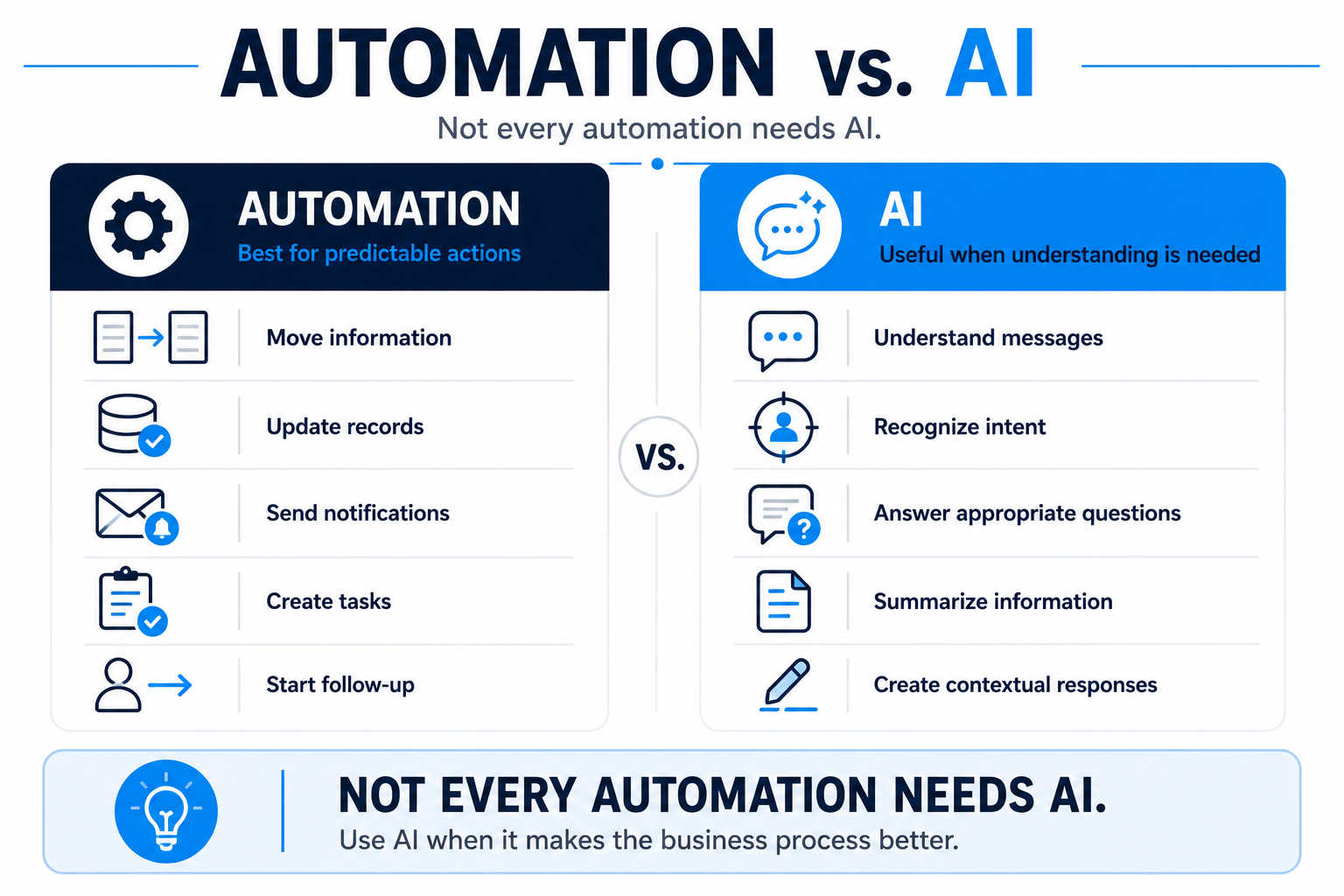
Not Every Automation Needs AI
This sounds strange in an article about AI automation, but it's worth saying clearly:
Don't use AI where normal automation already solves the problem perfectly well.
Suppose a new website form is submitted.
The system needs to create a contact record.
Does AI need to decide whether to create it?
Probably not.
An appointment is tomorrow and the customer needs a standard reminder.
Does AI need to write a completely new reminder from scratch every time?
Probably not.
A lead needs to be moved into the correct follow-up stage after booking.
Again, probably not.
Those are predictable actions.
Regular automation is great at predictable actions.
Where AI becomes useful
Now imagine the HVAC customer replies:
"My AC is running but it's blowing warm air and making a weird rattling sound. Do you guys handle that?"
That's different.
The system has to understand what a person is saying.
AI can potentially help interpret the message, identify what the customer needs and respond appropriately within the boundaries you've established.
In simple terms:
Regular automation is useful for:
- moving information
- updating records
- sending predetermined notifications
- creating tasks
- starting follow-up
- triggering the next step
AI can be useful for:
- understanding customer messages
- recognizing what someone is asking for
- answering appropriate questions
- summarizing information
- creating contextual responses
- recognizing when a conversation may need a person
The takeaway is simple:
Don't add AI because you're selling AI automation. Add AI when it makes the business process better.
Sometimes the best automation has a lot of AI.
Sometimes it has a little.
Sometimes the smartest solution barely needs AI at all.
Build One Useful Piece Before Building Everything
Once you start seeing automation opportunities inside a business, it's easy to get carried away.
Maybe the HVAC company could eventually automate — and for a broader set of practical AI automation ideas showing business processes worth automating, that's covered separately:
- new lead response
- missed calls
- appointment reminders
- estimates
- customer reactivation
- review requests
- internal notifications
- sales follow-up
- FAQs
- old lead nurturing
Great.
That doesn't mean you need to build all of it at once.
Especially when you're starting out.
Maybe the first project is simply:
Website inquiry → immediate response → follow-up → scheduling opportunity
Get that working reliably.
Learn from it.
Then decide what should come next.
This is also why a clear AI automation service package matters. The client should understand what you're actually building instead of assuming every possible automation idea is included in the original project.
More automation is not automatically better automation.
Step 4: Test It Like a Real Customer
You've built the first version.
Don't celebrate yet.
Now try to break it.
A weak test looks like this:
Name: Test
Email: test@test.com
Message: Test
The response arrives.
Success!
Except real customers don't behave like test records.
So act like a customer.
Submit:
"My AC stopped working."
Then reply:
"Do you service Coral Springs?"
Then:
"Can someone come tomorrow?"
Then:
"Actually Thursday is better."
Then:
"Can I talk to someone?"
What happens?
Does the conversation still make sense?
Does the correct information get saved?
Can the customer reach a person when needed?
Does scheduling work correctly?
Does anything weird happen?
Test situations that don't go perfectly
Try a customer who:
- doesn't answer
- gives incomplete information
- asks an unexpected question
- is outside the service area
- wants to reschedule
- already exists in the CRM
- wants a human
- changes the subject
- decides they're no longer interested
Your goal isn't to predict every possible thing a human could ever do.
Good luck with that.
Your goal is to test enough realistic situations that you're confident the automation can handle normal business life.
One of the principles from our AI automation client onboarding guide matters here:
Real businesses live in the exceptions.
So don't just test whether the automation technically runs.
Test whether the experience makes sense.
That's a much higher standard.
Know When a Human Should Take Over
AI automation doesn't need to mean eliminating people from the process.
Sometimes involving a person is exactly what the automation should do.
Maybe our HVAC system can comfortably handle:
"Do you offer AC repair?"
But what happens when someone says:
"My unit is making a strange electrical smell and I'm not sure if it's safe."
Perhaps that's not a conversation you want an automated system casually improvising its way through.
The appropriate response may be to follow predefined safety guidance and get a qualified person involved.
The same principle applies outside HVAC.
A prospect might:
- have an unusual request
- become frustrated
- ask something the AI doesn't know
- need a custom quote
- request an exception
- explicitly ask for a person
Decide ahead of time when that should happen.
AI handles what it can appropriately. People handle the situations that need people.
That's not an automation failure.
That's good automation design.
What Happens If Something Breaks?
Automations rely on software.
Software doesn't work perfectly forever.
A message might fail.
A connection between systems might stop working.
Someone may change a setting.
A calendar may become unavailable.
Something unexpected will eventually happen.
You don't need to become a software engineer to understand the important question:
If this step doesn't happen, will someone know?
If a customer can't schedule, perhaps they should have another way to reach the business.
If an important step fails, perhaps someone on the team should be notified.
If the AI doesn't know how to handle a conversation, perhaps it should stop and involve a person.
The exact solution depends on the automation.
But the principle doesn't:
A good automation shouldn't quietly fail while everyone assumes it's working.
Step 5: Launch, Watch and Improve
Eventually, you have to let real customers use the system.
That's when you'll learn things you couldn't discover during testing.
Maybe prospects repeatedly ask a question you didn't expect.
Maybe people keep getting confused at one particular step.
Maybe employees are constantly taking over the same type of conversation.
Maybe customers want appointments in a way you didn't anticipate.
Maybe a follow-up message isn't getting the response you expected.
Good.
That's information.
Use it.
The first version doesn't have to account for every future possibility.
It needs to solve the agreed problem well enough to launch responsibly.
Then:
Watch what happens.
Fix what doesn't work.
Improve what could work better.
That's one reason our approach to pricing AI automation services separates building a system from potentially running and improving it over time.
Building and ongoing optimization aren't necessarily the same job.
Keep Simple Notes About What You Built
Documentation sounds painfully boring right up until six months later when you're staring at an automation thinking:
"Why the hell did I make it do that?"
You don't need a 70-page technical manual for every small project.
But keep enough information that you—or someone else—can understand the system later.
At minimum, document:
- what starts the automation
- what it's supposed to accomplish
- which systems it uses
- where AI is involved
- when a human should take over
- what happens if an important step fails
- any important rules or limitations
- who is responsible for ongoing support
Your future self will appreciate it.
So will your client.
How Complicated Should Your First Client Automation Be?
Probably less complicated than you think.
Your first automation project should ideally solve:
one clear problem
with:
a manageable number of moving parts
and:
an outcome you can explain and test.
Something as simple as:
Missed call → immediate text response → conversation → appointment opportunity
can solve a legitimate business problem.
So can:
Website inquiry → immediate response → follow-up → scheduling
You don't need to build an autonomous AI workforce.
You need to build something useful.
As your skills improve, you can take on more complicated projects.
But don't confuse complexity with value.
A simple system that reliably prevents good leads from disappearing may be more valuable to a business than an elaborate AI setup nobody trusts or understands.
Do You Need to Know How to Code to Build AI Automations?
Not necessarily.
Many modern automation platforms allow you to connect systems and build useful workflows without traditional programming. If you want a concrete walkthrough of how that works in practice, my guide to HighLevel workflows is a good starting point.
That has dramatically lowered the barrier to getting started.
But "no-code" doesn't mean "no skill."
You still need to understand:
- the business problem
- the process you're changing
- how the tools you're using work
- what could go wrong
- how to test the system
- what you're responsible for maintaining
As projects become more customized or complicated, technical skills can become increasingly valuable.
That's fine.
You don't need to learn everything before starting.
Start within your ability and expand your technical skills as the problems you're solving become more sophisticated.
That's a much healthier approach than selling a massive system you don't actually know how to deliver.
Which Tools Should You Use?
There isn't one universal AI automation stack every business needs.
Different tools are good at different things.
Depending on the project, you may need software for:
- managing customer relationships
- connecting applications
- sending messages
- scheduling appointments
- creating automated workflows
- handling AI conversations
- managing phone calls
- storing information
Platforms such as GoHighLevel, Zapier, Make, n8n and others can play different roles depending on what you're building.
But don't start by collecting software.
Start with:
What does this business need the system to do?
Then choose tools capable of doing it.
The technology should serve the process.
Not the other way around.
A Simple AI Automation Build Checklist
Before you build:
- Identify one clear business problem
- Understand the client's current process
- Decide what the improved process should look like
- Define what the automation is responsible for
- Decide where a human needs to remain involved
- Confirm what you actually agreed to build
While you build:
- Start with the simplest useful version
- Use normal automation for predictable actions
- Use AI where understanding or contextual responses add value
- Connect only the systems you actually need
- Keep the workflow understandable
Before launch:
- Test it like a real customer
- Test situations that don't go perfectly
- Test human handoff
- Make sure important failures can be noticed
- Have the client test the experience
- Confirm what happens after launch
After launch:
- Watch how real people use it
- Fix problems
- identify repeated questions or friction
- gather client and staff feedback
- improve useful parts of the system
- separate new feature requests from the original project
You don't need to memorize this checklist.
The five-step framework is enough:
PROBLEM → PROCESS → BUILD → TEST → IMPROVE
Start there.
The Technology Is Not the Product
This is probably the most important lesson.
Clients aren't really buying triggers, workflows, AI models or automation software.
They're buying an improvement to how their business operates.
They want things like:
- faster response
- more consistent follow-up
- fewer missed opportunities
- less repetitive work
- easier scheduling
- better organization
- smoother customer communication
The technology helps create those improvements.
But the technology isn't the reason the business cares.
That's why the process should always begin with:
What's the problem?
Not:
Which AI tool should I use?
Understand the problem.
Map the better process.
Build the simplest useful system.
Test it with real-world situations.
Then improve it based on what actually happens.
That's how you go from an automation idea to something a client can actually use.
And if you want to turn the delivered automation into recurring revenue, that's a separate decision about what ongoing value you continue providing after launch.
Build the Business Behind the Automation
Knowing how to build an automation is only one piece of creating an AI-powered service business.
You still need to decide what to sell, find the right market, package the service, price it, get clients and deliver the work responsibly.
The 48-Hour AI Cashflow Stack is designed to help organize those pieces into a practical path for building an AI-powered service business.
It isn't a promise that you'll create a successful agency in 48 hours.
And it isn't a substitute for learning how to solve real business problems.
It's a framework for turning AI and automation capabilities into services businesses can understand and potentially pay for.
Download the 48-Hour AI Cashflow Stack and start building the system behind the business.
