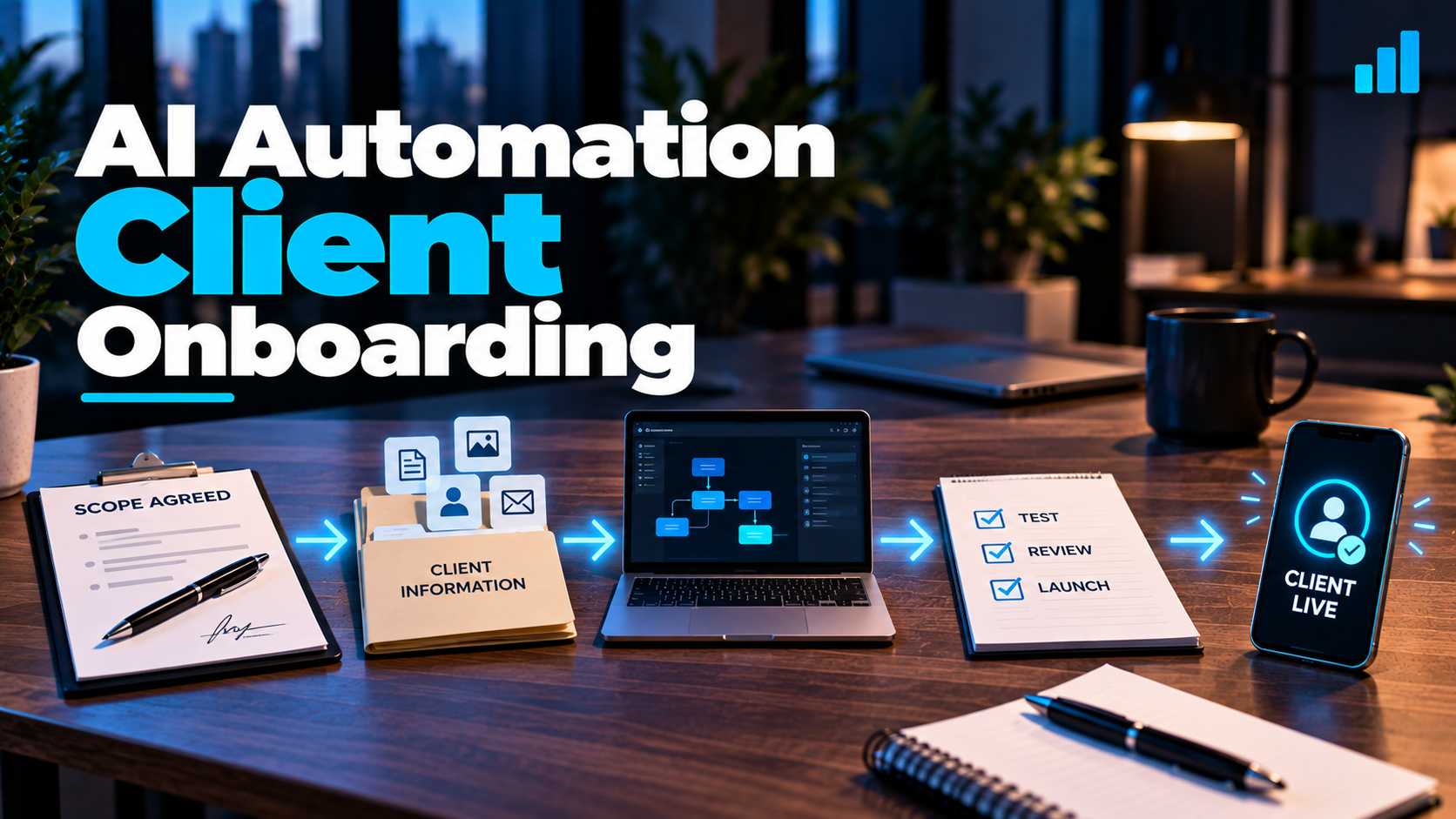
You got the client.
They signed the agreement. The payment came through. Everybody is excited.
Now comes the dangerous part:
Actually building what you sold.
AI automation projects can go sideways surprisingly fast when onboarding consists of sending a questionnaire, collecting a few passwords and immediately building workflows.
The problem usually isn't the automation tool.
It's assumptions.
You assumed you understood how leads were handled.
The owner assumed their staff followed a particular process.
The employee doing the work has a completely different version.
And the beautifully designed automation you built is solving a workflow that doesn't actually exist.
A better rule is:
Automate the process you understand—not the process you imagine exists.
Good AI automation client onboarding isn't primarily administrative. It's operational discovery.
Before building, you need to understand what happens today, what should happen tomorrow, which people and systems are involved, where exceptions occur and what success actually means.
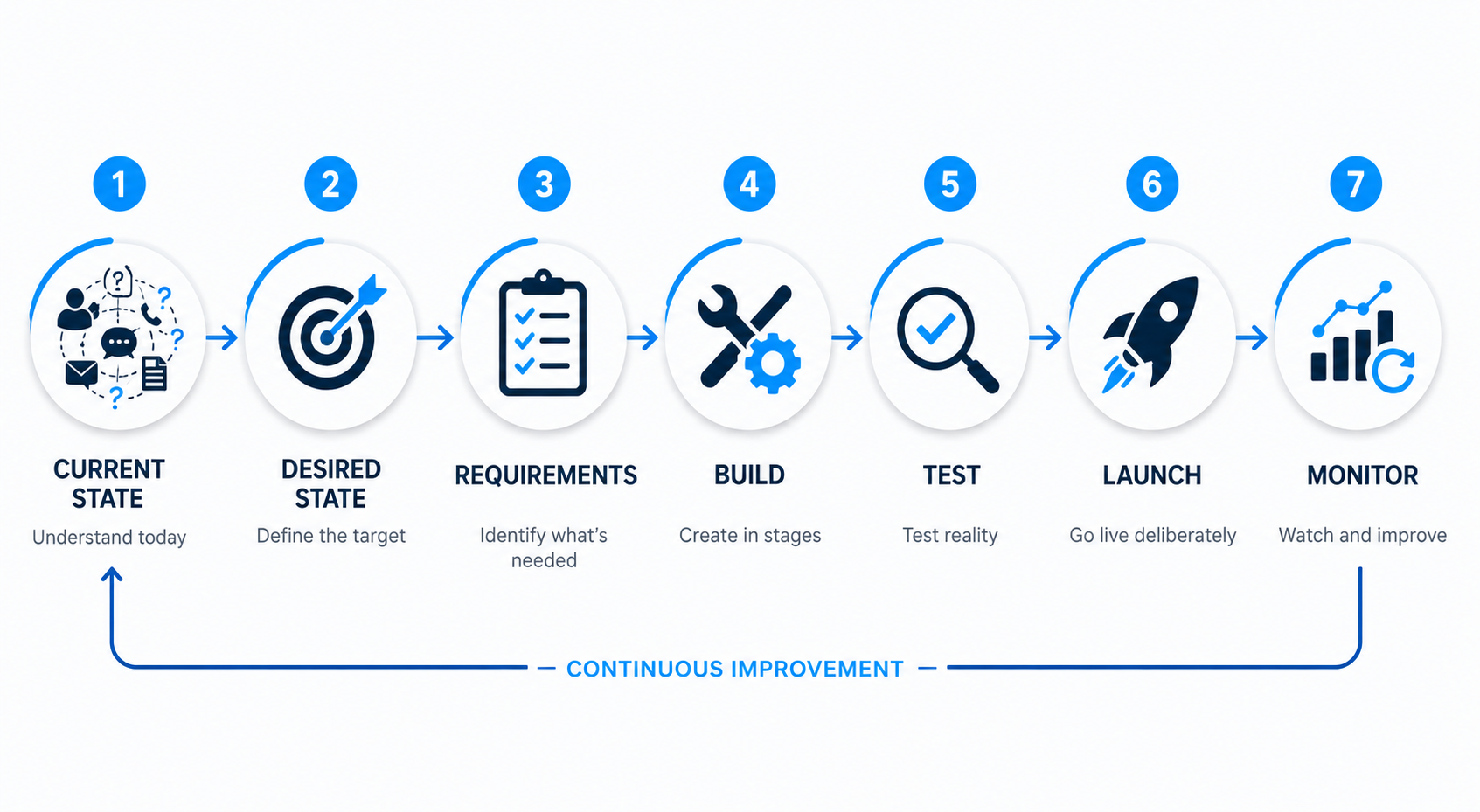
A useful implementation journey looks like this:
CURRENT STATE → DESIRED STATE → REQUIREMENTS → BUILD → TEST → LAUNCH → MONITOR
Let's break it down.
Why AI automation client onboarding is different
Traditional client onboarding might involve:
- contracts
- billing
- contact information
- brand assets
- communication preferences
- account access
- kickoff meetings
You may need all of those things.
But automation adds another layer.
You're changing how work actually moves through the business.
That means you may be touching:
- customer data
- lead routing
- communications
- calendars
- CRM records
- internal notifications
- sales processes
- AI-generated responses
- staff responsibilities
- business-critical software
A mistake isn't always a slightly ugly graphic or a typo on a webpage.
It can mean a customer doesn't receive a response, an appointment gets scheduled incorrectly, a lead enters the wrong pipeline or an AI system says something it shouldn't.
So the goal of onboarding isn't merely:
Get everything you need from the client.
It's:
Understand enough of the business process to implement the automation responsibly.
The sale is not the specification
Your sales conversation should establish the problem, proposed solution and enough scope for the client to decide whether to hire you.
That doesn't mean you've discovered every implementation detail.
Suppose you sold an automated lead-response system.
During the sales conversation, the owner tells you:
"When a new lead comes in, Sarah calls them."
Simple enough.
Then during onboarding you speak with Sarah.
Turns out:
- website leads go to Sarah
- Facebook leads go somewhere else
- commercial inquiries go to another employee
- existing customers are handled differently
- nobody responds after 6 p.m.
- certain ZIP codes aren't serviced
- some leads need immediate escalation
- appointments can only be scheduled with certain employees
Suddenly:
"Sarah calls the leads"
wasn't a workflow.
It was a summary.
Onboarding is where the summary becomes a specification.
That's why the offer you created using a clear AI automation service package should define the boundaries of the engagement without pretending every implementation detail is already known.
Step 1: Confirm exactly what was sold
Before expanding into discovery, establish the baseline — ideally captured in an approved AI automation proposal that both sides signed off on.
Document:
- the problem being addressed
- agreed deliverables
- systems included
- systems excluded
- implementation responsibilities
- client responsibilities
- timeline or milestones
- pricing
- ongoing support, if any
- what happens after launch
This protects both sides.
The client knows what they're buying.
You know what you're responsible for delivering.
This is also where good AI automation pricing matters. If pricing was based on a small implementation and onboarding reveals an enterprise-sized mess, you need a mechanism for addressing that rather than quietly absorbing unlimited complexity.
Step 2: Map the current process before designing the new one
This is probably the most important part of the entire onboarding process.
Ask:
What actually happens today?
Not what should happen.
Not what the owner thinks happens.
Not what the SOP from 2023 says happens.
What happens now?
A useful way to map a process is:
TRIGGER → ACTIONS → PEOPLE → SYSTEMS → DECISIONS → EXCEPTIONS → OUTCOME
Suppose you're automating lead follow-up for a contractor.
The current process might look like:
Website form submitted
→ notification goes to office inbox
→ receptionist opens email
→ receptionist calls prospect
→ no answer
→ receptionist makes a note
→ tries again later
→ manually creates CRM record
→ appointment eventually gets scheduled
Already, you can start asking better questions.
Who receives the notification?
What happens after hours?
How quickly is the first call normally attempted?
How many follow-ups happen?
Where are notes stored?
What happens if two employees contact the same person?
What happens if the lead replies by text instead?
What happens if they're outside the service area?
Those details are where the real workflow lives.
Talk to the people who actually perform the process
This deserves emphasis.
If you're automating work currently performed by employees, involve the people doing that work whenever practical.
An owner may understand the business at a high level.
The employee handling the process often knows the exceptions.
They know:
"We don't do it that way when this happens."
Those sentences are gold during automation discovery.
The goal isn't to interrogate employees or make them feel like you're mapping their job for elimination.
You're trying to understand the operating reality.
A process that looks simple from 30,000 feet can become surprisingly complicated when you talk to the person doing it every Tuesday afternoon.
Step 3: Define the desired state
Once you understand the current process, ask:
What should happen instead?
For the same contractor, the desired process might become:
Lead submits form
→ CRM contact created
→ inquiry categorized
→ immediate acknowledgment sent
→ appropriate employee notified
→ automated follow-up begins
→ prospect can schedule
→ appointment confirmation sent
→ reminders triggered
→ pipeline updated
→ human takes over when necessary
Now you're designing an actual system.
Notice that we didn't begin by asking:
"What cool AI tools can we connect?"
We started with the business process—the same approach I use when building workflows inside an automation platform.
That's the same principle behind choosing the best AI automation services to sell: technology becomes valuable when it's attached to a meaningful business problem.
Don't automate a bad process just because you can
Sometimes discovery reveals that the existing process isn't merely manual.
It's broken.
Automating it exactly as-is could simply make the broken process happen faster.
For example:
If every incoming lead is routed to the wrong person, automatically routing those leads faster doesn't solve much.
If nobody has defined which appointments require qualification, adding AI scheduling may create calendar chaos more efficiently.
If the CRM contains five duplicate pipelines nobody understands, automating all five isn't necessarily progress.
Sometimes the first implementation decision should be:
Simplify the process before automating it.
That's not scope creep if it's necessary to make the agreed automation function correctly.
But it does need to be identified, discussed and documented.
Step 4: Define the requirements
Once current state and desired state are clear, identify what the automation actually requires.
That might include:
- CRM access
- website forms
- calendars
- email accounts
- business phone/SMS systems
- pipeline configuration
- access needed to connect software systems
- automation platforms
- AI services
- scheduling rules
- qualification criteria
- staff notifications
- message templates
- escalation rules
- business hours
- service areas
- opt-out handling
- reporting requirements
Not every project needs all of these.
The point is to derive requirements from the workflow instead of starting with a generic software checklist.
Handle account access professionally
Automation projects often require access to important business systems.
Treat that seriously.
Whenever possible, prefer:
- individual user accounts
- delegated access
- appropriate roles and permissions
- secure credential-sharing methods
- least-privilege access
- documented account ownership
Avoid casually collecting a pile of passwords in an email thread or shared document.
And don't ask for administrator-level access simply because it's convenient if a narrower permission level can accomplish the work.
You should know:
What access do I need?
Why do I need it?
How long do I need it?
Who owns the account?
What happens to my access when the engagement ends?
That's basic operational professionalism.
Step 5: Establish ownership before you build
This is one of the least glamorous parts of automation work.
It's also one of the most important.
Clarify who owns or controls:
- CRM accounts
- automation-platform accounts
- phone numbers
- domains
- email accounts
- API accounts
- AI service accounts
- customer data
- workflow documentation
- custom assets
- ongoing software costs
Also define what happens if the relationship ends.
Can the client continue operating the system?
What needs to be transferred?
Which subscriptions belong to you versus the client?
Who pays usage charges?
What access gets revoked?
You don't need to turn onboarding into a 47-page legal summit.
But ambiguity here becomes painful later.
Step 6: Decide what AI is allowed to do
Not every automation uses generative AI.
But when AI is communicating, interpreting information or influencing decisions, onboarding needs another layer.
Ask:
- What information can the AI access?
- What information does it actually need?
- What topics can it answer?
- What should it never answer?
- What actions can it take automatically?
- Which actions require human approval?
- When should it escalate?
- What happens when it's uncertain?
- What happens when a customer asks for a human?
- What data should not be sent to an AI system?
- Who reviews or approves important AI-generated content?
The goal isn't maximum autonomy.
The goal is the appropriate level of autonomy for the process and the risk involved.
Sometimes AI can handle an interaction end-to-end.
Sometimes it should gather information and hand off.
Sometimes it should draft something for a human to approve.
Those are different implementation choices.
Step 7: Map the exceptions
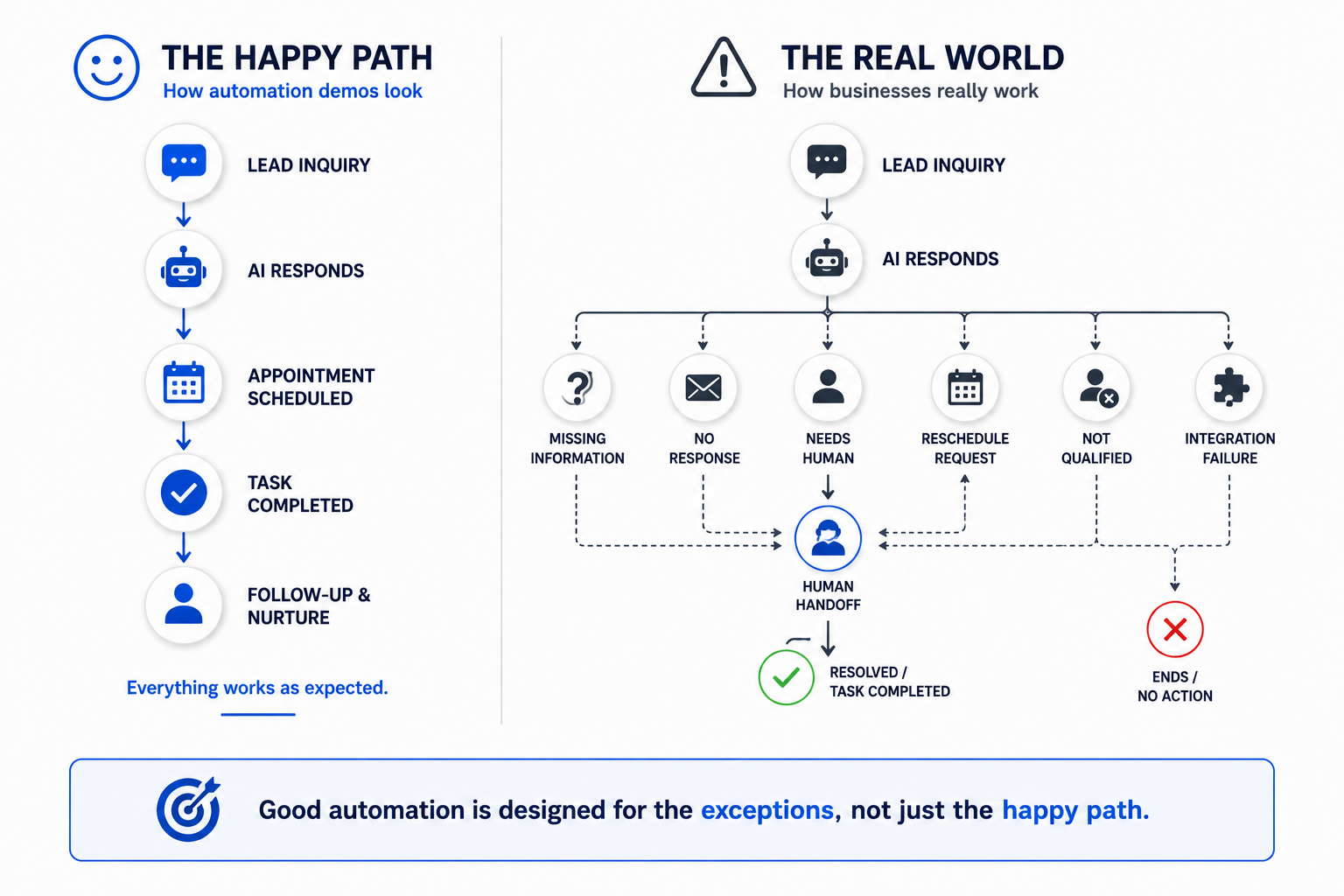
Automation demos love the happy path.
Real businesses love destroying the happy path by 9:17 Monday morning.
Imagine this workflow:
Lead → AI conversation → Appointment
Looks beautiful.
Now ask:
What if the lead doesn't provide a phone number?
What if they provide the wrong number?
What if they're outside the service area?
What if they already exist in the CRM?
What if the calendar is full?
What if they request a time that isn't available?
What if they reply STOP?
What if the AI doesn't understand the request?
What if they become angry?
What if they need emergency help?
What if the integration fails?
What if the CRM connection is temporarily unavailable?
What if a staff member manually changes the record?
Now we're designing a production system instead of a demo.
Design the handoff before you need the handoff.
Human handoff is part of the automation
People sometimes treat human intervention as evidence that the automation failed.
That's backwards.
A well-designed system should know when automation is no longer the best tool for the situation.
The handoff might involve:
- assigning a conversation
- notifying an employee
- creating a task
- escalating a support request
- stopping automated messages
- transferring a call
- flagging a record
- requesting human approval
The goal isn't to remove humans from every process.
It's to use humans where human judgment is actually valuable.
Step 8: Define success before launch
Ask what successful implementation actually means.
Depending on the project, that might mean:
- every eligible inquiry enters the CRM
- immediate acknowledgment is consistently sent
- follow-up occurs according to the agreed process
- appointments can be scheduled correctly
- staff receives the appropriate notifications
- manual data entry is reduced
- conversations escalate properly
- pipeline stages update reliably
Notice that these are primarily system behaviors.
You can also measure business outcomes when appropriate, but be careful about promising outcomes the automation doesn't completely control.
An automated follow-up system can consistently follow up.
It cannot guarantee that every prospect buys.
Define what the system is responsible for.
Then measure that.
Step 9: Build in stages
You don't get bonus points for constructing the entire automation in one giant workflow.
Start with the core process.
Build it.
Test it.
Review it.
Then expand.
A staged implementation might look like:
Core trigger
→ Data handling
→ Primary automation
→ Notifications
→ AI layer
→ Scheduling
→ Follow-up
→ Reporting
The exact sequence depends on the project.
The principle doesn't:
Reduce the number of unknown things you're testing at once.
That makes troubleshooting considerably easier.
Step 10: Test the ugly stuff
A successful test isn't:
"I submitted the form and got the text. We're live."
That's a demo.
Testing should include the expected path and realistic failure conditions.
Test things like:
- missing information
- invalid information
- duplicate contacts
- duplicate submissions
- after-hours inquiries
- calendar conflicts
- unavailable appointment times
- opt-outs
- unexpected replies
- AI uncertainty
- human takeover
- incorrect routing
- integration failures
- workflow interruptions
You won't predict every edge case.
That's impossible.
But intentionally testing obvious exceptions makes the system much more resilient.
Test with the client before customers depend on it
Before a production launch, let the relevant client stakeholders experience the workflow.
Have them submit forms.
Reply to messages.
Book appointments.
Trigger handoffs.
Try to confuse it.
Ask questions real customers ask.
The person who has worked in that business for ten years may break your automation in thirty seconds using a scenario you never considered.
That's useful.
You want that to happen before the customer does it.
Step 11: Launch deliberately
Don't finish testing at 4:52 Friday afternoon, flip everything live and disappear for the weekend.
A launch plan doesn't need to be complicated.
Know:
- when the system goes live
- who knows it's going live
- who is monitoring it
- what the fallback process is
- who handles human escalations
- how failures are reported
- what can be disabled quickly if necessary
- when the first post-launch review happens
For higher-risk automations, a gradual rollout may make more sense than switching everything at once.
The complexity of the launch should match the risk of the system.
Step 12: Monitor what actually happens
Launch isn't the end of implementation.
It's when the automation meets reality.
Watch:
- workflow execution
- failed steps
- unusual conversations
- handoff frequency
- customer behavior
- staff feedback
- scheduling problems
- data quality
- AI responses
- unexpected edge cases
This connects directly to the BUILD → RUN → IMPROVE model discussed in our guide to pricing AI automation services.
Some clients may only need implementation.
Others will need ongoing monitoring, support and optimization.
Those are different responsibilities and should be priced accordingly.
Scope creep will happen if you don't define what "done" means
Automation creates ideas.
That's a good thing.
A client sees one workflow working and says:
"This is great. Could it also automatically send estimates, reactivate old customers, answer Facebook messages, ask for reviews and update QuickBooks?"
Maybe.
But those aren't necessarily part of the project they bought.
You need to distinguish between three things:
1. Correction
Something you built isn't functioning according to the agreed requirement.
Fix it.
2. Clarification of an existing requirement
The original requirement needs reasonable adjustment to function as intended.
Handle it according to the engagement.
3. New capability
The client wants something that wasn't part of the original scope.
That's not a bug.
That's an opportunity.
It might become:
- a new phase
- an add-on
- an expanded implementation
- an ongoing optimization engagement
"While you're in there…" should not become your pricing model.
Create documentation someone besides you can understand
You don't need to produce a technical encyclopedia for every small automation.
But important systems should have enough documentation that the client—and future you—can understand what exists.
Document things like:
- purpose of the automation
- trigger
- primary workflow
- connected systems
- major decision rules
- human handoff
- important dependencies
- account ownership
- known limitations
- support responsibility
If an automation only works because you remember why "Workflow Final V2 REAL FINAL 7" exists, you don't have documentation.
You have a future problem.
A practical AI automation onboarding checklist
Before building:
- Confirm scope and deliverables
- Confirm payment and engagement terms
- Identify client stakeholders
- Map the current workflow
- Define the desired workflow
- Identify systems involved
- Gather required access securely
- Clarify account and data ownership
- Document business rules
- Define AI boundaries where applicable
- Identify common exceptions
- Define human handoff
- Establish success criteria
- Confirm implementation responsibilities
Before launch:
- Test the primary workflow
- Test edge cases
- Test human takeover
- Test opt-outs where applicable
- Test scheduling and routing
- Test integrations
- Review AI behavior where applicable
- Have client stakeholders test
- Confirm fallback procedures
- Confirm launch date
- Confirm post-launch monitoring
After launch:
- Monitor execution
- Review failures
- Gather staff feedback
- Review unexpected scenarios
- Correct implementation issues
- Separate new requests from original scope
- Document important changes
- Determine ongoing support and optimization needs
The checklist is useful.
But remember:
A checklist cannot replace understanding the process.
Your onboarding process should improve with every client
Your first onboarding process won't be perfect.
Good.
Use the project to improve it.
After implementation, ask:
What did we learn too late?
What access should we have requested earlier?
Which question would have exposed that exception?
What confused the client?
Where did scope become ambiguous?
What should become part of the standard onboarding process?
What was unnecessary?
Then improve the system.
This is one reason getting your first AI automation client matters beyond the revenue.
A real client exposes assumptions.
And those lessons can make every future implementation better.
Good onboarding protects the relationship
Clients don't experience your automation project as a collection of triggers, APIs and workflows.
They experience:
Did you understand our business?
Did you build what we agreed on?
Did you communicate clearly?
Did it work when we needed it?
Did you handle problems professionally?
Technical skill matters.
But technical skill without operational understanding can create a very sophisticated mess.
So before you automate anything:
Understand the current state.
Define the desired state.
Clarify the requirements.
Build deliberately. Once you're ready to build, our guide on how to build an AI automation for a client walks through the process step by step.
Test reality.
Launch carefully.
Monitor what happens.
That's client onboarding for automation work.
Not:
"Send me your logins and I'll start building."
Build the Business Behind the Automation
Getting a client is only one part of building an AI automation business.
You also need a repeatable way to decide what to sell, package the offer, price the work, acquire clients and actually deliver what you've promised.
The 48-Hour AI Cashflow Stack is designed to help you put those pieces together into a practical AI-powered service business.
It isn't a promise that you'll build an agency in 48 hours.
And it isn't a shortcut around learning how businesses actually operate.
It's a framework for turning AI and automation capabilities into services businesses can understand and potentially pay for.
Download the 48-Hour AI Cashflow Stack and start building the system behind the business.
