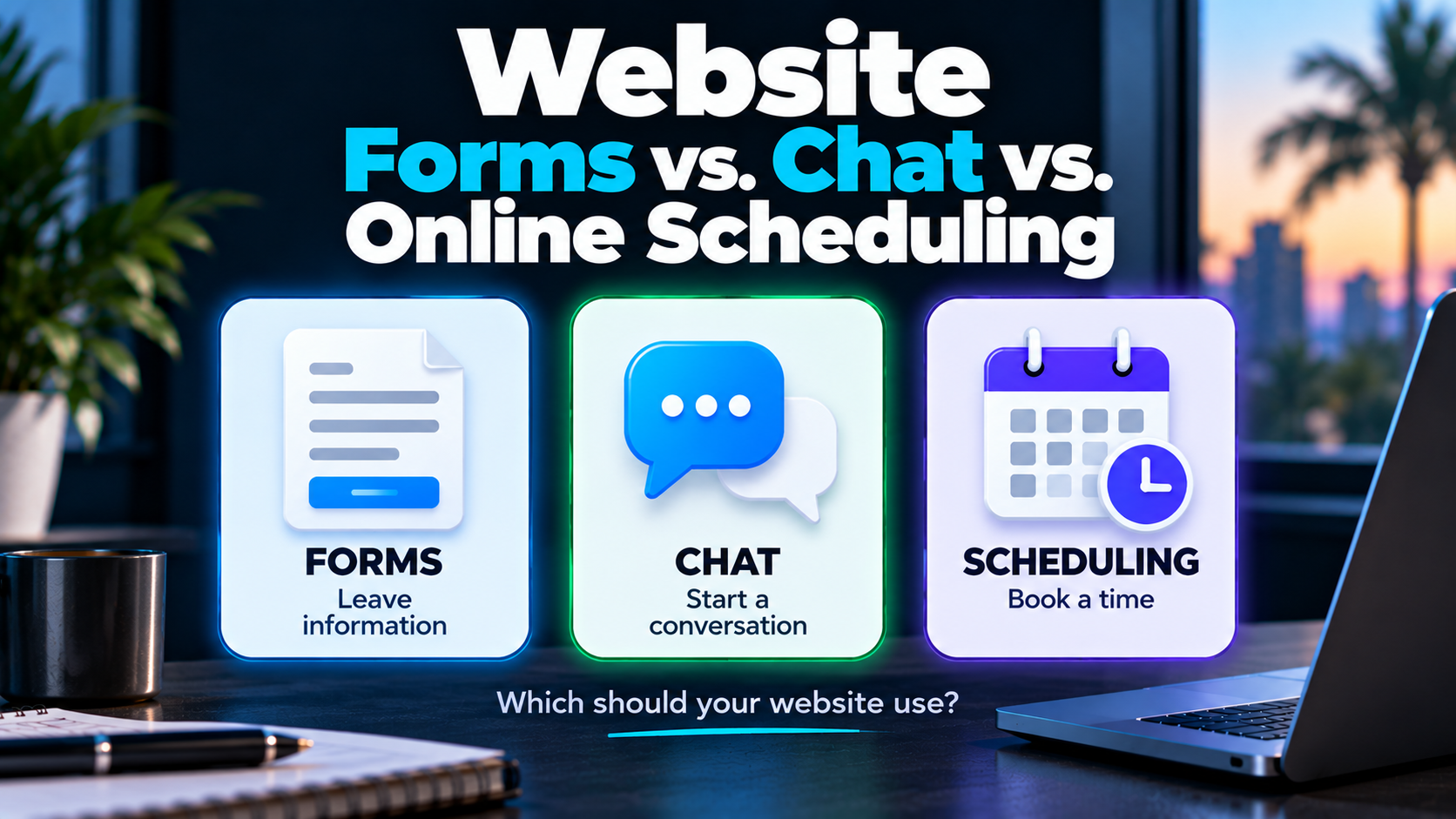
Should your website ask visitors to fill out a form?
Start a chat?
Book an appointment?
Call?
There isn't one conversion method that automatically wins.
Forms, chat and online scheduling solve different problems. The better choice depends on what the visitor needs, what the business needs to know, and what should realistically happen next.
Sometimes the right answer is a form.
Sometimes it's a conversation.
Sometimes letting someone schedule immediately removes unnecessary friction.
And sometimes the best thing your website can do is make the phone number impossible to miss.
The mistake is choosing a conversion method because it's trendy instead of because it fits the customer journey.
There Is No Universal Highest-Converting Option
It would be convenient if we could say:
Add chat and conversions go up.
Or:
Replace your forms with online scheduling.
Real websites aren't that simple.
Imagine three visitors.
One has water coming through the ceiling and needs somebody now.
Another is considering a $100,000 remodel and has questions before scheduling anything.
A third already understands the service and simply wants to choose a consultation time.
Those people shouldn't necessarily be pushed through the same conversion path.
That's why service business website conversion needs to be evaluated in context.
The objective isn't maximum button clicks.
It's helping an appropriate visitor take an appropriate next step.
What Is a Website Conversion Path?
A conversion path is the route a visitor uses to move from browsing the website to taking a meaningful action.
For a service business, common conversion paths include:
- website forms
- chat
- online scheduling
- phone calls
These methods aren't interchangeable.
Each asks something different from the visitor and creates a different responsibility for the business afterward.
Website Forms: Best When You Need Structured Information
Forms remain useful because they're familiar and flexible.
A visitor can submit one without waiting for someone to become available.
The business can collect specific information before responding.
Depending on the service, that might include:
- name
- phone
- service requested
- ZIP code
- project type
- preferred contact method
- project details
Forms can be particularly useful for estimate requests, project inquiries and services where some basic qualification helps before a conversation.
Where Forms Work Well
A form may make sense when:
- the business needs structured information
- immediate scheduling isn't appropriate
- the visitor may be contacting the company after hours
- some qualification should happen before staff involvement
- the service involves project details
- the next step depends on what the visitor submits
Forms also connect cleanly to CRM and automation workflows.
Submission can trigger acknowledgment, contact creation, routing and follow-up.
But that's only useful if the process behind the form actually works.
Where Forms Go Wrong
Forms create friction when they ask for more than the situation requires.
A visitor trying to ask a basic question probably doesn't want to provide:
- full address
- project budget
- desired start date
- referral source
- ten project details
- their mother's maiden name
Okay, hopefully not that last one.
But you get the idea.
At the same time, shorter isn't automatically better.
If ZIP code determines whether you serve someone, asking for ZIP code can be useful.
If project type determines who should respond, that field can help.
The right question is:
What information do we genuinely need at this stage?
Useful qualification and unnecessary friction are not the same thing.
A Form Submission Is Not a Conversation
This is one of the biggest weaknesses of forms when the process behind them is poor.
The visitor submits.
They see:
Thank you. We'll be in touch.
Then what?
If the inquiry lands in a shared inbox and sits there, the website technically recorded a conversion.
The business hasn't done much with it.
That's why what happens after a website lead deserves as much attention as the form itself.
A useful form workflow might look like:
Submission → Acknowledgment → CRM Capture → Routing → Response → Follow-Up
The form creates the inquiry.
It doesn't finish the job.
Website Chat: Best When Conversation Helps
Chat creates a different experience.
Instead of presenting every question at once, information can be gathered conversationally.
A visitor might start with:
Do you install impact windows in Weston?
That can lead naturally into:
Yes. Are you looking to replace windows throughout the home or only certain openings?
The interaction can evolve based on what the visitor says.
That's something a static form doesn't do particularly well.
Not All Website Chat Is the Same
"Chat" has become an extremely broad label.
There are at least four common versions.
Basic Contact Widget
The visitor types a message that someone receives and responds to later.
This is essentially a conversational-looking form.
Rule-Based Chat
The visitor moves through predefined options or questions.
For example:
What service are you interested in?
→ Roofing
→ Windows
→ Remodeling
Useful when the decision tree is predictable.
AI-Assisted Chat
AI can interpret natural language instead of requiring the visitor to choose from rigid options.
It may help:
- understand questions
- collect context
- categorize inquiries
- answer appropriate bounded questions
- determine a likely next step
- assist with routing
- help with scheduling
Human Live Chat
A real person communicates with the visitor.
That can be valuable when expertise, judgment or a real-time conversation matters.
None of these approaches is automatically superior.
The appropriate version depends on what the business needs chat to accomplish.
Where Chat Works Well
Chat can be useful when visitors:
- have questions before taking a bigger step
- aren't ready to call
- need help identifying the right service
- want to provide information conversationally
- need guidance toward an appropriate next action
It can also be useful outside normal staff availability when automation or AI can appropriately handle the initial interaction.
But there's a big qualifier there:
appropriately.
Where Chat Goes Wrong
Bad chat is annoying.
We've all met the chatbot that pops up immediately, blocks half the screen and desperately asks:
HOW CAN I HELP YOU TODAY????
before you've even read the headline.
Don't be that website.
Other problems include:
- rigid conversation loops
- irrelevant responses
- inaccurate AI answers
- no way to reach a human
- asking the same information repeatedly
- aggressive popups
- pretending a bot is a person
- collecting information without doing anything useful with it
AI doesn't automatically make chat better.
The conversation design still matters.
Online Scheduling: Best When an Appointment Really Is the Next Step
Online scheduling can remove an entire layer of back-and-forth.
Instead of:
What time works for you?
Tuesday.
Morning or afternoon?
Afternoon.
How about 3:00?
Can't do 3:00.
the visitor can see available times and choose one.
That's useful when an appointment is genuinely the next appropriate step.
Examples might include:
- consultation
- discovery call
- estimate appointment
- inspection
- service appointment
- showroom consultation
The specific use depends on the business.
Where Online Scheduling Works Well
Scheduling can be effective when:
- the visitor already understands the service
- qualification is simple or has already occurred
- the business has defined appointment types
- calendar availability reflects reality
- staff can reliably honor booked times
- scheduling is the natural next step
It can also connect to confirmations, reminders, CRM workflows and preparation instructions.
That reduces administrative back-and-forth.
Where Online Scheduling Goes Wrong
A calendar isn't automatically a better CTA.
Imagine a commercial contractor handling multimillion-dollar projects.
Should every visitor be able to grab a 60-minute estimating appointment because they clicked a button?
Probably not.
Some services require:
- qualification
- project details
- service-area verification
- budget context
- human review
- an initial conversation
before scheduling makes sense.
Otherwise the calendar can fill with appointments that never should have been booked.
Removing all friction isn't always good conversion strategy.
Sometimes appropriate friction protects everybody's time.
Don't Forget the Phone
Forms, chat and scheduling get most of the website-technology attention.
But plenty of customers still want to call.
For some services, the phone may be the most appropriate primary conversion path.
Especially when the need is:
- urgent
- complicated
- difficult to explain in a form
- easier to resolve through conversation
On mobile, click-to-call can make that path particularly easy.
But the business needs to consider what happens when nobody answers.
If a prospect calls and gets voicemail, missed-call text back can help reopen the communication channel rather than letting the interaction simply end.
The conversion path isn't just the phone number.
It's the process surrounding the call.
Forms vs. Chat vs. Scheduling vs. Phone
Here's the practical comparison.
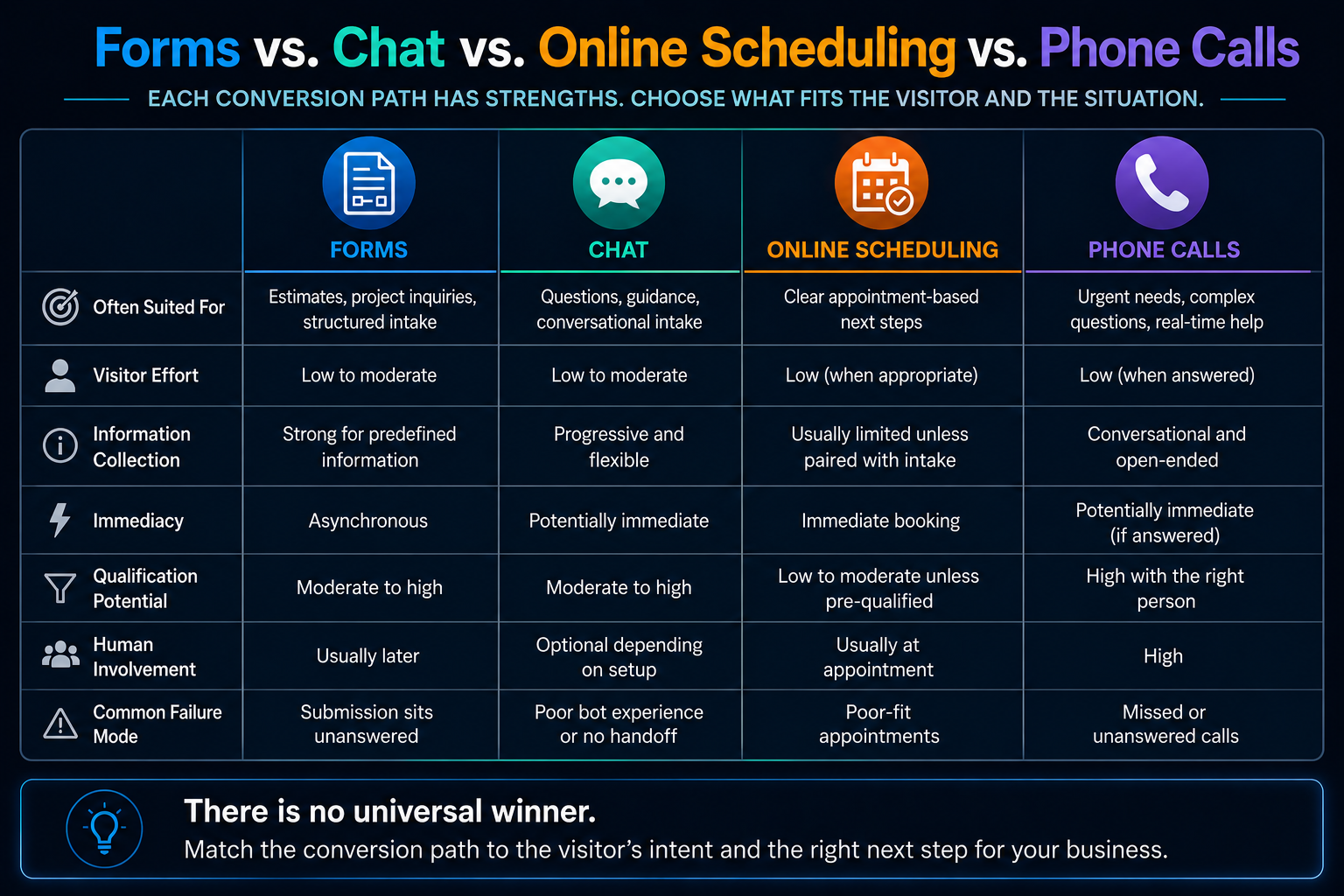
| Conversion Path | Often Best Suited For | Visitor Effort | Information Collection | Immediacy | Qualification Potential | Human Involvement | Common Failure Mode |
|---|---|---|---|---|---|---|---|
| Form | Estimates, project inquiries, structured intake | Low to moderate | Strong for predefined information | Asynchronous | Moderate to high | Usually later | Submission sits unanswered |
| Chat | Questions, guidance, conversational intake | Low to moderate | Progressive and flexible | Potentially immediate | Moderate to high | Optional depending on setup | Poor bot experience or no handoff |
| Online Scheduling | Clear appointment-based next steps | Low when appropriate | Usually limited unless paired with intake | Immediate booking | Low to moderate unless pre-qualified | Usually at appointment | Poor-fit appointments |
| Phone | Urgent needs, complex questions, human conversation | Low when answered | Conversational | Potentially immediate | High with the right person | High | Missed or unanswered calls |
Notice what's missing.
A winner.
Because there isn't one.
Match the Conversion Path to Visitor Intent
Instead of asking which tool is best, start with the situation.
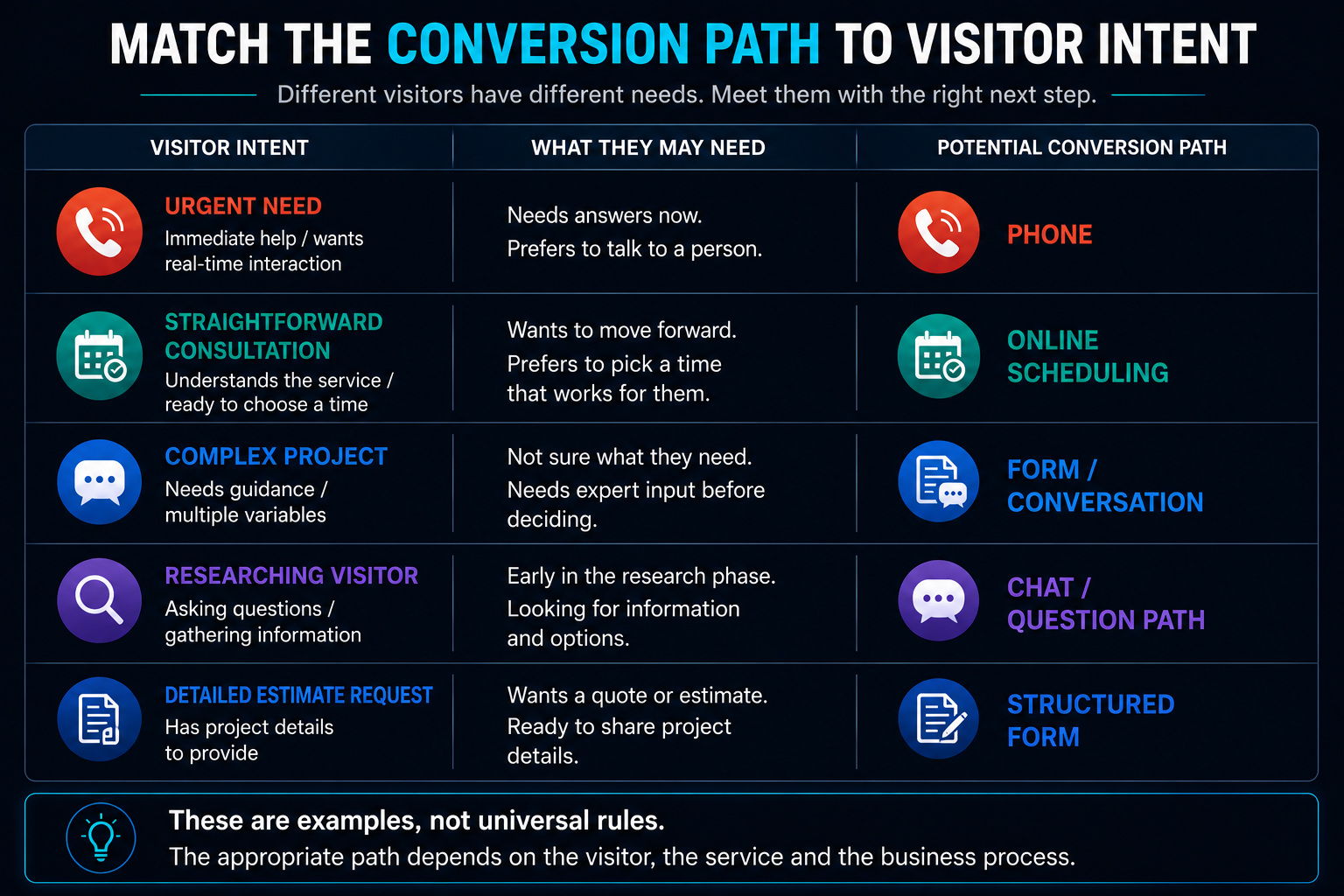
Emergency or Urgent Service
Phone may deserve the strongest placement.
The visitor doesn't want to complete a seven-step intake experience while their kitchen is underwater.
Straightforward Consultation
Scheduling may be ideal if the visitor already understands the service and a consultation is clearly the next step.
Complex Project
A form or conversation may be more appropriate before putting anything on the calendar.
The business may need context first.
Researching Visitor
Chat or a low-commitment question path may make more sense than immediately asking for an appointment.
Detailed Estimate Request
A structured form may help collect enough project information for the business to respond intelligently.
These aren't universal rules.
They're examples of matching the conversion mechanism to the job it needs to do.
One Website Can Have Multiple Conversion Paths
Choosing a primary conversion path doesn't mean banning every alternative.
A service page might use:
Primary CTA: Request an Estimate
with:
Secondary CTA: Call Us
A consulting page might use:
Primary CTA: Schedule a Consultation
with:
Secondary CTA: Ask a Question
The primary action should reflect the dominant visitor intent.
The secondary action gives someone another reasonable way forward.
But more options aren't automatically better.
If the visitor sees:
CALL!
TEXT!
CHAT!
BOOK!
GET A QUOTE!
EMAIL!
DOWNLOAD!
all screaming with equal importance, you've created another problem.
Choice should help.
Not overwhelm.
Conversion Friction Isn't Always the Enemy
"Remove friction" is common conversion advice.
It's incomplete.
Remove unnecessary friction.
Useful friction can help a business determine:
- whether the prospect needs a service it provides
- whether the location is within its service area
- what type of project is involved
- whether an appointment makes sense
- who should handle the inquiry
A ZIP code field adds friction.
It can also prevent a salesperson from spending 20 minutes with someone 300 miles outside the service area.
A project-type question adds friction.
It can also help with lead routing.
The objective isn't zero effort.
It's making the effort proportional to the next step.
What Happens After Each Conversion?
This is where the choice becomes more interesting.
After a Form
Submission
↓
Acknowledgment
↓
CRM Capture
↓
Routing
↓
Response / Follow-Up
After Chat
Conversation
↓
Context Collected
↓
Appropriate Next Step
↓
CRM / Human Handoff Where Needed
After Scheduling
Appointment Booked
↓
Confirmation
↓
Reminders
↓
Preparation
↓
Human Interaction
After a Phone Call
If answered:
Conversation → Qualification / Next Step
If missed:
Missed Call → Response Process → Conversation / Follow-Up
Different front-end conversion methods create different back-end responsibilities.
That's why the website and the lead conversion system should be designed together.
Where AI Actually Helps
AI can make certain conversion paths more capable.
The clearest example is conversational intake.
Traditional forms require the website designer to decide every field in advance.
Rule-based chat requires predefined branches.
AI can potentially interpret something like:
We have a 20-year-old pool and the deck is cracking. I'm not sure if we need resurfacing or a full remodel.
and recognize useful context without forcing the visitor to know the correct service category.
That may help the system:
- identify likely intent
- ask relevant follow-up questions
- collect project information
- categorize the inquiry
- route it appropriately
- answer bounded questions
- assist with scheduling
That's one way an AI-powered website can do more than display information.
But AI shouldn't be inserted simply because it's available.
If a dropdown reliably answers the question, use the dropdown.
Where Humans Still Matter
Some conversations require judgment.
A visitor may have:
- an unusual project
- multiple overlapping needs
- a sensitive concern
- a technical question
- a high-value opportunity
- an existing relationship
- a situation the automation doesn't understand
That's where human handoff matters.
A good system doesn't try to prove that automation can handle everything.
It recognizes when automation has done enough.
Don't Measure These Paths Only by Completion Rate
Suppose chat generates 100 conversations and a project form generates 40 submissions.
Chat wins?
Maybe.
What if most chat conversations are basic questions while the form submissions contain detailed project inquiries?
Now the answer isn't so obvious.
Evaluate conversion paths using context such as:
- qualified inquiries
- conversion source
- visitor intent
- device
- contact rate
- appointment quality
- downstream progression where measurable
Raw volume is useful.
It just isn't the entire story.
Seven Questions for Choosing the Right Conversion Path
Before deciding what your website should emphasize, answer these.
1. What Does This Visitor Likely Need?
Immediate help?
Information?
An estimate?
A conversation?
An appointment?
2. How Much Information Do We Need Before Responding?
Very little?
Or enough context to understand a complicated project?
3. Does Qualification Need to Happen First?
Can anybody book?
Or should the business determine fit first?
4. Is an Appointment Genuinely the Next Step?
Don't add scheduling simply because your software has a calendar.
5. Does the Visitor Need a Conversation?
Some decisions are easier when questions can be asked and answered.
6. What Can the Business Reliably Respond To?
Don't promise live chat if nobody is actually available.
Don't open appointment slots the team can't honor.
7. What Happens Immediately After the Conversion?
Who gets notified?
Where does the information go?
Who owns the next step?
What happens if nobody responds?
That last question may matter more than which button you chose.
The Best Conversion Path Connects Intent to Action
Forms aren't outdated.
Chat isn't automatically better.
Online scheduling isn't automatically more convenient.
Phone calls aren't obsolete.
They're tools.
The best conversion path is the one that creates the clearest appropriate bridge between visitor intent and the business's next useful action.
Sometimes that's one path.
Often it's a primary path with a sensible alternative.
The website should make that decision easier for the visitor—not force them into whatever widget happens to be fashionable this year.
How This Fits Into an AI-Powered Website
An AI-powered website isn't simply a traditional website with a chatbot bolted onto the corner.
A more useful way to think about it is as a connected customer interaction layer.
Depending on the business, the website can potentially coordinate:
Calls
Forms
Chat
Scheduling
↓
CRM
↓
Routing
↓
Automation
↓
Follow-Up
↓
Human Handoff
AI may assist in parts of that process where interpretation or conversation adds value.
Traditional automation may handle predictable rules.
Humans handle the parts requiring judgment and relationships.
The objective isn't maximum AI.
It's a better system.
Want to Improve How Visitors Become Opportunities?
If your website currently has a generic Contact Us form because that's what websites are supposed to have, it's worth asking whether that actually matches how customers want to engage with your business.
Boost Local Biz builds AI-Powered Websites around the complete visitor-to-opportunity journey.
That can include the right combination of:
- forms
- calls
- conversational experiences
- scheduling
- CRM integration
- routing
- automation
- follow-up
- human handoff
Not every business needs every component.
The point is to build the conversion path around the business and its customers—not around a software checklist.
