
Starting an AI automation agency can get expensive surprisingly fast.
Not because you need a huge amount of software.
Because it's incredibly easy to convince yourself that you do.
You watch one video and sign up for an automation platform.
Another person says you need a different one.
Then you need a CRM.
Then an AI agent builder.
Then a scraping tool.
Then a proposal platform.
Then some shiny new app that promises to replace your entire team by Thursday.
Pretty soon you're paying for a miniature software company and you still don't have a client.
There is a better way to approach it.
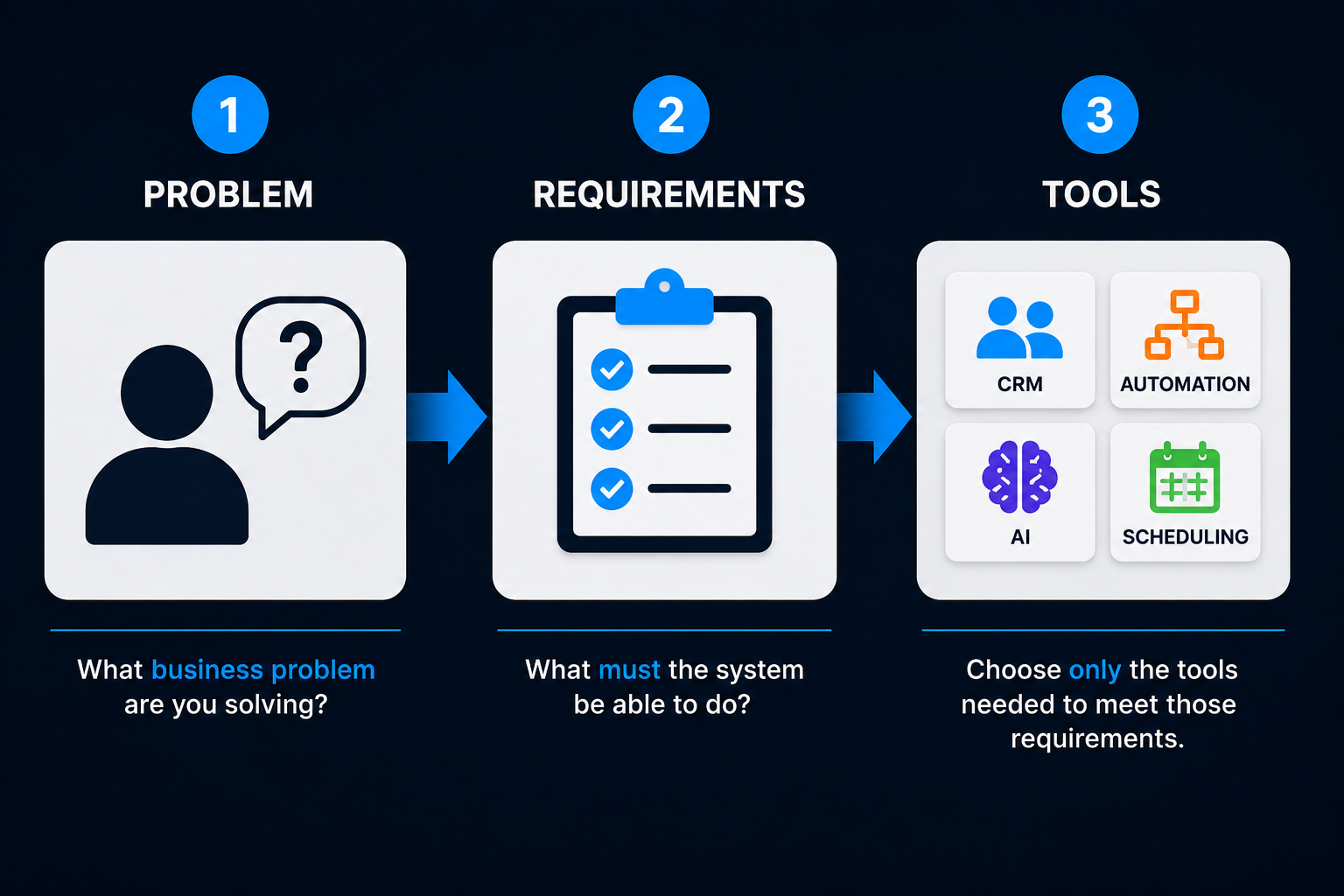
You don't need a giant AI automation tech stack to get started. You need a small number of tools that perform the specific jobs required by the service you're selling.
The simplest decision process is:
PROBLEM → REQUIREMENTS → TOOLS
Figure out what problem you're solving.
Determine what the system needs to do.
Then choose the software capable of doing it.
Not the other way around.
What Tools Do You Actually Need for an AI Automation Agency?
For many beginners, the software falls into a few basic categories:
- CRM — organizes contacts, opportunities and customer information.
- Automation platform — connects systems and makes repeatable actions happen automatically.
- AI layer — adds language understanding, generation, classification or other AI capabilities when needed.
- Communication tools — handle things like email, text, phone or web conversations.
- Scheduling — lets customers or prospects book appointments when that's part of the process.
- Documentation/project organization — helps you keep client requirements, processes and implementations organized.
Here's the part that saves you money:
You do not necessarily need six different software subscriptions.
One platform may perform several of those jobs.
And depending on the service you're selling, you may not need every category at all.
Start With the Problem, Not the Tech Stack
This is the same principle we've used throughout this entire AI automation business series.
Don't ask:
Which tools should an AI automation agency own?
Ask:
What do I need the system to do for this client?
Suppose you're selling a lead-response system to a contractor.
The system may need to:
- capture the lead
- store the contact
- respond quickly
- continue follow-up
- allow appointment scheduling
- notify staff
- keep the opportunity organized
That tells you quite a bit about your software requirements.
Now suppose you're automating an internal document process instead.
The system may need to:
- receive a document
- extract information
- categorize it
- send the information somewhere else
- notify the appropriate person
That's a different problem.
And it may require a completely different stack.
This is why buying every popular automation tool before deciding what AI automation services you're actually going to sell is backwards.
Choose the problem first. Let the requirements determine the tools.
What Is a CRM?
CRM stands for customer relationship management.
That sounds more complicated than it is.
A CRM is software businesses use to organize things such as:
- contacts
- leads
- conversations
- sales opportunities
- appointments
- follow-up
- customer information
If you're building client-facing automation around leads, sales or customer communication, a CRM often becomes an important part of the system.
For example:
A homeowner requests an estimate.
Instead of that inquiry living only inside someone's email inbox, the contact can enter the CRM, become an opportunity, receive follow-up and move through a defined process.
The CRM gives the business a place to keep track of what is happening.
What Is an Automation Platform?
An automation platform connects steps together so repeatable work can happen without someone manually performing every action.
For example:
New lead arrives → Create contact → Send response → Notify salesperson → Start follow-up
Different platforms approach this in different ways.
Some are designed to be very approachable.
Some offer much deeper flexibility.
Some combine automation with CRM, messaging and other business tools.
The mistake is assuming you need the most sophisticated option.
You need the option that fits the problem you're capable of solving.
What Is the "AI Layer"?
AI doesn't necessarily replace your automation platform.
Think of AI as something you can add when the system needs capabilities such as:
- understanding a customer message
- recognizing intent
- categorizing information
- summarizing something
- generating a contextual response
- extracting useful information from unstructured text
As we explained in how to build an AI automation for a client, not every automation needs AI.
Creating a contact record doesn't usually require AI.
Understanding:
"My AC is blowing warm air and making a weird noise. Can somebody come today?"
might.
That distinction can save you a lot of unnecessary complexity.
Disclosure: Some links in this article are affiliate links. If you sign up through them, Boost Local Biz may earn a commission at no additional cost to you. That does not affect which tools we recommend or how we evaluate them.
Where GoHighLevel Fits
GoHighLevel becomes particularly interesting when the service you're selling revolves around customer acquisition and conversion. For a deeper explanation of the platform as a whole, see my complete guide to GoHighLevel.
The platform currently combines a large number of capabilities that would otherwise often require separate software, including:
- CRM and pipelines
- workflow automation
- unified customer conversations
- forms and surveys
- booking calendars
- email and SMS marketing
- inbound and outbound calling
- website and funnel tools
- reputation management
- payments and invoicing
- AI-powered conversation, voice and content capabilities
That can make it a useful foundation for agencies building systems around:
Lead capture → response → follow-up → scheduling → pipeline management → customer communication
In other words, the types of workflows we talk about frequently at Boost Local Biz.
When GoHighLevel makes a lot of sense
Suppose your offer is:
We help service businesses respond to missed calls and website inquiries, continue following up and turn qualified prospects into appointments.
You need several moving pieces.
CRM.
Messaging.
Automations.
Calendars.
Pipeline.
Potentially AI conversations.
Instead of stitching six separate platforms together, it can make sense to use a platform that already combines many of those capabilities.
That's one reason GoHighLevel can be attractive for this particular agency model.
When GoHighLevel may not be enough by itself
That doesn't mean GoHighLevel should be the answer to every automation problem.
Maybe your client needs a highly customized process connecting specialized software.
Maybe you're automating internal operations rather than customer acquisition.
Maybe the workflow needs flexibility beyond what your primary CRM platform provides.
That's where tools such as Zapier, Make or n8n may become useful.
An all-in-one platform can reduce your tool count. It doesn't eliminate the need for every specialized tool.
And that's fine.
Where Zapier Fits
Zapier is fundamentally about connecting applications and automating work between them.
You can think of it like this:
Something happens in one app → Zapier causes something to happen somewhere else.
Today, Zapier has expanded beyond basic workflows into a broader automation platform that includes tools for forms, data and AI-powered automation.
For a beginner, the important point is simpler:
Zapier can be useful when you need different software applications to work together.
For example:
New form submission → Create CRM contact → Add information to spreadsheet → Send internal notification
It can also incorporate AI into workflows where useful.
Where Zapier can fit well
Zapier may be worth considering when:
- the applications you need already connect with it
- the workflow is relatively straightforward
- you're connecting existing tools rather than replacing them
- you want to get an automation working without building everything from scratch
That makes it particularly relevant when a client already has a software stack and you simply need those systems to communicate better.
Where Make Fits
Make is another platform for connecting applications and building automated workflows.
Its defining experience is highly visual.
You can see the different pieces of the workflow and how data moves between them.
Make currently supports thousands of integrations and has also been expanding its built-in AI capabilities, including AI agents and AI tools.
For the beginner, I would think about Make this way:
It gives you more room to visually build and control more involved workflows as your needs become more sophisticated.
That doesn't mean you need Make simply because a workflow contains more than three steps.
And it doesn't mean Make is automatically "better" than Zapier.
They're tools.
The question remains:
What are you trying to build?
Where n8n Fits
n8n is another workflow automation platform, but it tends to become especially interesting as your technical needs become more customized.
It offers hosted options as well as the ability to run the platform yourself.
That additional control can be valuable.
It also means the learning curve can become more technical depending on how you're using it.
Should a complete beginner start with n8n?
You can.
But I wouldn't choose n8n simply because more technical automation builders use it.
Start with the problems you're capable of solving.
If you're building relatively straightforward lead-response and follow-up systems, you don't earn bonus points for choosing the most technically flexible platform.
If your projects eventually require deeper customization and you develop the skills to support them, n8n may become much more interesting.
Technical flexibility is valuable when you need technical flexibility.
Before then, it can simply be more stuff to learn.
Where OpenAI Fits
This one causes confusion because ChatGPT and the OpenAI API aren't the same thing.
ChatGPT is the AI product you can interact with directly.
An API is a way software systems can communicate with each other.
So an automation platform can potentially send information to an OpenAI model, receive the result and use that result somewhere else in the workflow.
You don't need to understand the technical details yet.
The important distinction is:
Paying for ChatGPT does not mean all of your client automations automatically get OpenAI usage.
API usage is its own service and is typically billed according to the AI models and amount of usage.
Many automation platforms can connect to OpenAI or other AI providers for you.
That allows AI to become one part of a larger business workflow.
For example:
Customer sends message
↓
AI helps determine what they're asking
↓
Automation uses that information to choose the appropriate next step
That's a much more useful way to think about OpenAI in an automation stack than treating ChatGPT as your entire agency platform.
GoHighLevel vs. Zapier vs. Make vs. n8n vs. OpenAI
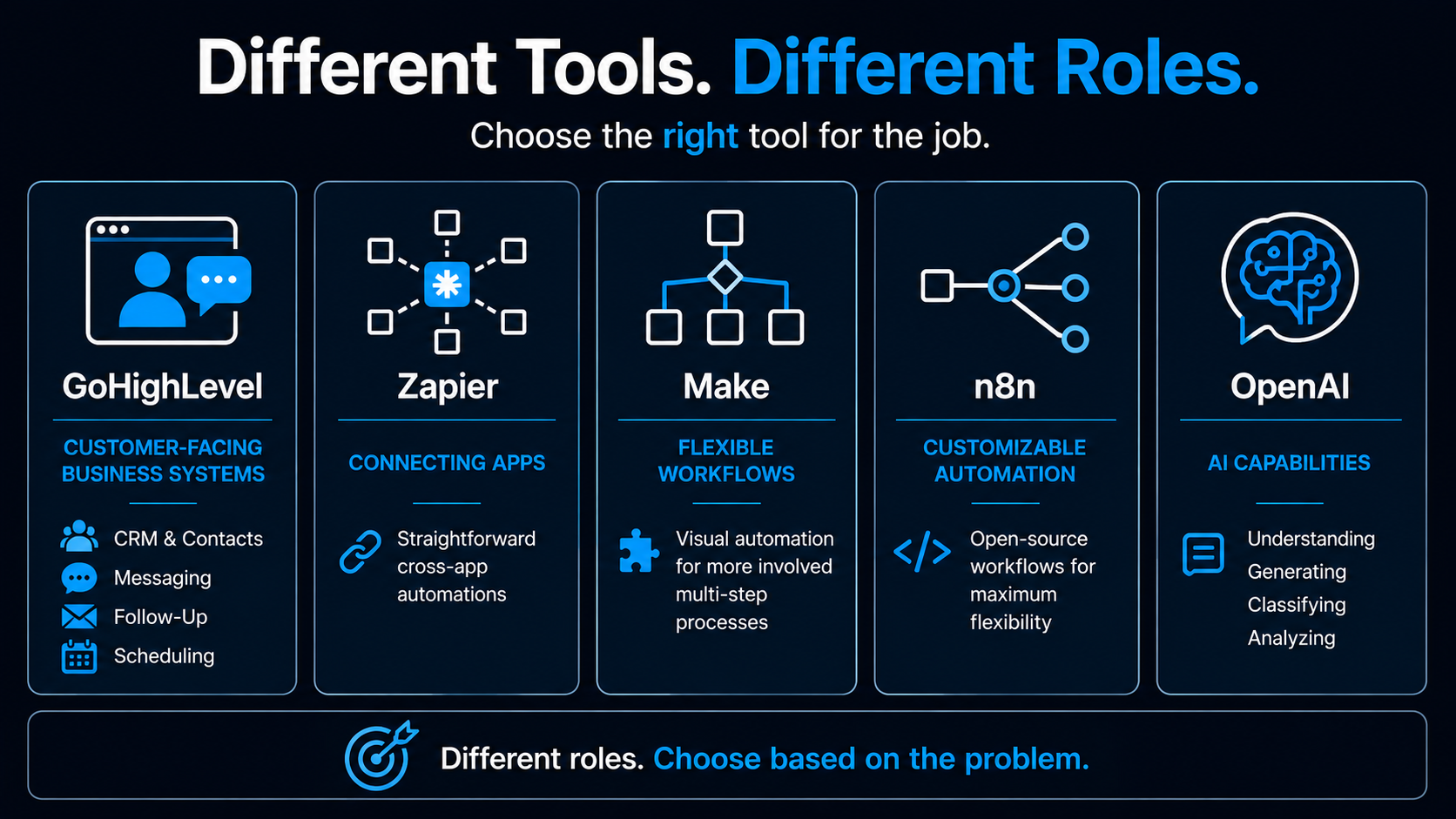
These tools aren't perfect substitutes for one another.
That's why "Which one is best?" isn't a particularly useful question.
Here's a simpler beginner comparison:
| Tool | What I Would Primarily Consider It For | Beginner Fit | Possible Role |
|---|---|---|---|
| GoHighLevel | Client-facing lead, CRM, communication and booking systems | Good fit for many marketing/service-business use cases | Can cover several parts of the stack |
| Zapier | Connecting existing applications and building straightforward workflows | Beginner-friendly starting point | Connects tools together |
| Make | Building more visual and flexible multi-step workflows | Moderate learning curve | Workflow automation |
| n8n | More customizable workflows and greater technical control | More technical for many beginners | Flexible automation engine |
| OpenAI | Adding AI understanding and generation into workflows | Depends on implementation | AI capability layer |
This isn't a ranking.
And it isn't saying you need all five.
You might need:
GoHighLevel only.
Or:
GoHighLevel + Make.
Or:
Existing client's CRM + Zapier + OpenAI.
Or:
n8n + several specialized systems.
The correct stack depends on the service.
An Example Beginner Stack
Let's go back to our hypothetical HVAC company.
Suppose the offer is:
Respond immediately to website leads, continue appropriate follow-up and make it easier for qualified prospects to schedule.
You need:
- somewhere to capture and manage the lead
- automated messaging
- follow-up workflows
- scheduling
- possibly AI for natural conversations
- a way for employees to take over when needed
For that particular service, an all-in-one customer-focused platform such as GoHighLevel may cover a large percentage of what you need.
You might not need Zapier.
You might not need Make.
You might not need n8n.
That's the point.
Don't build your software collection first and then justify why you own it.
Build the smallest stack capable of delivering the service well.
A Different Client May Need a Completely Different Stack
Now imagine another client wants to:
Take incoming documents, extract specific information, categorize them and move the results into several existing internal systems.
That's not primarily a lead-conversion system.
A CRM-centered platform may no longer be the center of the solution.
A flexible workflow tool combined with an AI service may make more sense.
Same agency.
Different problem.
Different requirements.
Different tools.
That's why the decision should always be:
PROBLEM → REQUIREMENTS → TOOLS
Not:
TOOLS → WHAT CAN I SELL WITH THESE?
Don't Buy Your Tech Stack Before You Know What You're Selling
This deserves repeating because it happens constantly.
You're excited about starting an automation agency.
So you buy software.
Then more software.
Then you start watching tutorials.
Then every tutorial uses another product.
Eventually you're paying hundreds of dollars per month and telling yourself:
"It's an investment."
Maybe.
Or maybe you've built yourself a monthly overhead problem.
Before paying for another platform, ask:
What client problem does this help me solve?
Does my current stack already solve it?
Do I need this now?
Will a client engagement pay for it?
Those questions eliminate a surprising number of subscriptions.
Our guide on how to package AI automation services is important here because the clearer your offer becomes, the clearer your software requirements usually become too.
How Much Should You Spend Before Getting Your First Client?
As little as reasonably necessary to:
- learn
- practice
- build demonstrations
- test your service
- confidently deliver the first engagement
That doesn't necessarily mean zero.
Useful software costs money.
But there's a difference between paying for the tools you actively need and assembling an enterprise software stack for clients who don't exist.
Many platforms provide free plans or trials that can help you learn before committing to larger subscriptions.
Use them.
Your objective isn't to own the most software.
Your objective is to become capable of solving a business problem well enough that someone pays you to solve it.
Then your software costs become part of the economics we discussed in how to price AI automation services.
Should You Use No-Code Tools?
For beginners, no-code and low-code tools can dramatically lower the barrier to building useful automations.
You can often create substantial business workflows visually without writing traditional software code.
That's powerful.
But remember what we said in how to build an AI automation for a client:
No-code doesn't mean no skill.
You still need to understand:
- the business process
- the software
- what the workflow should do
- how to test it
- what can go wrong
- what you're responsible for
Eventually, some problems may require more technical knowledge.
You can learn that as your capabilities grow.
You don't have to begin there.
Do You Need Multiple Automation Platforms?
Probably not at first.
Learning one tool well enough to deliver real work is usually more useful than being mediocre with six.
The exception is when different tools serve clearly different roles.
For example:
Your primary client platform may handle CRM, messaging and follow-up while a separate workflow platform connects to another specialized system.
That's reasonable.
But adding multiple workflow tools because you saw impressive demos of each one creates unnecessary complexity.
Build competence before you build a collection.
Don't Confuse the Tool With the Offer
This matters especially with GoHighLevel.
Don't sell:
GoHighLevel setup.
Sell:
A system that helps a service business respond to new inquiries and continue follow-up.
Don't sell:
Zapier workflows.
Sell:
A process that eliminates repetitive manual handoffs between systems.
Don't sell:
OpenAI integration.
Sell:
A system capable of understanding incoming messages and routing them appropriately.
The client doesn't need to become excited about your software.
They need to understand the business improvement.
That's the difference between selling tools and selling an offer.
The Beginner Tech Stack I Would Recommend
If you're starting from zero, I wouldn't create one universal shopping list.
I'd use this process:
Step 1: Decide what type of problem you'll solve
Lead conversion?
Scheduling?
Follow-up?
Internal operations?
Customer service?
Something else?
Step 2: Determine what the system needs
CRM?
Messaging?
Calendar?
Cross-app automation?
AI?
Phone?
Step 3: Choose the fewest tools that cover those requirements well
Start simple.
Step 4: Learn those tools deeply enough to deliver
Build test systems.
Try realistic scenarios.
Break them.
Fix them.
Step 5: Add software only when the work requires it
Let client needs expand the stack.
Not YouTube recommendations.
That's the approach I would take.
The Best Automation Stack Is the One That Fits the Problem
There isn't one correct stack for an AI automation agency.
And that's actually good news.
You don't have to master everything.
If you're building customer-facing automation for service businesses, a platform such as GoHighLevel may cover a large portion of what you need.
If you're mainly connecting existing applications, Zapier may be useful.
If you need more flexible visual workflows, Make may fit.
If your requirements become more technical or customized, n8n may become attractive.
And AI providers such as OpenAI can add intelligence where the workflow genuinely needs it.
But none of those decisions should happen first.
Start here:
PROBLEM
Then:
REQUIREMENTS
Then:
TOOLS
The software industry would prefer you reverse that order.
Your bank account will probably appreciate this version.
Build the Business, Not Just the Tech Stack
Tools are only one component of an AI automation business.
You still need a market, a problem worth solving, a clear offer, pricing, client acquisition and a delivery process.
That's what the 48-Hour AI Cashflow Stack is designed to help you put together.
It isn't a giant list of AI software.
And it isn't a promise that subscribing to the right apps magically creates a business.
It's a practical framework for building an AI-powered service around problems companies actually care about solving.
Download the 48-Hour AI Cashflow Stack and build the business before you build the software collection.
